AI agent for data scientists
Baseline Versus Complex Model Agent
The simplest model that does the job, with evidence that added complexity was worth it
What it does
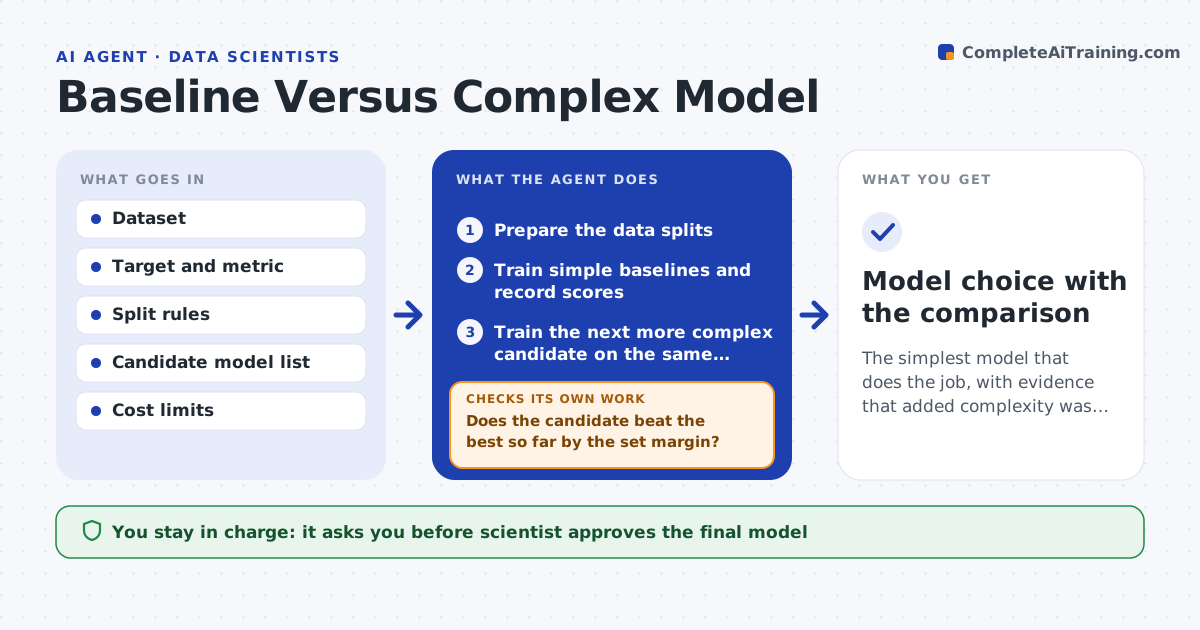
Complex models are often built before anyone shows that they beat a simple one. This agent trains simple baselines first, such as an average or a basic regression, and then trains complex candidates. It compares them on the same data splits and the same cost metrics, including run time and effort to maintain. It stops adding complexity when the gains are small. It records the comparison so the choice can be explained. The scientist approves the model. Edge case: a complex model wins by 0.5% but takes ten times as long to run, so the agent reports the gain as too small for the cost.
How it works
Follow the arrows from top to bottom. The orange dashed arrow is the loop: when a check fails, the agent goes back and tries again.
Read the steps as a list
- Modeling project starts
- Prepare the data splits
- Train simple baselines and record scores
- Train the next more complex candidate on the same splits
- Compare scores, run time and maintenance cost
- Does the candidate beat the best so far by the set margin?If not: stop adding complexity and keep the simpler model. Back to step 4.
- Does the winner hold up on a held-out test set?If not: return to the simpler model and compare again. Back to step 4.
- Write the comparison table and recommendation
- Scientist approves the modelThe agent waits here for your OK.
- Model choice with the comparison
How it decides
A more complex model is chosen only when it beats the best simpler one by more than the set margin and fits within cost limits.
- Always train a baseline first
- Compare on the same splits
- Require a margin of improvement (default 1 point)
- Count run time and upkeep as costs
Make it yours
Every agent is a starting point. You choose these settings for your own situation.
- Margin for choosing a complex model (default: 1 point)
- Candidate model list
- Cost limits
- Metric
What keeps you in control
It always asks you first
- Scientist approves the final model
Hard limits
- Never deploys a model
- Never tunes on the test set
It stops when
- Done: a model is approved with evidence
- Stop: the data is too small or unreliable to compare models
Set it up
We guide you through the set-up, step by step
Members get the full set-up guide for this agent. No technical skills needed: you copy, paste and upload.
- One set of instructions to paste into your AI, with the clicks for ChatGPT, Claude, Microsoft 365 Copilot, Gemini and Grok
- The agent then walks you through connecting your own data, one source at a time
- A downloadable copy with the flow chart, the rules and the full guide