AI agent for statisticians
A/B Test Validity Check Agent
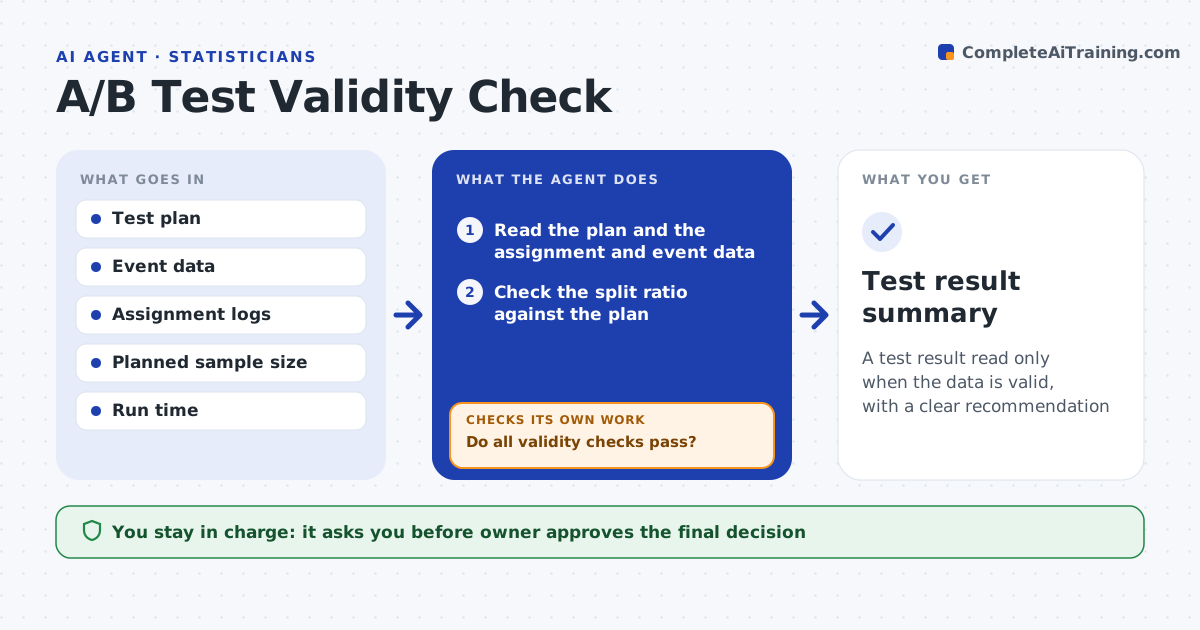
A test result read only when the data is valid, with a clear recommendation
What it does
Test results are often read before the data is valid. This agent checks the split ratio, sample size, run time and tracking. It looks for peeking, where a test was stopped on a good day, and for novelty effects at the start. It computes the result only when the checks pass. If they fail, it suggests extending the test or fixing the setup. It then checks the significance and the size of the effect against the plan. The owner approves the decision. Edge case: the split is 55/45 when 50/50 was planned, so the agent runs a mismatch test and holds the result.
How it works
Follow the arrows from top to bottom. The orange dashed arrow is the loop: when a check fails, the agent goes back and tries again.
Read the steps as a list
- Test reaches its end date
- Read the plan and the assignment and event data
- Check the split ratio against the plan
- Check sample size, run time and tracking events
- Do all validity checks pass?If not: suggest extending the test or fixing the setup, and wait. Back to step 2.
- Look for peeking and novelty effects
- Is the effect stable across the first and second halves of the test?If not: extend the test or mark the result as unclear. Back to step 2.
- Compute the result and effect size
- Owner approves the decisionThe agent waits here for your OK.
- Test result summary
How it decides
Results are computed only when the split, sample size, duration and tracking checks pass. Otherwise the test is extended or marked invalid.
- Run a split mismatch test
- Require the planned sample size and duration
- Compare early and late periods for novelty
- Report effect size with the interval
Make it yours
Every agent is a starting point. You choose these settings for your own situation.
- Required sample size and duration
- Significance level (default: 95%)
- Split tolerance
- Segments to review
What keeps you in control
It always asks you first
- Owner approves the final decision
Hard limits
- Never declares a winner on an invalid test
- Never changes the test setup
It stops when
- Done: the result is valid and the decision is approved
- Stop: the test cannot be fixed and is marked invalid
Set it up
We guide you through the set-up, step by step
Members get the full set-up guide for this agent. No technical skills needed: you copy, paste and upload.
- One set of instructions to paste into your AI, with the clicks for ChatGPT, Claude, Microsoft 365 Copilot, Gemini and Grok
- The agent then walks you through connecting your own data, one source at a time
- A downloadable copy with the flow chart, the rules and the full guide