AI agent for board members
Board Evaluation Follow-through Agent
Evaluation findings turn into owned actions that are checked for real change.
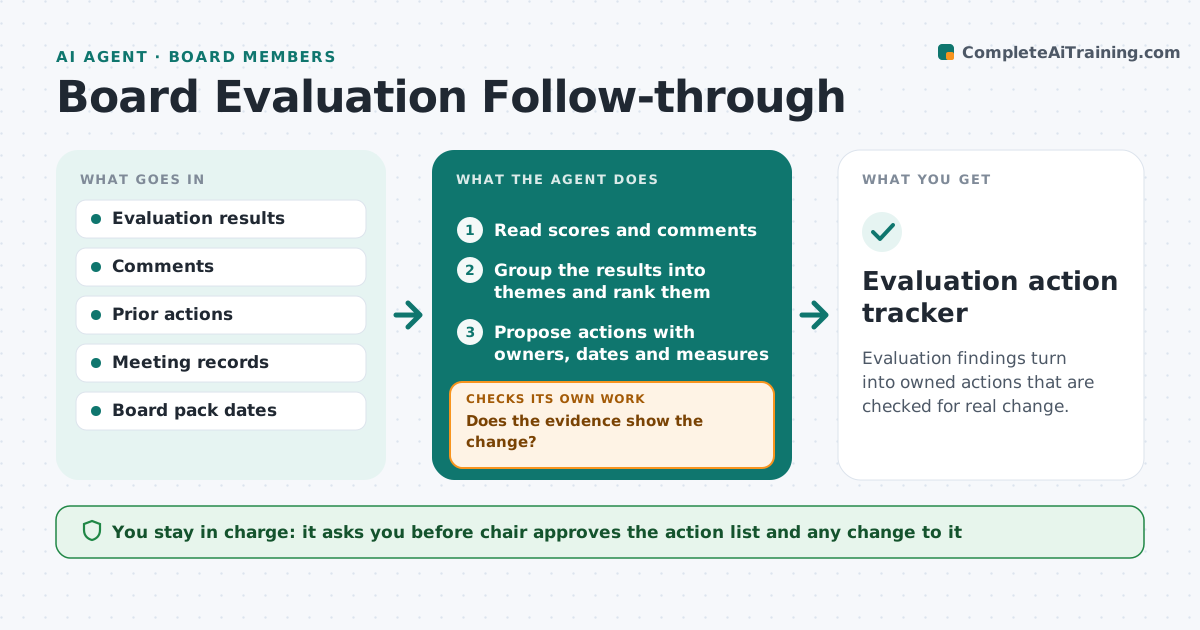
What it does
Boards run self-evaluations and then lose the results. Actions are not assigned and next year shows the same problems. After each evaluation, this agent extracts the themes, proposes actions with owners, tracks them each quarter and checks whether the follow-up evidence shows change. If it does not, it revises the action. It decides by comparing survey results and meeting records to the target for each action. The chair approves the action list. Edge case: a theme about late materials is marked fixed, but the next three board packs were still late, so the agent reopens it.
How it works
Follow the arrows from top to bottom. The orange dashed arrow is the loop: when a check fails, the agent goes back and tries again.
Read the steps as a list
- Evaluation results arrive
- Read scores and comments
- Group the results into themes and rank them
- Propose actions with owners, dates and measures
- Chair approves the action listThe agent waits here for your OK.
- Collect evidence each quarter
- Compare the evidence to each measure
- Does the evidence show the change?If not: revise the action or owner and set a new date. Back to step 3.
- Report progress to the chair
- Evaluation action tracker
How it decides
It groups comments into themes, ranks by frequency and score, and judges completion by measurable evidence, not by reports.
- Give each theme an owner and a measure
- Count an action done only when evidence shows it
- Reopen an action when the evidence fails
- Report quarterly
Make it yours
Every agent is a starting point. You choose these settings for your own situation.
- Measures per theme
- Review frequency
- Evidence sources
- Owner assignment
- Report format
What keeps you in control
It always asks you first
- Chair approves the action list and any change to it
Hard limits
- Never reveal who gave a comment
- Never close an action without evidence
It stops when
- Done: every theme has evidence of change
- Stop: a theme has no owner
Set it up
We guide you through the set-up, step by step
Members get the full set-up guide for this agent. No technical skills needed: you copy, paste and upload.
- One set of instructions to paste into your AI, with the clicks for ChatGPT, Claude, Microsoft 365 Copilot, Gemini and Grok
- The agent then walks you through connecting your own data, one source at a time
- A downloadable copy with the flow chart, the rules and the full guide