AI agent for recruitment coordinators
Candidate Experience Survey Agent
Gather enough candidate feedback to spot real problems.
What it does
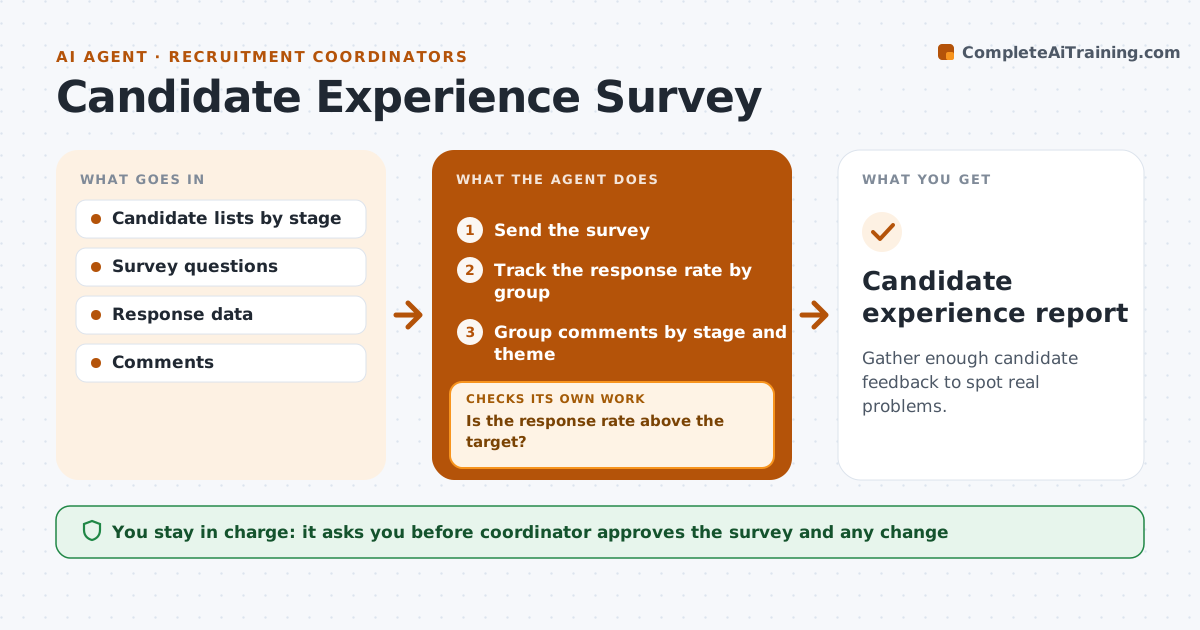
Few candidates fill in feedback surveys, and the answers that do come arrive too late to help. This agent sends a short survey at set points in the process and tracks who has replied. It groups the comments by stage and theme and proposes changes. If response is low, it resends to the missing groups at a different time and compares the answers. The coordinator approves the survey and any change. Each wave is kept separate so the agent can tell whether a change in scores comes from the process or from who answered. Comments are shown without names, so the hiring team can read them freely. Edge case: a candidate who was rejected quickly is asked a shorter set of questions.
How it works
Follow the arrows from top to bottom. The orange dashed arrow is the loop: when a check fails, the agent goes back and tries again.
Read the steps as a list
- Candidate completes a stage
- Send the survey
- Track the response rate by group
- Is the response rate above the target?If not: Resend to the missing groups at a different time. Back to step 3.
- Group comments by stage and theme
- Compare answers across waves
- Propose changes
- Coordinator approves changesThe agent waits here for your OK.
- Report results to the hiring team
- Do later scores improve after the change?If not: Review the change and propose another. Back to step 4.
- Candidate experience report
How it decides
It compares responses by stage and sends a second wave to groups with low response.
- Target a 30 percent response rate
- Resend once at a different time of day
- Group by stage
- Treat fewer than 10 replies as too few to act on
Make it yours
Every agent is a starting point. You choose these settings for your own situation.
- Survey timing
- Target response rate (default 30 percent)
- Questions by stage
- Minimum replies to act (default 10)
What keeps you in control
It always asks you first
- Coordinator approves the survey and any change
Hard limits
- Never share individual comments with names
- Never change the process without approval
It stops when
- Done: results are reported and changes tracked
- Stop: replies are too few to decide anything
Set it up
We guide you through the set-up, step by step
Members get the full set-up guide for this agent. No technical skills needed: you copy, paste and upload.
- One set of instructions to paste into your AI, with the clicks for ChatGPT, Claude, Microsoft 365 Copilot, Gemini and Grok
- The agent then walks you through connecting your own data, one source at a time
- A downloadable copy with the flow chart, the rules and the full guide