AI agent for recruitment coordinators
Recruiting Event Follow-up Preparation Agent
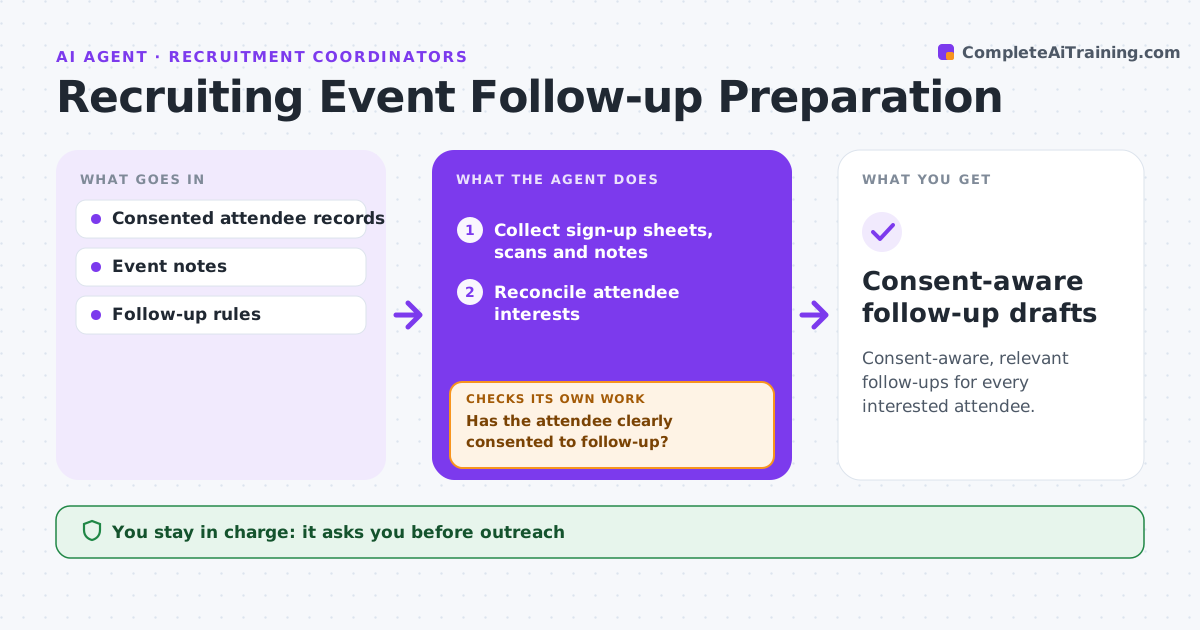
Consent-aware, relevant follow-ups for every interested attendee.
What it does
After recruiting events, records of what attendees were interested in and whether they agreed to be contacted are often inconsistent across sign-up sheets, badge scans and notes. This agent reconciles each attendee's stated interests from all sources. Before drafting anything, it checks for outreach consent. No consent means the attendee is excluded and no send-ready draft is created. For consenting attendees it picks follow-up resources that match their explicit interests, such as a team page or open roles, and drafts a message. It does not rank candidates or make hiring decisions. The coordinator approves outreach. Edge case: an attendee ticked consent on the paper form but not in the app, so the agent treats consent as unclear and asks the coordinator.
How it works
Follow the arrows from top to bottom. The orange dashed arrow is the loop: when a check fails, the agent goes back and tries again.
Read the steps as a list
- Event ends
- Collect sign-up sheets, scans and notes
- Reconcile attendee interests
- Has the attendee clearly consented to follow-up?If not: exclude them from outreach or send unclear consent to the coordinator. Back to step 3.
- Choose resources that match stated interests
- Draft the follow-up message
- Coordinator approves outreachThe agent waits here for your OK.
- Consent-aware follow-up drafts
How it decides
It matches content to explicit interests and gates every draft on consent.
- No clear consent, no send-ready draft.
- Content comes only from explicitly stated interests.
- Conflicting consent records go to the coordinator.
Make it yours
Every agent is a starting point. You choose these settings for your own situation.
- Sources used for interests and consent
- Resource library to choose from
- Days after the event to send (default 2)
- Who approves outreach (default recruiting coordinator)
What keeps you in control
It always asks you first
- Outreach
- Candidate ranking
- Hiring decisions
Hard limits
- No outreach without consent.
It stops when
- Done: drafts staged.
Set it up
We guide you through the set-up, step by step
Members get the full set-up guide for this agent. No technical skills needed: you copy, paste and upload.
- One set of instructions to paste into your AI, with the clicks for ChatGPT, Claude, Microsoft 365 Copilot, Gemini and Grok
- The agent then walks you through connecting your own data, one source at a time
- A downloadable copy with the flow chart, the rules and the full guide