AI agent for property managers
Capital Expense Planning Agent
A multi-year replacement schedule that keeps the reserve above a minimum balance
What it does
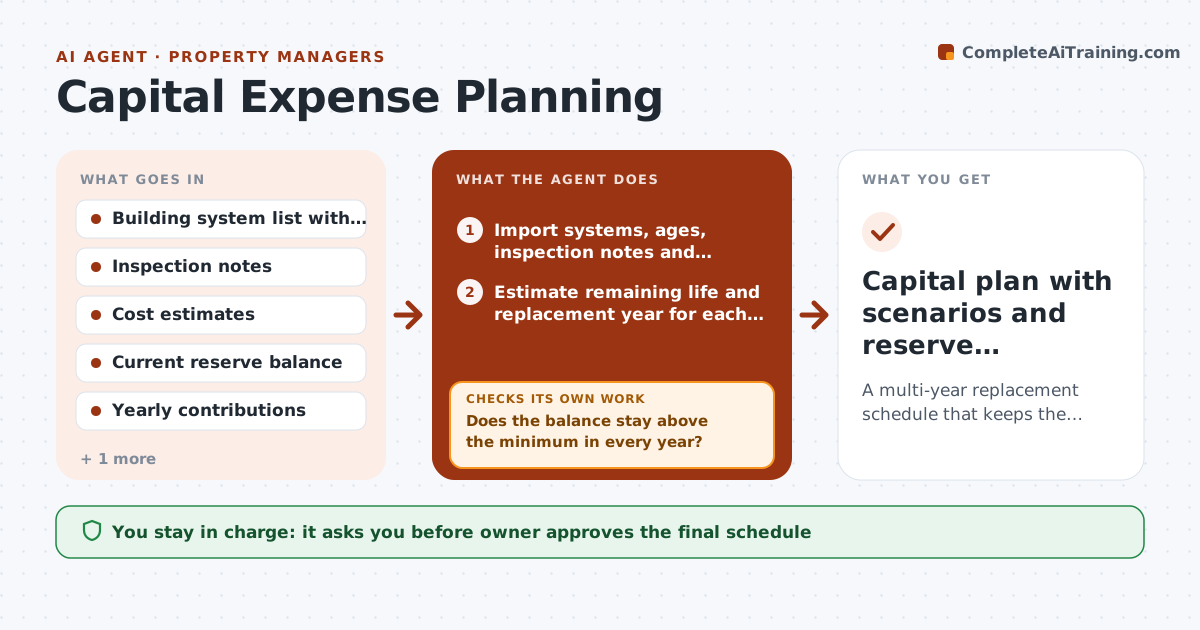
Roofs, boilers and elevators wear out on their own schedule, and the reserve account is often too small when the bill comes. This agent builds a list of building systems with install year, expected life and replacement cost, then estimates when each will need work. It builds a year-by-year spending line and compares it with the current reserve and yearly contributions. If the balance would drop below the minimum, it tests other scenarios: moving a replacement a year, raising contributions, or splitting a project. It picks the plan that stays above the floor with the smallest rise in contributions. Each run checks that totals add up and costs use current quotes or indexed prices. The owner approves the schedule. Edge case: a roof near the end of its life is moved earlier because a leak report exists.
How it works
Follow the arrows from top to bottom. The orange dashed arrow is the loop: when a check fails, the agent goes back and tries again.
Read the steps as a list
- Budget cycle starts
- Import systems, ages, inspection notes and reserve balance
- Estimate remaining life and replacement year for each system
- Price each replacement using recent quotes and cost indexes
- Build the year-by-year spending line against the reserve
- Does the balance stay above the minimum in every year?If not: try scenarios: shift a project one year, split it, or raise contributions, and keep the cheapest workable one. Back to step 5.
- Do spending totals tie to the system list and the cost sources?If not: recheck the price of the system that breaks the tie. Back to step 4.
- Owner approves the schedule and any contribution changeThe agent waits here for your OK.
- Capital plan with scenarios and reserve projection
How it decides
It projects each year's balance and rejects any plan that dips below the floor. Among workable plans it picks the one with the least extra contribution.
- Move a replacement earlier when an inspection or leak report shows failure risk
- Reject any scenario that falls below the minimum balance in any year
- Prefer shifting timing before raising contributions
- Use quotes under 12 months old, otherwise indexed estimates
Make it yours
Every agent is a starting point. You choose these settings for your own situation.
- Minimum reserve balance
- Planning horizon in years (default 20)
- Cost inflation assumption
- Which scenarios to test
What keeps you in control
It always asks you first
- Owner approves the final schedule
- Owner approves any change in contributions
Hard limits
- Never present estimates as final bids
- Do not assume costs without a source
- Keep all figures traceable to an input
It stops when
- Done: a scenario stays above the floor every year
- Stop: no scenario works and the owner must decide on financing
Set it up
We guide you through the set-up, step by step
Members get the full set-up guide for this agent. No technical skills needed: you copy, paste and upload.
- One set of instructions to paste into your AI, with the clicks for ChatGPT, Claude, Microsoft 365 Copilot, Gemini and Grok
- The agent then walks you through connecting your own data, one source at a time
- A downloadable copy with the flow chart, the rules and the full guide