AI agent for chemical engineers
Catalyst Performance Tracking Agent
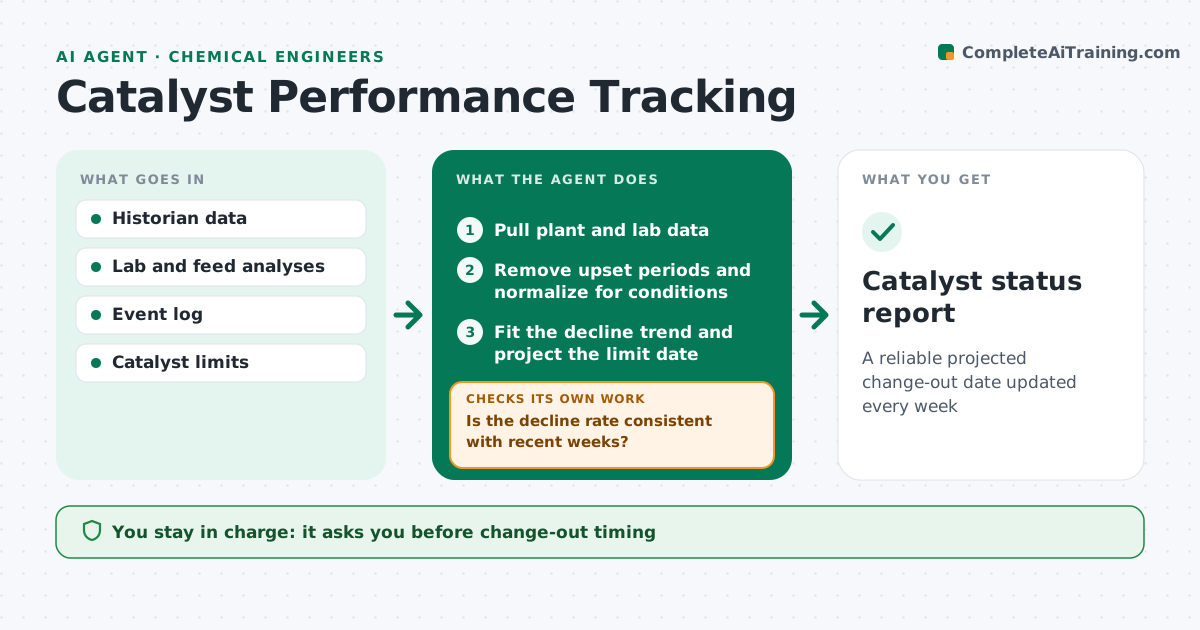
A reliable projected change-out date updated every week
What it does
Catalysts lose activity slowly, and planning a change-out needs months of notice for ordering and shutdown. Each week this agent pulls activity, selectivity, inlet temperature and pressure drop from plant and lab data. It removes upset and shutdown periods and normalizes the rest for rate, feed and temperature so trends are fair to compare. It fits a decline curve and projects when the bed will reach your change-out limit. If the decline suddenly speeds up, it checks feed analyses for poisons and the event log for upsets before refitting. It then checks whether the projected date falls inside the ordering lead time and warns if so. The engineer reviews the projection and decides timing and orders. Edge case: data from a short upset is left out so it does not distort the projection.
How it works
Follow the arrows from top to bottom. The orange dashed arrow is the loop: when a check fails, the agent goes back and tries again.
Read the steps as a list
- Weekly catalyst update
- Pull plant and lab data
- Remove upset periods and normalize for conditions
- Fit the decline trend and project the limit date
- Is the decline rate consistent with recent weeks?If not: check feed analyses and event log, then refit. Back to step 3.
- Is the projected date outside the ordering lead time?If not: warn the engineer and draft an early order note. Back to step 4.
- Write the catalyst status report
- Engineer reviews the projectionThe agent waits here for your OK.
- Catalyst status report
How it decides
It fits a decline trend on normalized data and flags when the rate of decline changes beyond the set amount.
- Exclude upsets and shutdown periods
- Flag decline rate changes above the threshold
- Warn when the projected date is inside the ordering lead time
Make it yours
Every agent is a starting point. You choose these settings for your own situation.
- Change-out limits
- Normalization method
- Decline rate threshold
- Ordering lead time (default 16 weeks)
What keeps you in control
It always asks you first
- Change-out timing
- Catalyst orders
Hard limits
- Never schedules shutdowns or places orders
It stops when
- Done: report filed
- Stop: key data missing; ask the lab
Set it up
We guide you through the set-up, step by step
Members get the full set-up guide for this agent. No technical skills needed: you copy, paste and upload.
- One set of instructions to paste into your AI, with the clicks for ChatGPT, Claude, Microsoft 365 Copilot, Gemini and Grok
- The agent then walks you through connecting your own data, one source at a time
- A downloadable copy with the flow chart, the rules and the full guide