AI agent for chemical engineers
Hazard Study Recommendation Closure Agent
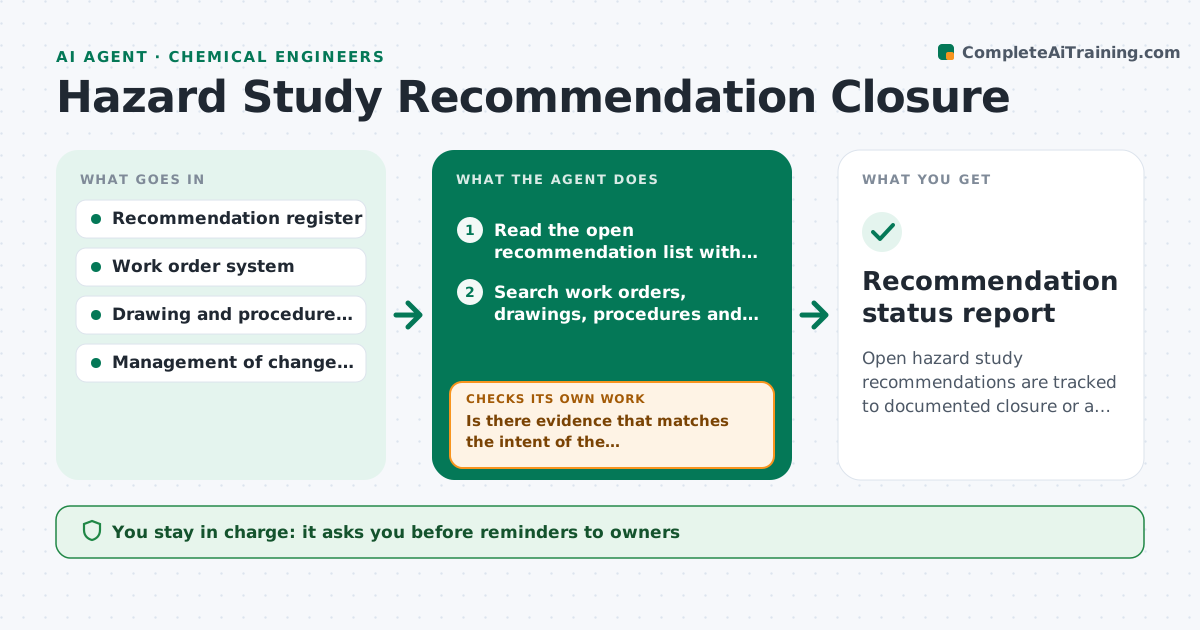
Open hazard study recommendations are tracked to documented closure or a justified decision.
What it does
A hazard study ends with 40 recommendations, and two years later half are marked open with no one sure what was done. This agent lists the open recommendations from the register and searches for evidence of completion, such as closed work orders, updated drawings, revised procedures and management of change records. It flags overdue items and items where evidence is found but not recorded. It drafts a reminder to each owner with the specific evidence needed, and rechecks after replies. It does not close anything itself. You approve each closure after reviewing the evidence. Edge case: a recommendation closed by a different action than the one proposed is flagged for your judgment on whether it is equivalent.
How it works
Follow the arrows from top to bottom. The orange dashed arrow is the loop: when a check fails, the agent goes back and tries again.
Read the steps as a list
- Weekly run
- Read the open recommendation list with owners and due dates
- Search work orders, drawings, procedures and change records for evidence
- Match evidence to each recommendation
- Is there evidence that matches the intent of the recommendation?If not: mark it open and list the evidence still needed. Back to step 3.
- Draft reminders to owners with the exact evidence requested
- Engineer approves reminders sentThe agent waits here for your OK.
- Read replies and updated records
- Is the evidence now enough to close?If not: return the question to the owner and keep it open. Back to step 7.
- Engineer approves each closureThe agent waits here for your OK.
- Recommendation status report
How it decides
A recommendation is ready to close when the evidence of the action exists and matches the recommendation. Otherwise it stays open and is chased by owner and age.
- High risk recommendation over 90 days overdue: escalate to the engineer
- Work order closed but no drawing update where one was needed: do not close
- Different action than proposed: ask the engineer if it is equivalent
- No owner assigned: flag for assignment
Make it yours
Every agent is a starting point. You choose these settings for your own situation.
- Risk ratings that escalate
- Overdue limit in days (default 90)
- Systems searched for evidence
- Reminder tone
- Report frequency
What keeps you in control
It always asks you first
- Reminders to owners
- Each recommendation closure
Hard limits
- Never close a recommendation
- Never assume completion without evidence
It stops when
- Done: every item closed or justified
- Stop: register unavailable
Set it up
We guide you through the set-up, step by step
Members get the full set-up guide for this agent. No technical skills needed: you copy, paste and upload.
- One set of instructions to paste into your AI, with the clicks for ChatGPT, Claude, Microsoft 365 Copilot, Gemini and Grok
- The agent then walks you through connecting your own data, one source at a time
- A downloadable copy with the flow chart, the rules and the full guide