AI agent for hardware engineers
Chip Errata Impact Review Agent
Know which errata affect this product and have a checked workaround for each
What it does
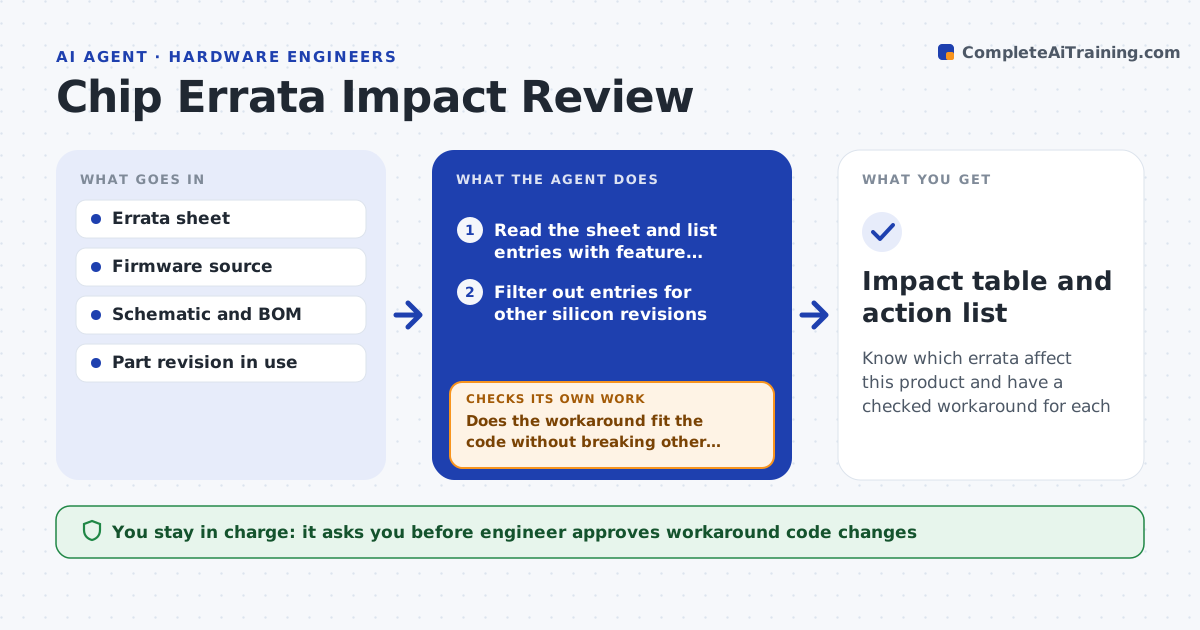
Chip vendors publish errata that can break a design, but the sheet is long and nobody checks it against the design. When a new errata is published, this agent reads each entry and notes the affected feature, silicon revision and conditions. It searches the firmware and schematic for use of that feature, such as a specific timer mode or a pin function. It rates the impact for this product as none, possible or serious, and shows the code lines or nets involved. For each serious item it proposes the vendor workaround and checks that the code would still work with it. The engineer approves the actions. Edge case: the errata applies only to revision A and the board uses revision C, so the agent marks it as not affected.
How it works
Follow the arrows from top to bottom. The orange dashed arrow is the loop: when a check fails, the agent goes back and tries again.
Read the steps as a list
- New errata sheet published
- Read the sheet and list entries with feature, revision and conditions
- Filter out entries for other silicon revisions
- Search firmware and schematic for use of each feature
- Rate impact as none, possible or serious with evidence
- Draft the vendor workaround for serious items
- Check the workaround against the code and test it where possible
- Does the workaround fit the code without breaking other features?If not: propose an alternative workaround or a design change. Back to step 6.
- Engineer approves actions and workaround changesThe agent waits here for your OK.
- Impact table and action list
How it decides
It marks an entry as affecting the product when the revision matches and the design uses the feature under the stated conditions.
- Treat an entry as out of scope if the revision does not match
- Rate serious when the feature is used under the failing condition
- Rate possible when the feature is used but the condition is unclear
- Always list items needing hardware change separately
Make it yours
Every agent is a starting point. You choose these settings for your own situation.
- Silicon revision used
- Parts and sheets to watch
- Impact rating wording
- Who receives the table
- How often to check vendor sites
What keeps you in control
It always asks you first
- Engineer approves workaround code changes
- Lead approves any hardware change
Hard limits
- Never mark an entry as not affected without evidence
- Never change production code without approval
It stops when
- Done: every serious item has an approved workaround
- Stop: an item needs a hardware change and is escalated
Set it up
We guide you through the set-up, step by step
Members get the full set-up guide for this agent. No technical skills needed: you copy, paste and upload.
- One set of instructions to paste into your AI, with the clicks for ChatGPT, Claude, Microsoft 365 Copilot, Gemini and Grok
- The agent then walks you through connecting your own data, one source at a time
- A downloadable copy with the flow chart, the rules and the full guide