AI agent for claims adjusters
Claim Diary and Status Follow-Up Agent
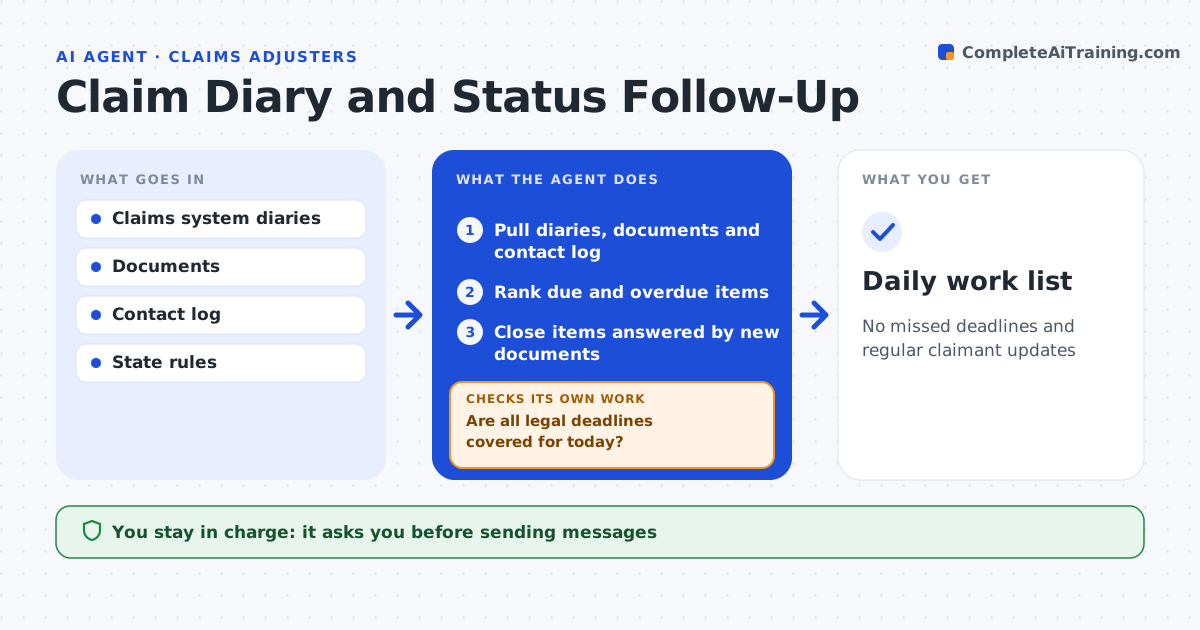
No missed deadlines and regular claimant updates
What it does
Adjusters carry large caseloads with diary dates, regulatory deadlines and claimants waiting for news, and one missed deadline can mean a penalty. Each morning this agent reviews the caseload. It checks diary dates, regulatory response deadlines, outstanding documents and the last contact with each claimant. It lists claims due today and overdue items in priority order, with any legal deadline within two days at the top. It drafts status updates for claimants with no contact in 30 days. It checks for new documents that answer outstanding requests and proposes closing those items. It then checks that every legal deadline for today is covered; if one is at risk, it moves it to the top and alerts the adjuster. The adjuster approves every message and diary closure. Edge case: one state requires acknowledgment within 10 days, so new claims from that state are prioritized.
How it works
Follow the arrows from top to bottom. The orange dashed arrow is the loop: when a check fails, the agent goes back and tries again.
Read the steps as a list
- Morning caseload review
- Pull diaries, documents and contact log
- Rank due and overdue items
- Close items answered by new documents
- Draft claimant updates
- Are all legal deadlines covered for today?If not: move at-risk items to the top and alert the adjuster. Back to step 3.
- Adjuster approves messagesThe agent waits here for your OK.
- Daily work list
How it decides
It ranks items by legal deadline first, then diary date and time since last contact.
- Legal deadline within 2 days: top
- No contact in 30 days: draft update
- New document matches request: close item
Make it yours
Every agent is a starting point. You choose these settings for your own situation.
- Contact interval
- State deadline rules
- Run time
- List format
What keeps you in control
It always asks you first
- Sending messages
- Closing diary items
Hard limits
- Never makes coverage decisions
- Never sends without approval
It stops when
- Done: list ready
- Stop: claims system down
Set it up
We guide you through the set-up, step by step
Members get the full set-up guide for this agent. No technical skills needed: you copy, paste and upload.
- One set of instructions to paste into your AI, with the clicks for ChatGPT, Claude, Microsoft 365 Copilot, Gemini and Grok
- The agent then walks you through connecting your own data, one source at a time
- A downloadable copy with the flow chart, the rules and the full guide