AI agent for clinical data managers
Clinical Edit Check Validation Agent
Edit checks proven to catch the right data before the study goes live
What it does
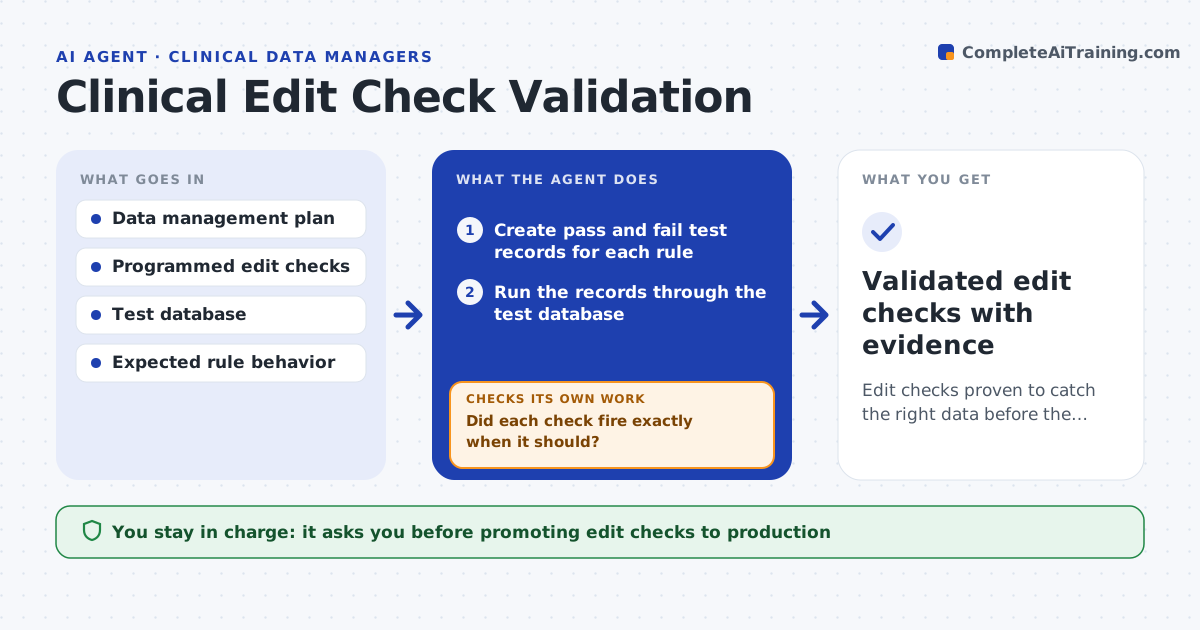
Edit checks are the rules that catch bad clinical data, and if they are wrong, bad data passes while good data gets queried. Before a study goes live, this agent reads the data management plan and the programmed checks. It creates test records that should pass and records that should fail each rule, including boundary values. It runs them through the database and checks that each rule fires exactly when it should and stays quiet when it should. Where a rule fires wrongly or misses a case, it records the rule, the test record and the expected result for the programmer. After fixes it reruns the full set, not just the fixed rule. It builds the validation evidence for the study file. You approve moving checks to production. Edge case: two rules that conflict on one field are flagged together.
How it works
Follow the arrows from top to bottom. The orange dashed arrow is the loop: when a check fails, the agent goes back and tries again.
Read the steps as a list
- Edit checks ready for testing
- Create pass and fail test records for each rule
- Run the records through the test database
- Did each check fire exactly when it should?If not: record the rule, test record and expected result for the programmer, then rerun. Back to step 2.
- Flag any conflicting rules on the same field
- Build the validation evidence package
- Data manager approves moving checks to productionThe agent waits here for your OK.
- Validated edit checks with evidence
How it decides
Each check must fire on every should-fail record and stay silent on every should-pass record before it is accepted.
- Accept a check only when pass and fail cases both behave
- Flag conflicting rules together
- Keep test records and results as evidence
Make it yours
Every agent is a starting point. You choose these settings for your own situation.
- Test cases per rule type
- Boundary values to always test
- Evidence format
- Rules in scope
What keeps you in control
It always asks you first
- Promoting edit checks to production
Hard limits
- Tests only in the test database
- Does not promote checks without approval
It stops when
- Done: all checks validated with evidence
- Stop: expected behavior is not defined in the plan
Set it up
We guide you through the set-up, step by step
Members get the full set-up guide for this agent. No technical skills needed: you copy, paste and upload.
- One set of instructions to paste into your AI, with the clicks for ChatGPT, Claude, Microsoft 365 Copilot, Gemini and Grok
- The agent then walks you through connecting your own data, one source at a time
- A downloadable copy with the flow chart, the rules and the full guide