AI agent for community moderators
Community Guideline Update Agent
Guidelines that match how the team actually moderates
What it does
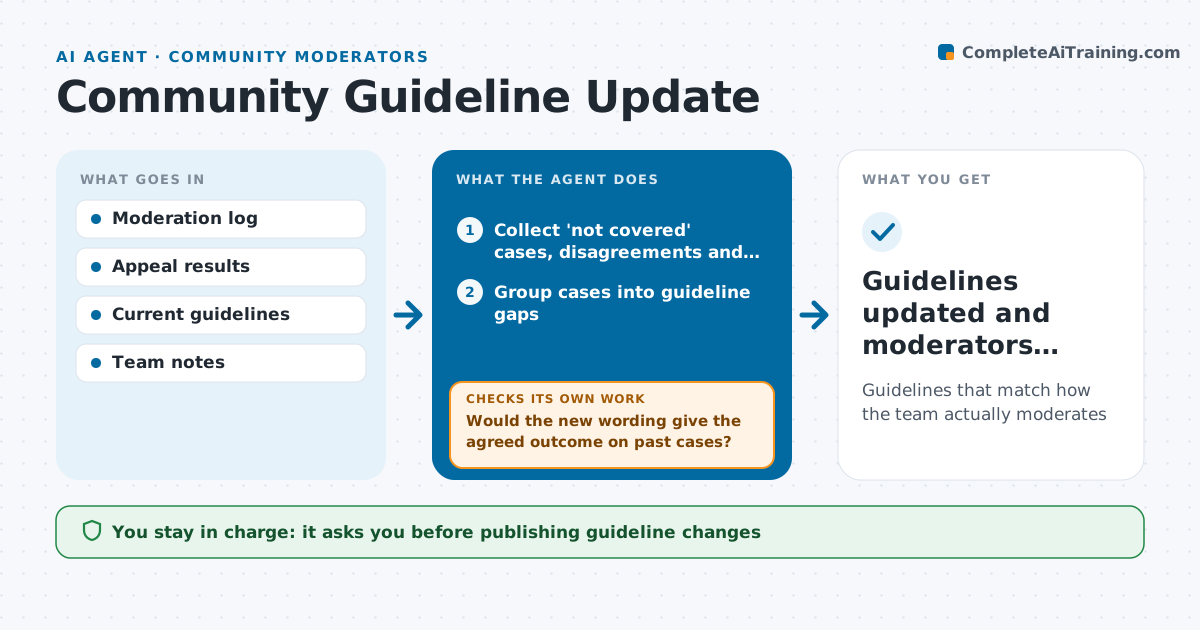
Community guidelines go stale, and moderators end up making calls the rules never covered. Each quarter this agent reviews cases where moderators wrote not covered or disagreed, plus appeals that were reversed. It groups them into gaps in the guidelines. For each gap it drafts new or clearer wording with examples. Then it tests the draft on the past cases: would the new wording have produced the decision the team agreed on? If not, it revises the wording and tests again. It drafts a member-facing change note in plain language. The moderation lead approves every change and the announcement. Edge case: a change that would make many past actions wrong is flagged, so the team can decide whether to review those actions.
How it works
Follow the arrows from top to bottom. The orange dashed arrow is the loop: when a check fails, the agent goes back and tries again.
Read the steps as a list
- Quarterly guideline review
- Collect 'not covered' cases, disagreements and reversed appeals
- Group cases into guideline gaps
- Draft new wording with examples
- Would the new wording give the agreed outcome on past cases?If not: revise the wording and retest. Back to step 4.
- Draft a plain-language change note for members
- Lead approves the guideline change and announcementThe agent waits here for your OK.
- Guidelines updated and moderators briefed
How it decides
It ranks gaps by how often they came up and tests each draft on real past cases.
- Gaps with five or more cases are addressed first
- Every change includes an example
- Changes that reverse many past actions are flagged
Make it yours
Every agent is a starting point. You choose these settings for your own situation.
- Review frequency
- Minimum cases per gap
- Tone of member notes
- Who approves changes
What keeps you in control
It always asks you first
- Publishing guideline changes
Hard limits
- Never publishes guideline changes
- Never applies new rules to past cases on its own
It stops when
- Done: changes approved
- Stop: no gaps found this quarter
Set it up
We guide you through the set-up, step by step
Members get the full set-up guide for this agent. No technical skills needed: you copy, paste and upload.
- One set of instructions to paste into your AI, with the clicks for ChatGPT, Claude, Microsoft 365 Copilot, Gemini and Grok
- The agent then walks you through connecting your own data, one source at a time
- A downloadable copy with the flow chart, the rules and the full guide