AI agent for director of strategies
Competitor Financial Benchmark Refresh Agent
A refreshed, comparable peer benchmark each quarter
What it does
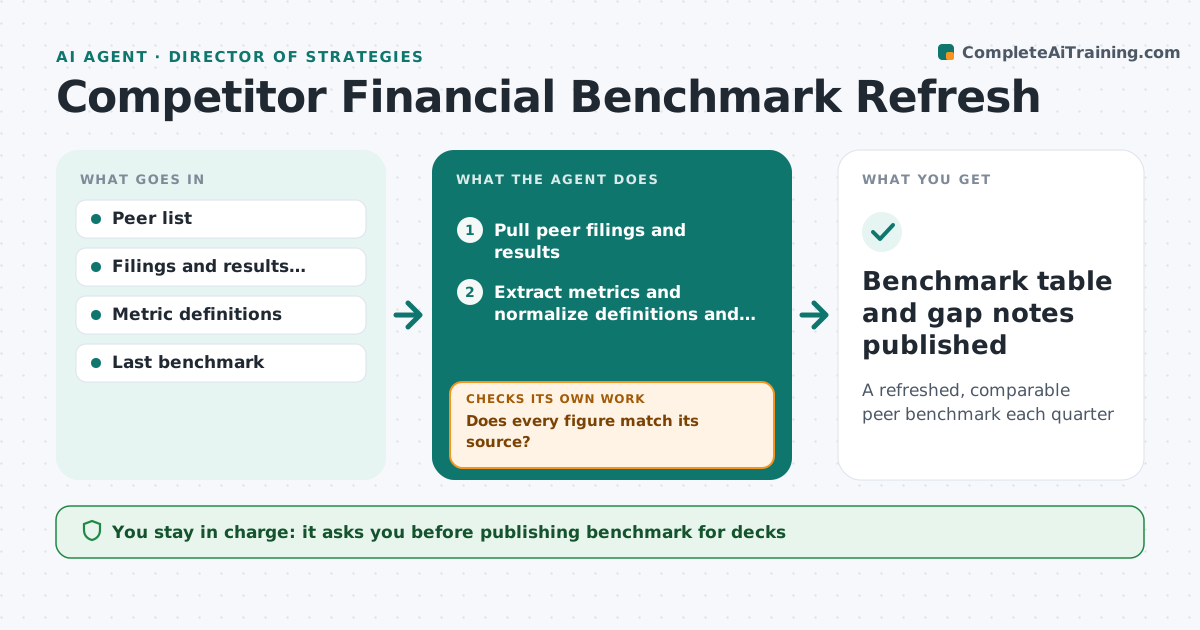
Strategy work compares the company with peers on growth, margins and efficiency, but benchmarks are rebuilt by hand and mix figures that do not compare. Each quarter this agent pulls peers' latest public results, extracts the agreed metrics and adjusts them to a common basis, such as calendar year and one margin definition. A peer that changes its fiscal year has its quarters realigned. It checks every figure against the source and against last quarter, and investigates big jumps for restatements, acquisitions or currency effects. It updates the table and highlights where the company's gap widened or narrowed. The strategy manager approves before it goes into decks.
How it works
Follow the arrows from top to bottom. The orange dashed arrow is the loop: when a check fails, the agent goes back and tries again.
Read the steps as a list
- Peer results season ends
- Pull peer filings and results
- Extract metrics and normalize definitions and periods
- Does every figure match its source?If not: correct the extraction and recheck. Back to step 3.
- Are all changes from last quarter explained or within range?If not: check for restatements, deals or currency effects and adjust. Back to step 3.
- Update the table and calculate the company's gaps
- Strategy manager approves the benchmarkThe agent waits here for your OK.
- Benchmark table and gap notes published
How it decides
It normalizes each metric to the agreed definition and investigates any quarter-on-quarter change above the set level before accepting it.
- Changes above 20% need an explanation
- All figures converted to one currency at average rates
- Non-public figures are excluded
Make it yours
Every agent is a starting point. You choose these settings for your own situation.
- Peer list
- Metrics and definitions
- Investigation threshold (default 20%)
- Reporting currency
What keeps you in control
It always asks you first
- Publishing benchmark for decks
- Adding or removing peers
Hard limits
- Public sources only
- Cites the source for every figure
It stops when
- Done: table refreshed
- Stop: a peer has not reported, mark as pending
Set it up
We guide you through the set-up, step by step
Members get the full set-up guide for this agent. No technical skills needed: you copy, paste and upload.
- One set of instructions to paste into your AI, with the clicks for ChatGPT, Claude, Microsoft 365 Copilot, Gemini and Grok
- The agent then walks you through connecting your own data, one source at a time
- A downloadable copy with the flow chart, the rules and the full guide