AI agent for marketing analysts
Competitor Review Sentiment Mining Agent
Rank competitor weaknesses and strengths by feature, using tagging that has passed a quality check.
What it does
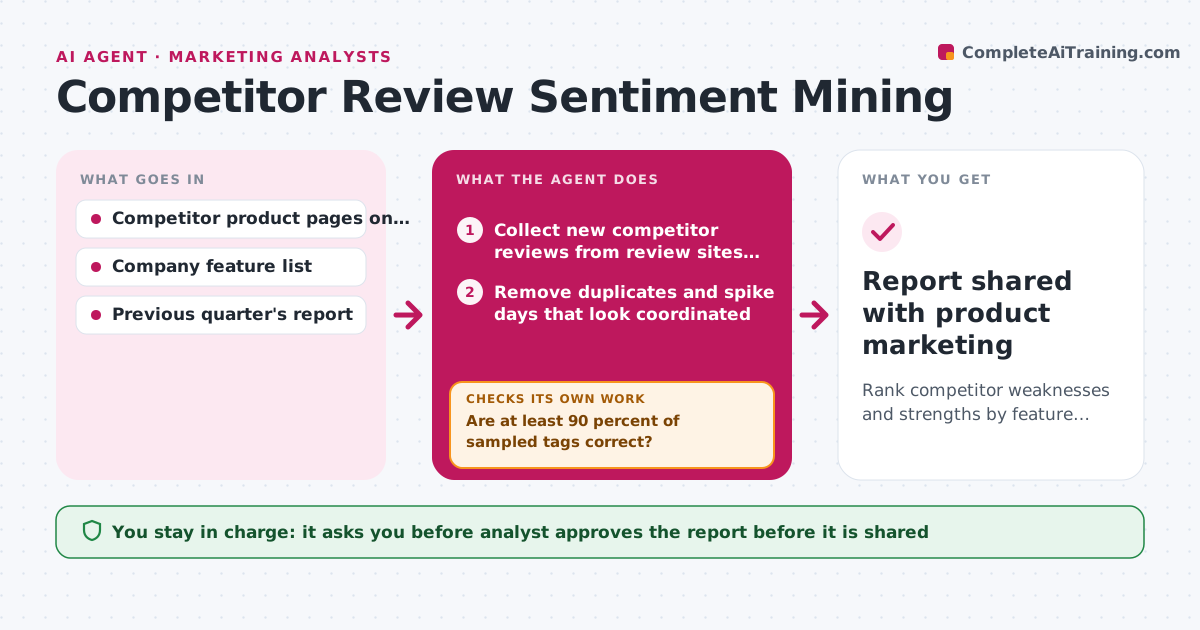
Reviews of competitor products hold honest complaints, but reading them by hand gives only anecdotes. Each quarter the agent collects reviews from review sites and app stores for each competitor. It tags every review by feature, such as setup, reporting or support, and marks it as praise or complaint. Because tagging can be wrong, it then checks a random sample of tagged reviews against the original text. If too many tags are wrong, it retags the whole set with clearer rules and samples again. It ranks features by how many complaints competitors receive and how well the company handles that feature, which shows where the company can win. The analyst approves the report before it is shared. Edge case: a burst of one-star reviews on a single day may be a coordinated campaign and not real sentiment, so it is set aside.
How it works
Follow the arrows from top to bottom. The orange dashed arrow is the loop: when a check fails, the agent goes back and tries again.
Read the steps as a list
- Quarterly run begins
- Collect new competitor reviews from review sites and app stores
- Remove duplicates and spike days that look coordinated
- Tag each review by feature and by praise or complaint
- Draw a random sample and compare tags to the review text
- Are at least 90 percent of sampled tags correct?If not: tighten the tagging rules using the errors found, then retag all reviews. Back to step 4.
- Count complaints and praise per feature and competitor
- Compare with the company's own feature strength, rank opportunities and draft the report
- Do the top five opportunities each have at least 20 supporting reviews?If not: widen the date range or drop the opportunity. Back to step 7.
- Analyst approves the reportThe agent waits here for your OK.
- Report shared with product marketing
How it decides
Features are ranked by competitor complaint volume against company strength. A tagging pass is accepted only when at least 90 percent of the sampled tags are correct.
- Set aside a day when one-star reviews exceed 5 times the daily average
- Accept tagging only at 90 percent sample accuracy
- Rank a feature as an opportunity when competitors have at least 20 complaints about it
- Quote reviews only in short excerpts with the source named
Make it yours
Every agent is a starting point. You choose these settings for your own situation.
- Competitors and review sources
- Sample size (default 60 reviews)
- Accuracy needed (default 90 percent)
- Feature list used for tags
- Report length and audience
What keeps you in control
It always asks you first
- Analyst approves the report before it is shared
- Analyst approves adding a new review source
Hard limits
- Do not post or reply to any review
- Never name individual reviewers
It stops when
- Done: report approved and shared
- Stop: tagging stays under 90 percent after three tries, hand the sample to the analyst
Set it up
We guide you through the set-up, step by step
Members get the full set-up guide for this agent. No technical skills needed: you copy, paste and upload.
- One set of instructions to paste into your AI, with the clicks for ChatGPT, Claude, Microsoft 365 Copilot, Gemini and Grok
- The agent then walks you through connecting your own data, one source at a time
- A downloadable copy with the flow chart, the rules and the full guide