AI agent for medical writers
Compliance Document Version Control Agent
Every controlled document cites current references and carries a valid approval before release.
What it does
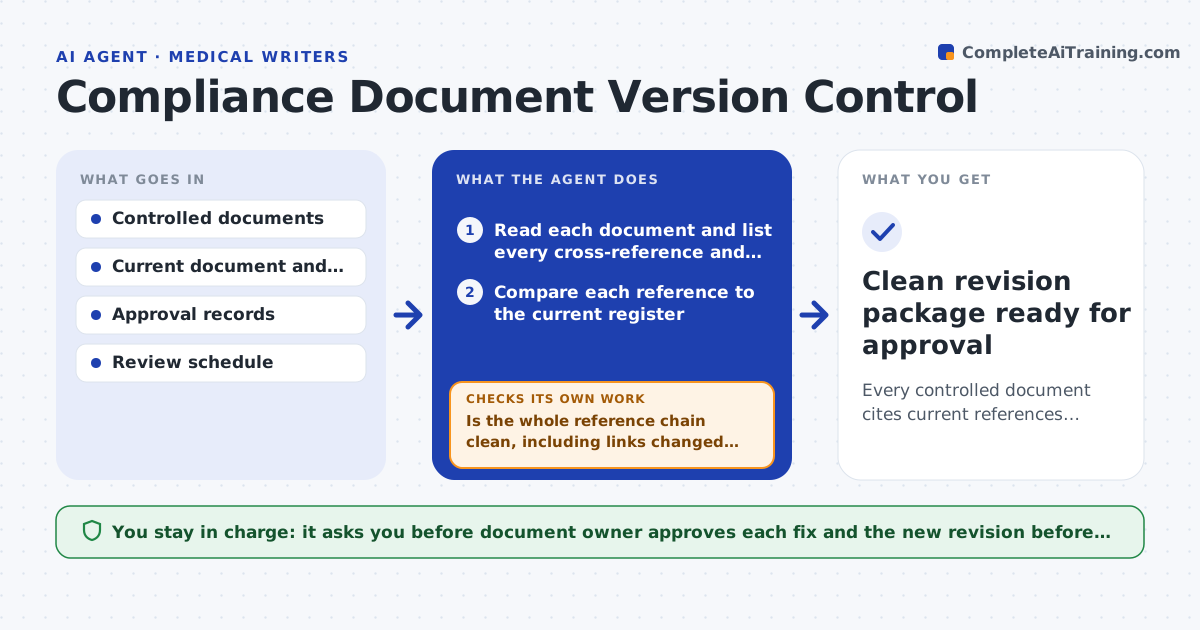
Regulated documentation has to cite the right standard, the right sibling document and the right revision, and carry a current approval. Old references and expired review dates are what auditors find first. This agent reads each controlled document in a set and checks every reference against the current document register. It confirms approval signatures, effective dates and review dates, then drafts a correction list with the exact location of each problem. After the owner fixes items, it rechecks the whole reference chain, not just the lines that changed, because one corrected number often breaks a link elsewhere. It keeps going until the chain is clean or an item needs a decision it cannot make. It never edits a controlled document or marks one approved. Edge case: SOP-14 now cites SOP-22 revision C, but the register shows revision D with a changed scope, so the agent flags that the cited step may no longer exist.
How it works
Follow the arrows from top to bottom. The orange dashed arrow is the loop: when a check fails, the agent goes back and tries again.
Read the steps as a list
- Document set is queued for review
- Read each document and list every cross-reference and standard
- Compare each reference to the current register
- Check approval signatures, effective dates and review dates against the approval matrix
- Draft a correction list with the location of each problem
- Document owner makes the fixes in the controlled systemThe agent waits here for your OK.
- Reread the full set and rebuild the reference chain
- Is the whole reference chain clean, including links changed by the fixes?If not: list the new breaks and return them to the owner as a second correction list. Back to step 3.
- Prepare the revision summary for release
- Clean revision package ready for approval
How it decides
It treats a reference as wrong when the register shows a later revision or a withdrawn document. It treats an approval as missing when the signature, date or role does not match the approval matrix.
- Flag any reference to a revision older than the register's current one
- Flag any review date older than the document's review cycle
- Flag any approval where the signer lacks the role in the matrix
- Escalate when a cited document was withdrawn without a replacement
Make it yours
Every agent is a starting point. You choose these settings for your own situation.
- Review cycle in months (default 24)
- Which register is the source of truth
- Approval roles required per document type
- Quarterly sweep day
- Severity labels for findings
What keeps you in control
It always asks you first
- Document owner approves each fix and the new revision before release
Hard limits
- Never edit or approve a controlled document
- Never mark a signature valid without a matching record
It stops when
- Done: no broken references and every approval valid
- Stop: a withdrawn reference has no replacement and needs a decision
Set it up
We guide you through the set-up, step by step
Members get the full set-up guide for this agent. No technical skills needed: you copy, paste and upload.
- One set of instructions to paste into your AI, with the clicks for ChatGPT, Claude, Microsoft 365 Copilot, Gemini and Grok
- The agent then walks you through connecting your own data, one source at a time
- A downloadable copy with the flow chart, the rules and the full guide