AI agent for medical writers
Patient Education Version Agent
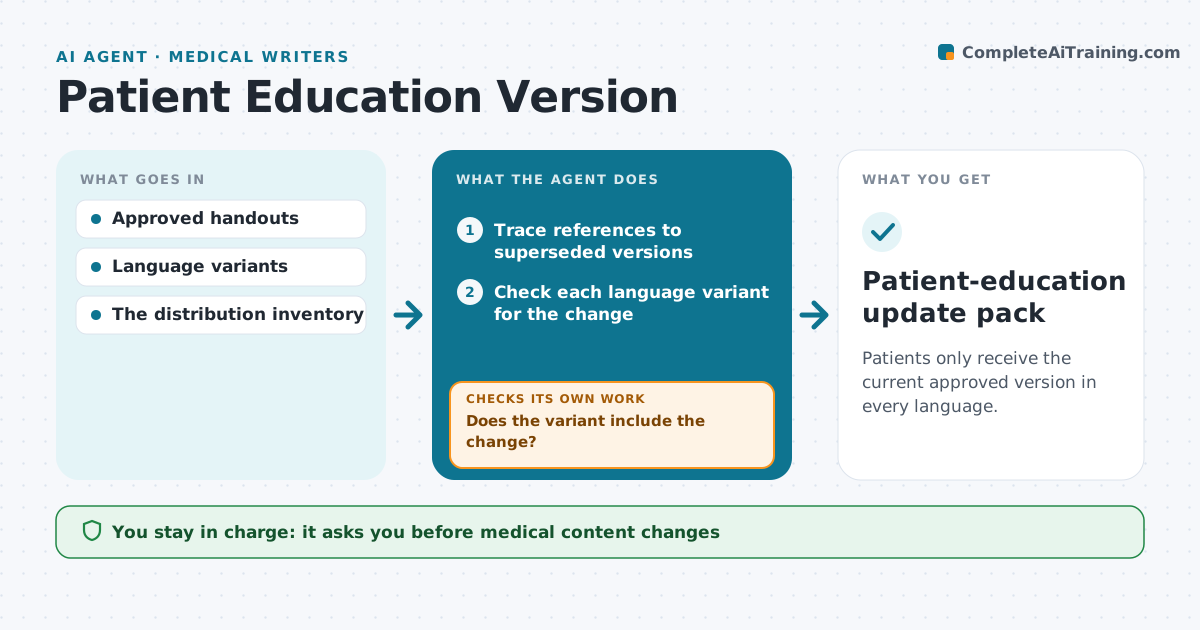
Patients only receive the current approved version in every language.
What it does
Patient handouts often stay linked to superseded versions after clinicians approve an update. When a new version is approved, this agent traces every place the old version is still referenced, such as the patient portal, ward folders and discharge templates. It then checks each language variant to see whether it includes the approved change. A variant that includes the change gets a prepared replacement reference. A variant that lacks it stays on its previous approval status and is marked pending translation review, so patients never get a mix of old and new advice. The education administrator approves distribution; medical content is never edited by the agent. Edge case: a variant contains the change but has a different version number, so the agent asks the translation team to confirm.
How it works
Follow the arrows from top to bottom. The orange dashed arrow is the loop: when a check fails, the agent goes back and tries again.
Read the steps as a list
- New version approved
- Trace references to superseded versions
- Check each language variant for the change
- Does the variant include the change?If not: keep it pending translation review. Back to step 3.
- Prepare replacement references
- Education administrator approves distributionThe agent waits here for your OK.
- Patient-education update pack
How it decides
It updates references only for variants that contain the approved change.
- A variant is current only when it includes the approved change.
- Variants lacking the change keep their previous status until translated.
- Version numbers must match across variants before release.
- Medical content is never edited by the agent.
Make it yours
Every agent is a starting point. You choose these settings for your own situation.
- Places to search for references (portal, wards, templates)
- Languages in scope
- Who reviews translations
- Who approves distribution
- Reminder schedule for pending translations (default every 5 days)
What keeps you in control
It always asks you first
- Medical content changes
- Patient distribution
Hard limits
- No content changes.
It stops when
- Done: all variants current or pending.
Set it up
We guide you through the set-up, step by step
Members get the full set-up guide for this agent. No technical skills needed: you copy, paste and upload.
- One set of instructions to paste into your AI, with the clicks for ChatGPT, Claude, Microsoft 365 Copilot, Gemini and Grok
- The agent then walks you through connecting your own data, one source at a time
- A downloadable copy with the flow chart, the rules and the full guide