AI agent for director of business developments
Conference Target Meeting Planner Agent
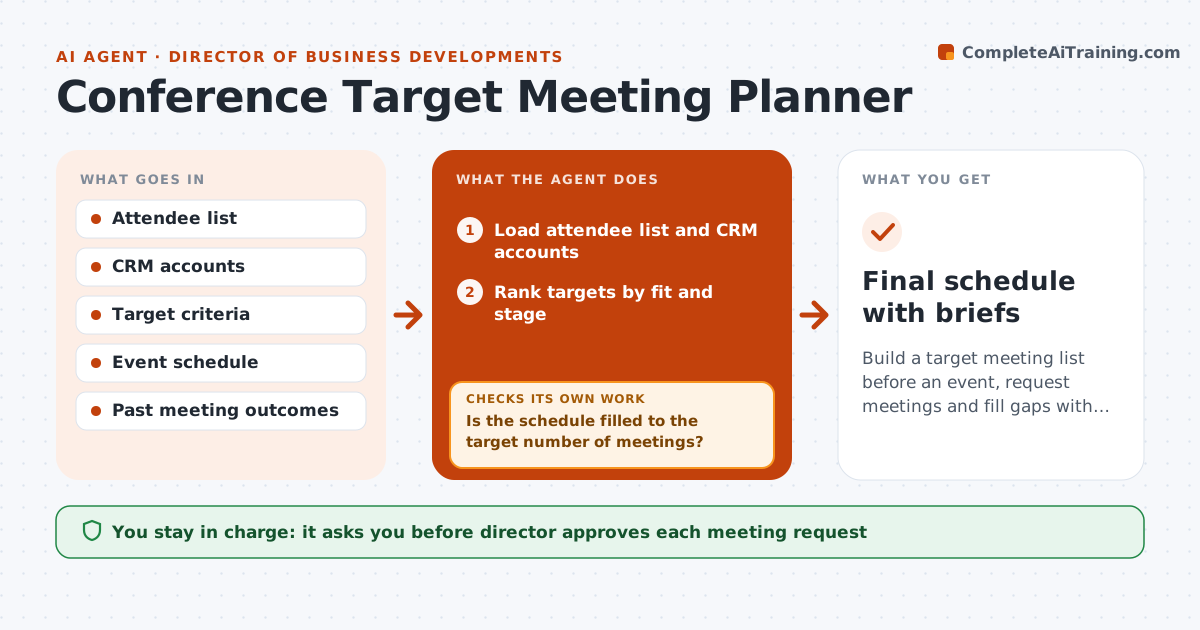
Build a target meeting list before an event, request meetings and fill gaps with next-best targets
What it does
Event time is wasted when meetings are not booked before arriving. About four weeks before an event, the agent builds a target list from the attendee list and the CRM. It ranks targets by fit with the company's goals, deal stage and past contact. It drafts personalized meeting requests with a suggested time and tracks replies. When someone declines or does not reply by the deadline, it moves to the next target and drafts a new request. It builds a schedule that fits the event and travel time. The director approves each request before it is sent. Edge case: two top targets both want Tuesday at 10, and the agent offers one a second slot.
How it works
Follow the arrows from top to bottom. The orange dashed arrow is the loop: when a check fails, the agent goes back and tries again.
Read the steps as a list
- Event is 4 weeks away
- Load attendee list and CRM accounts
- Rank targets by fit and stage
- Draft personalized meeting requests
- Director approves each requestThe agent waits here for your OK.
- Track replies and update the schedule
- Is the schedule filled to the target number of meetings?If not: Choose second-choice targets and draft new requests. Back to step 2.
- Check for time conflicts and travel gaps
- Does the final schedule have no conflicts?If not: Reschedule and offer alternate times. Back to step 7.
- Prepare a one-page brief per meeting
- Final schedule with briefs
How it decides
Targets are ranked by fit; unfilled slots go to the next-best target within the schedule.
- Target 8 meetings per day
- Send a second request after 5 days
- Move to the next target after 2 no-replies
- Do not book meetings within 30 minutes of travel
Make it yours
Every agent is a starting point. You choose these settings for your own situation.
- Target meeting number
- Follow-up timing (default 5 days)
- Ranking rules
- Meeting length
What keeps you in control
It always asks you first
- Director approves each meeting request
- Director approves changes to the list
Hard limits
- Never send a request without approval
- Never use attendee data beyond the event purpose
It stops when
- Done: schedule filled and briefs ready
- Stop: the event is canceled or the budget is cut
Set it up
We guide you through the set-up, step by step
Members get the full set-up guide for this agent. No technical skills needed: you copy, paste and upload.
- One set of instructions to paste into your AI, with the clicks for ChatGPT, Claude, Microsoft 365 Copilot, Gemini and Grok
- The agent then walks you through connecting your own data, one source at a time
- A downloadable copy with the flow chart, the rules and the full guide