AI agent for construction contractors
Construction Submittal Completeness Agent
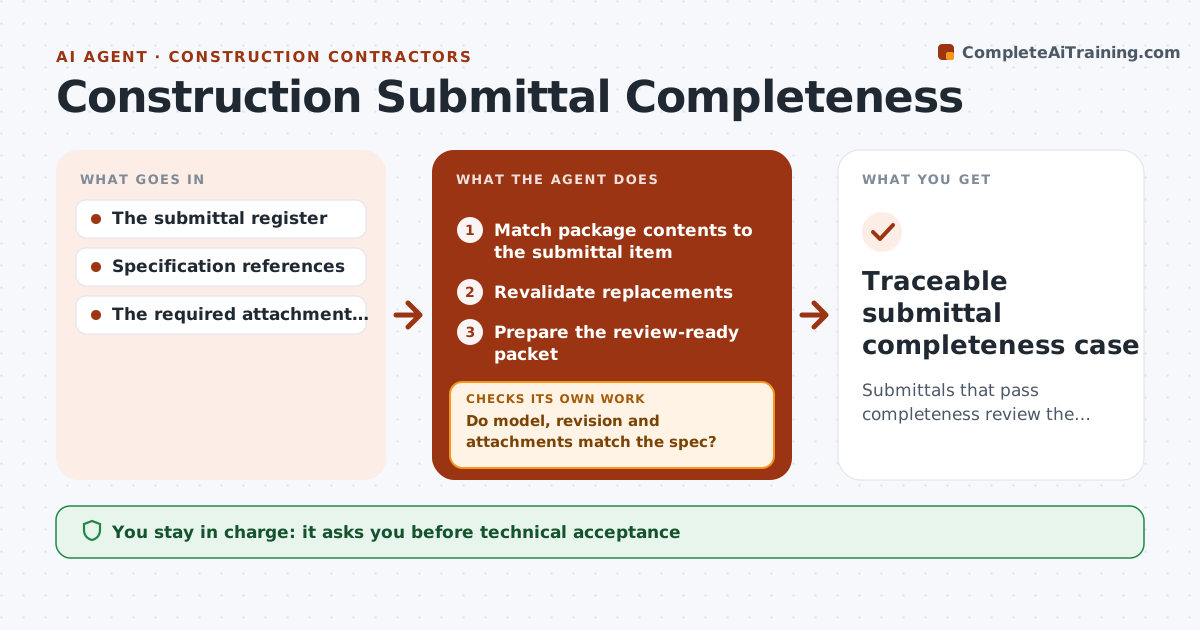
Submittals that pass completeness review the first time.
What it does
Submittals such as product data and shop drawings often come back from review because they are incomplete or show the wrong product. Every rejection costs days on the schedule. This agent checks each uploaded package against the submittal item it claims to answer. It reads the documents themselves, not the file names, and confirms model IDs, revision numbers, required attachments and admin fields such as spec section and stamp. When something is missing or wrong, it prepares a deficiency draft that names the exact gap, then rechecks the replacement when it arrives. Only complete packages go to the coordinator for technical review. Technical acceptance and formal notices stay with people. Edge case: a brochure covering a whole product family is not accepted until the required model is clearly marked.
How it works
Follow the arrows from top to bottom. The orange dashed arrow is the loop: when a check fails, the agent goes back and tries again.
Read the steps as a list
- Submittal uploaded
- Match package contents to the submittal item
- Do model, revision and attachments match the spec?If not: prepare a targeted deficiency draft. Back to step 2.
- Revalidate replacements
- Prepare the review-ready packet
- Submittal coordinator sends for technical reviewThe agent waits here for your OK.
- Traceable submittal completeness case
How it decides
It tests each requirement against document content, not file names.
- Read document content; file names never prove compliance.
- A deficiency draft names the exact missing or wrong item.
- Product family brochures pass only when the required model is marked.
- Replacements get the full check again, not just the corrected item.
Make it yours
Every agent is a starting point. You choose these settings for your own situation.
- Required attachment list per spec section
- Admin fields that must be present (default: spec section, revision, contractor stamp)
- Deficiency note tone and template
- Who is notified when a package passes (default: submittal coordinator)
- How long to wait for a replacement before escalating (default 5 working days)
What keeps you in control
It always asks you first
- Technical acceptance
- Design judgments
- Formal notices
Hard limits
- No technical acceptance.
It stops when
- Done: complete.
- Waiting: replacement.
Set it up
We guide you through the set-up, step by step
Members get the full set-up guide for this agent. No technical skills needed: you copy, paste and upload.
- One set of instructions to paste into your AI, with the clicks for ChatGPT, Claude, Microsoft 365 Copilot, Gemini and Grok
- The agent then walks you through connecting your own data, one source at a time
- A downloadable copy with the flow chart, the rules and the full guide