AI agent for production planners
Backlog Aging Agent
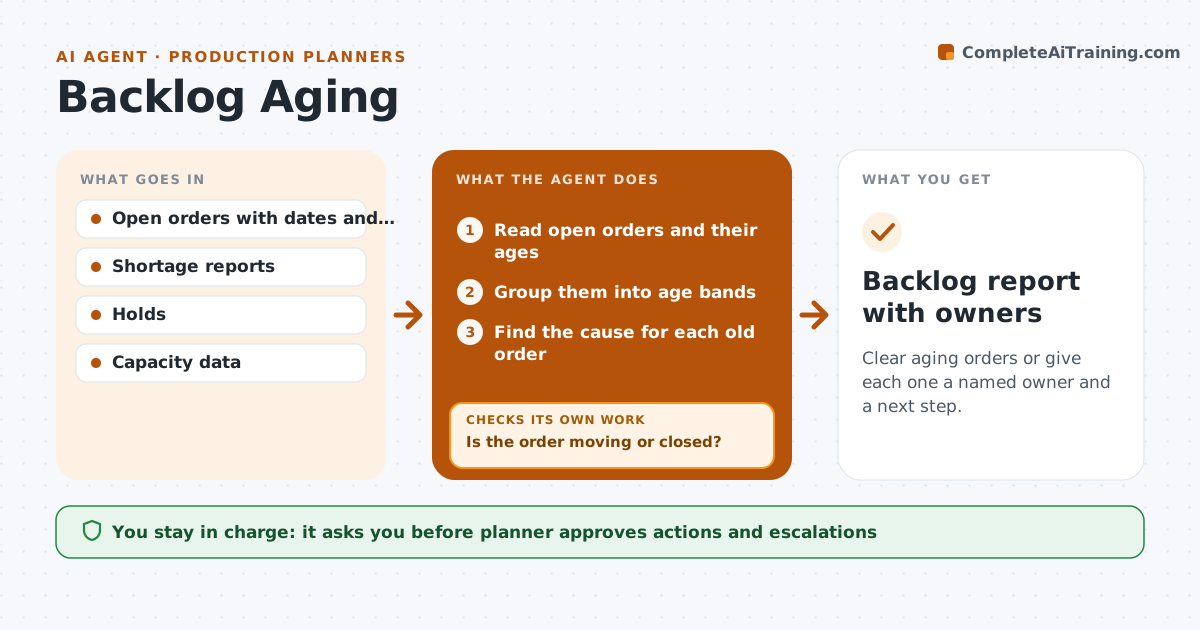
Clear aging orders or give each one a named owner and a next step.
What it does
Old orders sit in the backlog because no one owns them. This agent ages every open order and sorts them by how long they have been waiting. For each old order it finds the cause, such as a material shortage, a customer hold, a missing drawing or a capacity gap. It proposes an action for each cause. After actions are taken it checks the age again and escalates the ones still stuck. The planner approves the actions. Edge case: an order held by the customer is moved to a separate list with a follow-up date rather than counted as a backlog failure.
How it works
Follow the arrows from top to bottom. The orange dashed arrow is the loop: when a check fails, the agent goes back and tries again.
Read the steps as a list
- Weekly backlog review
- Read open orders and their ages
- Group them into age bands
- Find the cause for each old order
- Propose an action and an owner
- Planner approves the actionsThe agent waits here for your OK.
- Send actions to the owners
- Wait for the action date
- Read the order's age and status again
- Is the order moving or closed?If not: Escalate to the manager and propose a different action. Back to step 3.
- Backlog report with owners
How it decides
It ranks orders by age and value and assigns the cause based on the status data.
- Flag orders older than 30 days past promise
- Separate customer holds
- Assign every old order an owner
- Escalate orders that stay stuck two weeks
Make it yours
Every agent is a starting point. You choose these settings for your own situation.
- Age bands (default 30, 60, 90 days)
- Escalation wait (default 2 weeks)
- Customer hold list
- Owners by cause
What keeps you in control
It always asks you first
- Planner approves actions and escalations
Hard limits
- Never cancel or change an order
- Never close an order itself
It stops when
- Done: each old order has moved or has an owner and a date
- Stop: the planner removes the order from the list
Set it up
We guide you through the set-up, step by step
Members get the full set-up guide for this agent. No technical skills needed: you copy, paste and upload.
- One set of instructions to paste into your AI, with the clicks for ChatGPT, Claude, Microsoft 365 Copilot, Gemini and Grok
- The agent then walks you through connecting your own data, one source at a time
- A downloadable copy with the flow chart, the rules and the full guide