AI agent for prompt engineers
Context Window Budget Agent
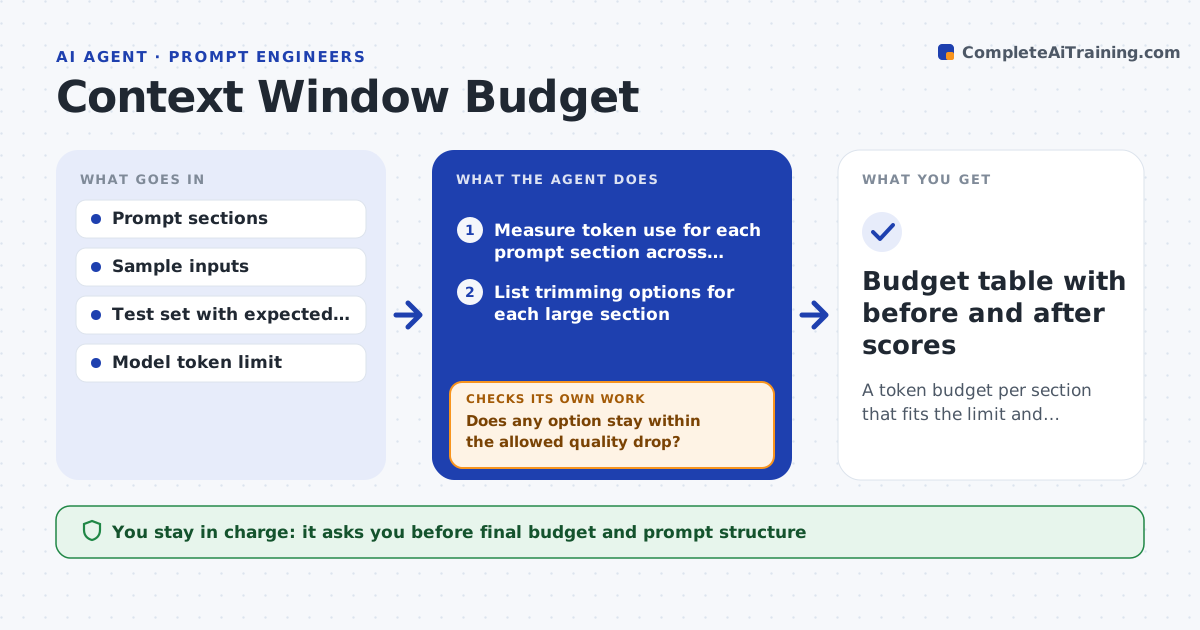
A token budget per section that fits the limit and keeps answer quality near the full version
What it does
When a prompt, documents and chat history do not fit the model's limit, something gets cut, often the part that mattered. This agent measures how many tokens each section uses: instructions, examples, retrieved documents, history and the user message. It then tests ways to trim, such as shorter examples, a summary of old turns or fewer documents. For each option it runs a test set and scores answers against the full version. It picks the cheapest option that keeps quality close. Before finishing it checks that the chosen plan fits the limit with room for the answer, and that quality on the longest test cases did not fall. If it did, it tries a different cut. The engineer approves the final budget. Edge case: a summary of history drops a customer's order number, so the agent keeps those facts verbatim.
How it works
Follow the arrows from top to bottom. The orange dashed arrow is the loop: when a check fails, the agent goes back and tries again.
Read the steps as a list
- Engineer reports cut context or rising token use
- Measure token use for each prompt section across sample inputs
- List trimming options for each large section
- Run the test set with each option and score the answers
- Does any option stay within the allowed quality drop?If not: combine smaller trims or try a different trimming method. Back to step 3.
- Choose the cheapest passing option and set section budgets
- Test the plan on the longest and messiest inputs
- Does the plan fit the limit and keep quality on long inputs?If not: restore protected facts or raise the budget for the failing section. Back to step 4.
- Engineer approves the budgetThe agent waits here for your OK.
- Budget table with before and after scores
How it decides
It chooses the option with the lowest token use that stays within the allowed quality drop and fits the limit with room for the answer.
- Allow a quality drop of at most 2 points against the full version
- Keep order numbers, dates and names verbatim in summaries
- Leave at least 15 percent of the limit for the answer
- Test on the 20 longest inputs before approval
Make it yours
Every agent is a starting point. You choose these settings for your own situation.
- Allowed quality drop (default 2 points)
- Reserved answer space (default 15 percent)
- Facts to keep verbatim
- Models and limits to plan for
What keeps you in control
It always asks you first
- Final budget and prompt structure
Hard limits
- Never drops safety or policy instructions
- Never changes the live prompt
It stops when
- Done: budget fits and quality holds on long inputs
- Stop: no test set exists to measure quality
Set it up
We guide you through the set-up, step by step
Members get the full set-up guide for this agent. No technical skills needed: you copy, paste and upload.
- One set of instructions to paste into your AI, with the clicks for ChatGPT, Claude, Microsoft 365 Copilot, Gemini and Grok
- The agent then walks you through connecting your own data, one source at a time
- A downloadable copy with the flow chart, the rules and the full guide