AI agent for corporate counsels
Contract Playbook Redline Agent
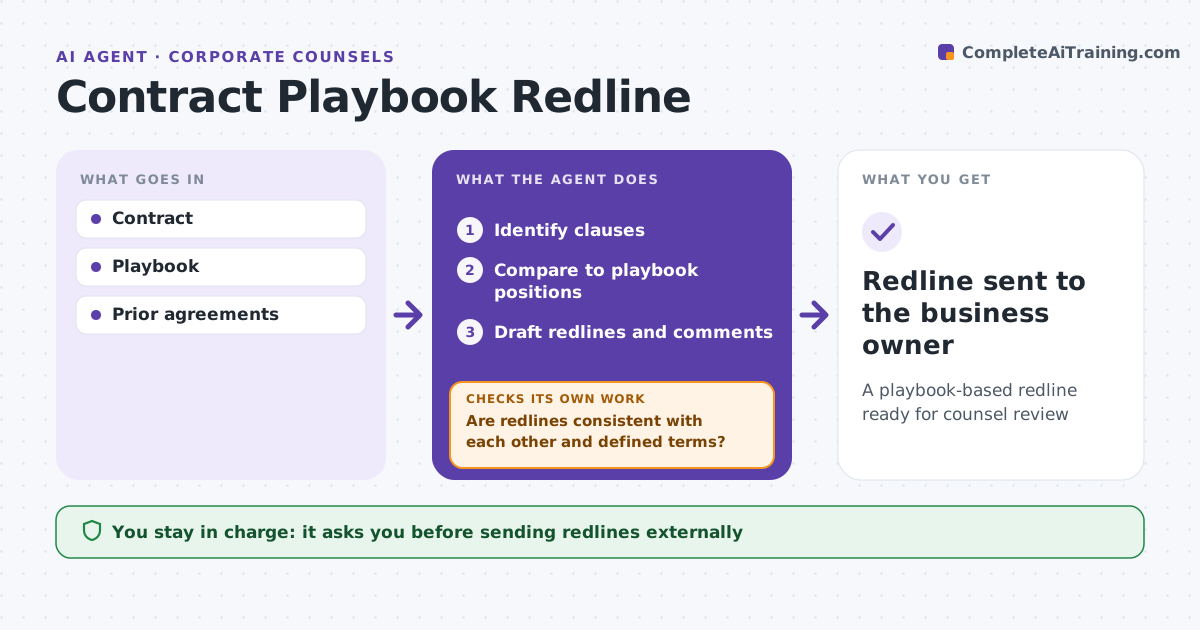
A playbook-based redline ready for counsel review
What it does
Legal teams spend hours on routine contracts, comparing each clause to the playbook by hand. When a third-party contract arrives, this agent reviews it against the playbook. It identifies clauses such as liability caps, indemnities, payment terms and governing law, and compares each one to the preferred and fallback positions. Clauses within fallback are accepted. Clauses outside fallback get redlines and comments and are escalated. Clauses the playbook does not cover are flagged. It then checks that its redlines are consistent with each other and with defined terms, and fixes any conflicts. If a clause is unclear, it marks it for counsel. Counsel approves the redline before it goes out. Edge case: a cap tied to fees paid in the last 12 months makes little sense for a one-time purchase, so the agent flags it.
How it works
Follow the arrows from top to bottom. The orange dashed arrow is the loop: when a check fails, the agent goes back and tries again.
Read the steps as a list
- Contract received
- Identify clauses
- Compare to playbook positions
- Draft redlines and comments
- Are redlines consistent with each other and defined terms?If not: fix conflicts and mark unclear clauses for counsel. Back to step 4.
- Counsel approves redlineThe agent waits here for your OK.
- Redline sent to the business owner
How it decides
It compares each clause to preferred and fallback positions and escalates anything outside them.
- Clause within fallback: accept
- Outside fallback: redline and escalate
- No playbook position: flag
Make it yours
Every agent is a starting point. You choose these settings for your own situation.
- Playbook positions
- Contract types
- Escalation rules
- Comment style
What keeps you in control
It always asks you first
- Sending redlines externally
Hard limits
- Never sends redlines
- Never gives final legal advice
It stops when
- Done: redline approved
- Stop: high value contract, full counsel review
Set it up
We guide you through the set-up, step by step
Members get the full set-up guide for this agent. No technical skills needed: you copy, paste and upload.
- One set of instructions to paste into your AI, with the clicks for ChatGPT, Claude, Microsoft 365 Copilot, Gemini and Grok
- The agent then walks you through connecting your own data, one source at a time
- A downloadable copy with the flow chart, the rules and the full guide