AI agent for legal operations managers
Legal Matter Intake Routing Agent
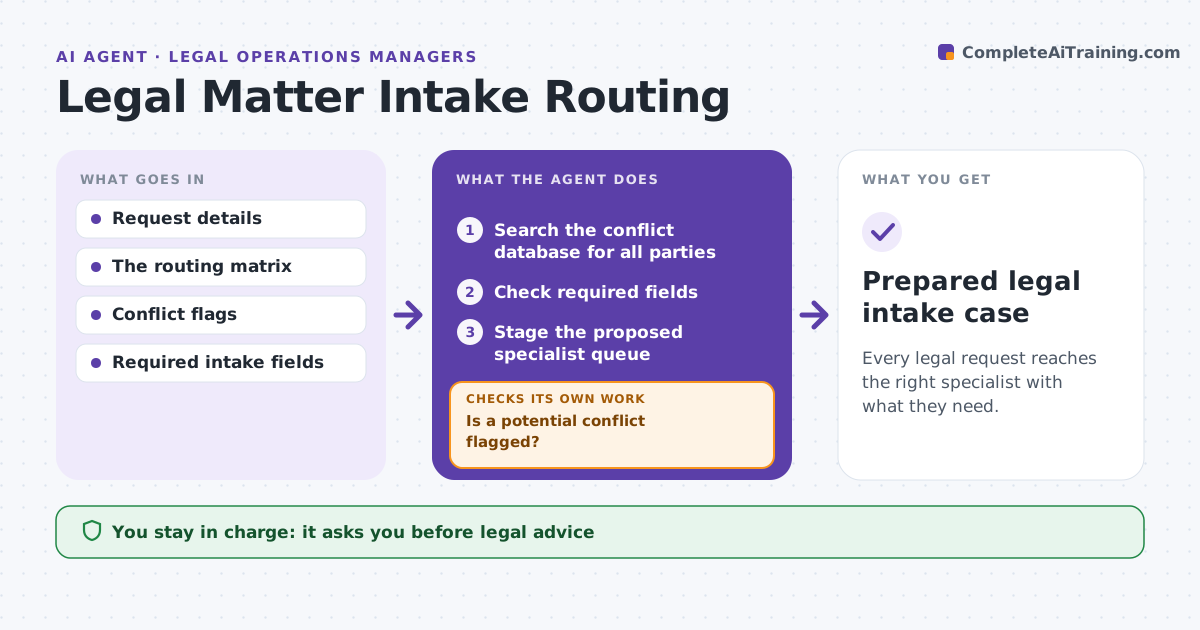
Every legal request reaches the right specialist with what they need.
What it does
Legal requests often arrive incomplete and land with the wrong specialist, which wastes days. When a request is submitted, this agent first checks for a potential conflict flag. If one is set, routing stops and the request goes to designated conflict review. Otherwise it checks the required fields, such as the business unit, counterparty, deadline and documents. For gaps it drafts specific clarification questions. It keeps any sensitivity flags intact and proposes a specialist queue from the routing matrix. Legal ops confirms the routing. The agent never gives legal advice. Edge case: an employment question names a counterparty that is also a current client, so the conflict flag sends it to review first.
How it works
Follow the arrows from top to bottom. The orange dashed arrow is the loop: when a check fails, the agent goes back and tries again.
Read the steps as a list
- Request submitted
- Search the conflict database for all parties
- Is a potential conflict flagged?If not: continue (if flagged: designated review). Back to step 2.
- Check required fields
- Is the request complete?If not: draft clarification questions. Back to step 4.
- Stage the proposed specialist queue
- Legal ops confirms routingThe agent waits here for your OK.
- Prepared legal intake case
How it decides
It checks conflict flags and completeness before routing.
- Conflict flags go to designated review first.
- The queue comes from the routing matrix.
- Ask one specific question per missing field.
Make it yours
Every agent is a starting point. You choose these settings for your own situation.
- Required fields per request type
- Routing matrix
- Sensitivity flags that must be preserved
- Who confirms routing (default legal ops)
What keeps you in control
It always asks you first
- Legal advice
- Conflict determinations
- External communications
Hard limits
- No legal advice.
It stops when
- Done: routed.
- Waiting: clarification.
Set it up
We guide you through the set-up, step by step
Members get the full set-up guide for this agent. No technical skills needed: you copy, paste and upload.
- One set of instructions to paste into your AI, with the clicks for ChatGPT, Claude, Microsoft 365 Copilot, Gemini and Grok
- The agent then walks you through connecting your own data, one source at a time
- A downloadable copy with the flow chart, the rules and the full guide