AI agent for online course creators
Course Resource Link Repair Agent
Every course resource works, still matches the lesson and is accessible.
What it does
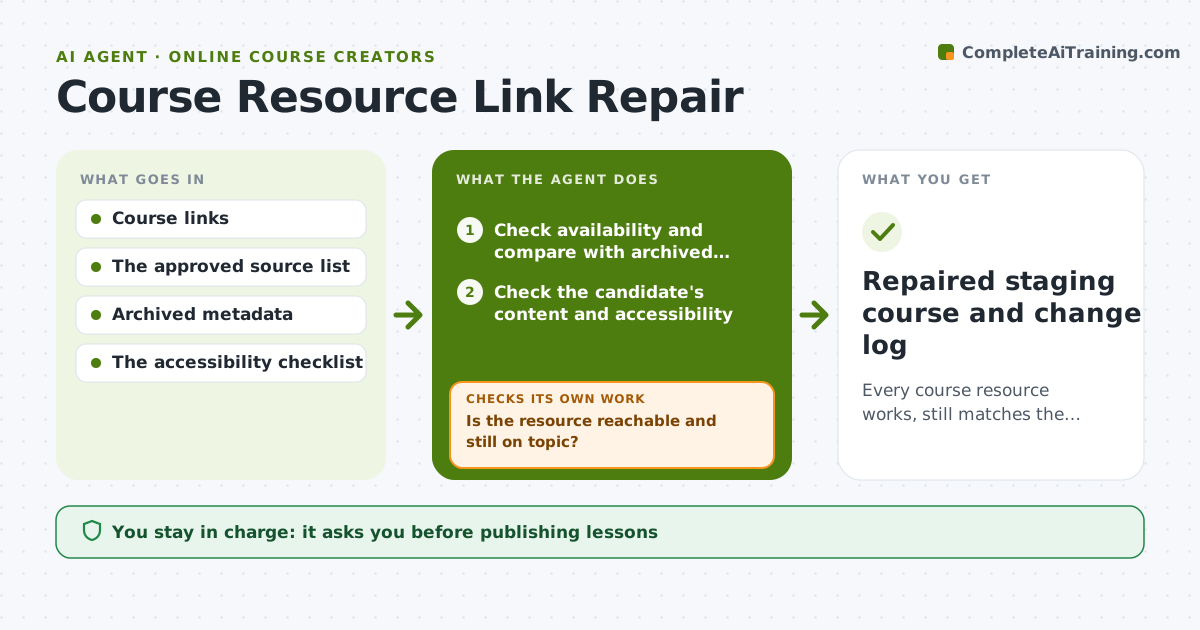
Online courses rely on external links to videos, articles and tools that break or quietly change content. Learners hit dead ends or unrelated pages. Each week this agent checks every linked resource and compares it with archived metadata such as title and length. When a link is broken or now points to unrelated content, it searches approved sources for a replacement or an accessible alternative. It checks each candidate's actual content and accessibility, rejects any that fail, and tries the next. A passing candidate goes into a staging copy of the lesson, which it tests again. The content manager publishes the change. Edge case: a link that still loads but now shows a parking page is treated as broken.
How it works
Follow the arrows from top to bottom. The orange dashed arrow is the loop: when a check fails, the agent goes back and tries again.
Read the steps as a list
- Weekly link check
- Check availability and compare with archived metadata
- Is the resource reachable and still on topic?If not: search approved sources for a replacement. Back to step 2.
- Check the candidate's content and accessibility
- Does the candidate fit the lesson and pass accessibility?If not: reject and try the next candidate. Back to step 4.
- Place it in the staging lesson and retest
- Content manager publishes the changeThe agent waits here for your OK.
- Repaired staging course and change log
How it decides
For each failing resource it decides: repair the moved URL, find an approved alternative, or ask the editor. Candidates that are unrelated or inaccessible are rejected and the search continues.
- Repair, replace or ask: repair moved links, replace removed content, ask when the topic changed partly.
- Accept a candidate: only when it covers the same topic and passes accessibility.
- Source order: publisher's own new location first, then approved alternative sources.
- Broken: any parking page, error page or unrelated content counts as broken.
Make it yours
Every agent is a starting point. You choose these settings for your own situation.
- Approved sources for replacements
- Accessibility checks required (default captions for video, readable text, no paywall)
- Check schedule (default weekly)
- Metadata compared (default title, length, author)
- Who publishes changes (default the content manager)
What keeps you in control
It always asks you first
- Publishing lessons
- Using unlicensed material
Hard limits
- Approved sources only.
It stops when
- Done: all resources pass.
- Needs a human: no approved replacement.
Set it up
We guide you through the set-up, step by step
Members get the full set-up guide for this agent. No technical skills needed: you copy, paste and upload.
- One set of instructions to paste into your AI, with the clicks for ChatGPT, Claude, Microsoft 365 Copilot, Gemini and Grok
- The agent then walks you through connecting your own data, one source at a time
- A downloadable copy with the flow chart, the rules and the full guide