AI agent for academic advisors
Course Waitlist Conversion Agent
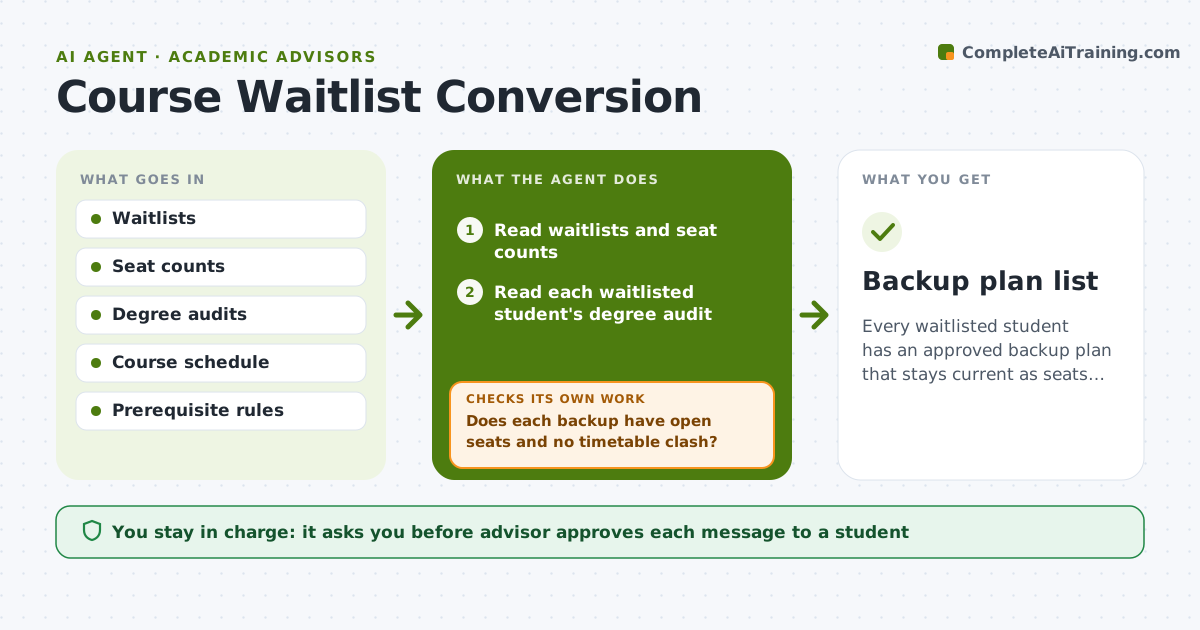
Every waitlisted student has an approved backup plan that stays current as seats change.
What it does
Students on a waitlist often have no plan if no seat opens, and the advisor only learns when the semester starts. Each day the agent reads waitlists and open seats, and for every waitlisted student it checks degree requirements to find which backup courses count. It proposes one or two backups that fit prerequisites and the timetable. When a seat opens or closes, it rechecks the student's position and updates the backup plan. It drafts messages to the student for the advisor to approve. Edge case: a student who moves from position 8 to 2 on the waitlist after a withdrawal, so the backup is kept but reordered.
How it works
Follow the arrows from top to bottom. The orange dashed arrow is the loop: when a check fails, the agent goes back and tries again.
Read the steps as a list
- Daily registration run
- Read waitlists and seat counts
- Read each waitlisted student's degree audit
- Find backup courses that meet the same requirement
- Does each backup have open seats and no timetable clash?If not: Remove it and search for another option. Back to step 4.
- Rank the options and write the plan
- Advisor approves the message to each studentThe agent waits here for your OK.
- Send the message
- Recheck waitlist position and seats the next day
- Did anything change for this student?If not: Rebuild the plan and draft an updated message. Back to step 9.
- Backup plan list
How it decides
It picks backups that satisfy the same requirement, fit the timetable and have open seats, and drops options that fill.
- Backup must satisfy the same degree requirement
- Never suggest a course the student lacks the prerequisite for
- Keep a backup plan until the student is enrolled
- Prioritize students graduating this year
Make it yours
Every agent is a starting point. You choose these settings for your own situation.
- Students and courses covered
- Number of backups per student (default 2)
- Run schedule
- Message tone
- Graduating-student priority
What keeps you in control
It always asks you first
- Advisor approves each message to a student
Hard limits
- Never enroll a student
- Do not share another student's waitlist position
It stops when
- Done: every waitlisted student has a current approved plan or a seat
- Stop: degree audit is missing or contradictory and the advisor must review
Set it up
We guide you through the set-up, step by step
Members get the full set-up guide for this agent. No technical skills needed: you copy, paste and upload.
- One set of instructions to paste into your AI, with the clicks for ChatGPT, Claude, Microsoft 365 Copilot, Gemini and Grok
- The agent then walks you through connecting your own data, one source at a time
- A downloadable copy with the flow chart, the rules and the full guide