AI agent for credit analysts
Credit Limit Increase Request Agent
Give the credit manager a scored, conditioned recommendation on each limit request within a day or two
What it does
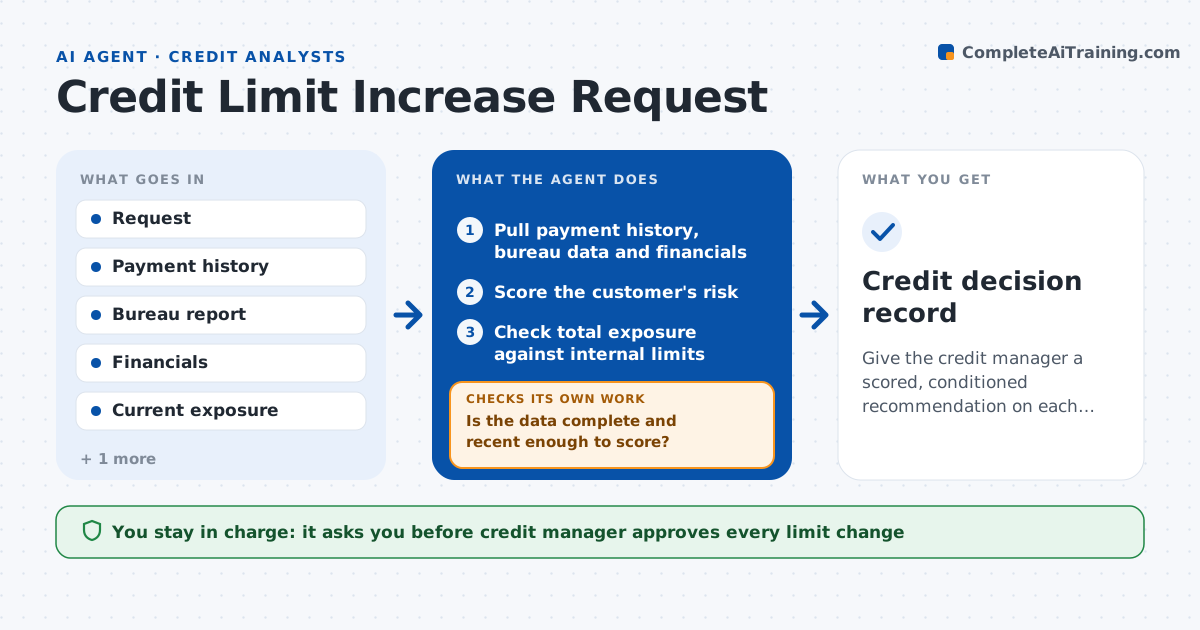
A customer wants to double a $50,000 limit before a busy season and the answer takes two weeks. This agent pulls the payment history, bureau data and financials for each request and scores the risk. It checks the customer's total exposure against internal limits and the portfolio mix. It proposes a limit with conditions, such as a shorter payment term, a deposit or a quarterly review. If data is thin, for example no recent financials, it requests more and rescores. If the score is borderline, it tests a smaller increase and compares the results. The credit manager approves. Edge case: a customer with a recent late payment is capped at the current limit until two on-time cycles.
How it works
Follow the arrows from top to bottom. The orange dashed arrow is the loop: when a check fails, the agent goes back and tries again.
Read the steps as a list
- Customer requests a higher limit
- Pull payment history, bureau data and financials
- Is the data complete and recent enough to score?If not: Request missing financials and reload. Back to step 2.
- Score the customer's risk
- Check total exposure against internal limits
- Does the requested limit meet score and exposure rules?If not: Test a smaller limit and add conditions, then rescore. Back to step 4.
- Draft the recommendation with limit and conditions
- Credit manager approvesThe agent waits here for your OK.
- Record the decision and review date
- Credit decision record
How it decides
It scores payment behavior, financial strength and exposure. It proposes the highest limit that keeps score above the cutoff and exposure within policy.
- Cap the limit when any payment in the last 12 months was over 30 days late
- Require financials less than 12 months old for increases above $25,000
- Reduce the requested limit until exposure fits policy
- Add a quarterly review for any increase above 50 percent
Make it yours
Every agent is a starting point. You choose these settings for your own situation.
- Score cutoff (default per credit policy)
- Financials age limit (default 12 months)
- Limit step size (default 10,000)
- Review frequency for increases (default quarterly)
What keeps you in control
It always asks you first
- Credit manager approves every limit change
Hard limits
- Never change a limit without approval
- Never promise a decision to the customer
- Keep bureau data restricted
It stops when
- Done: Decision recorded
- Stop: Customer does not provide data, so keep the current limit
Set it up
We guide you through the set-up, step by step
Members get the full set-up guide for this agent. No technical skills needed: you copy, paste and upload.
- One set of instructions to paste into your AI, with the clicks for ChatGPT, Claude, Microsoft 365 Copilot, Gemini and Grok
- The agent then walks you through connecting your own data, one source at a time
- A downloadable copy with the flow chart, the rules and the full guide