AI agent for credit analysts
Customer Credit File Preparation Agent
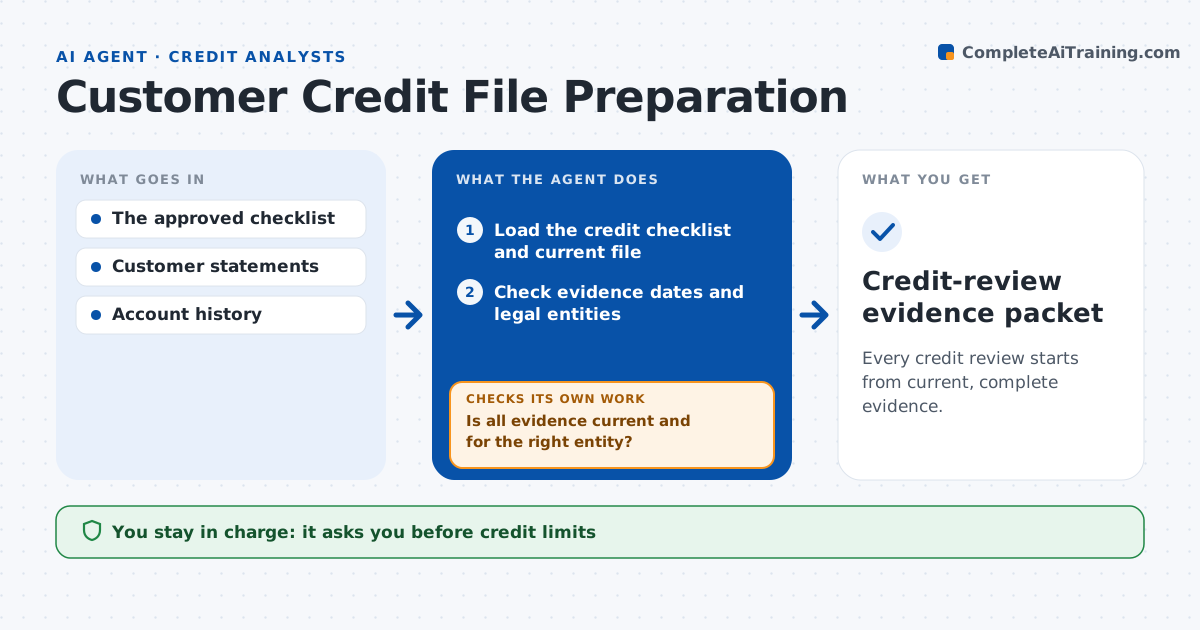
Every credit review starts from current, complete evidence.
What it does
Credit review files often hold outdated financial statements or documents for the wrong legal entity. When a review is due, this agent checks each piece of evidence against the credit checklist for date and entity. It ranks gaps, starting with the most outdated or mismatched document, and drafts targeted requests. A credit administrator approves before the customer is contacted. When new documents arrive, it checks them again and loops until the file is complete or the deadline passes. It then assembles a current review file. New statements update the file, but they never authorize a credit decision; that stays with the credit team. Edge case: a customer uploads its parent company's accounts, so the agent asks for the subsidiary's own statements.
How it works
Follow the arrows from top to bottom. The orange dashed arrow is the loop: when a check fails, the agent goes back and tries again.
Read the steps as a list
- Credit review comes due
- Load the credit checklist and current file
- Check evidence dates and legal entities
- Rank gaps, most outdated or mismatched first
- Draft targeted document requests
- Administrator approves contacting the customerThe agent waits here for your OK.
- Is all evidence current and for the right entity?If not: draft a narrower request for what is still wrong. Back to step 3.
- Assemble the current review file
- Credit-review evidence packet
How it decides
It checks dates and entities and drafts requests for the most outdated or mismatching evidence first.
- Stale: older than the checklist allows for that document type.
- Entity match: the legal entity must match the account holder.
- Request order: most outdated or mismatched evidence first.
- New documents never trigger a credit decision.
Make it yours
Every agent is a starting point. You choose these settings for your own situation.
- Maximum document age per evidence type (default 15 months for accounts)
- Credit checklist to apply per customer tier
- Days before the review due date to start (default 30)
- Who approves customer contact
- Reminder schedule for unanswered requests
What keeps you in control
It always asks you first
- Credit limits
- Lending decisions
- Customer contact
Hard limits
- No credit decisions.
It stops when
- Done: file current.
Set it up
We guide you through the set-up, step by step
Members get the full set-up guide for this agent. No technical skills needed: you copy, paste and upload.
- One set of instructions to paste into your AI, with the clicks for ChatGPT, Claude, Microsoft 365 Copilot, Gemini and Grok
- The agent then walks you through connecting your own data, one source at a time
- A downloadable copy with the flow chart, the rules and the full guide