AI agent for credit analysts
Credit Policy Change Impact Agent
A clear list of loans and deals affected by each policy change
What it does
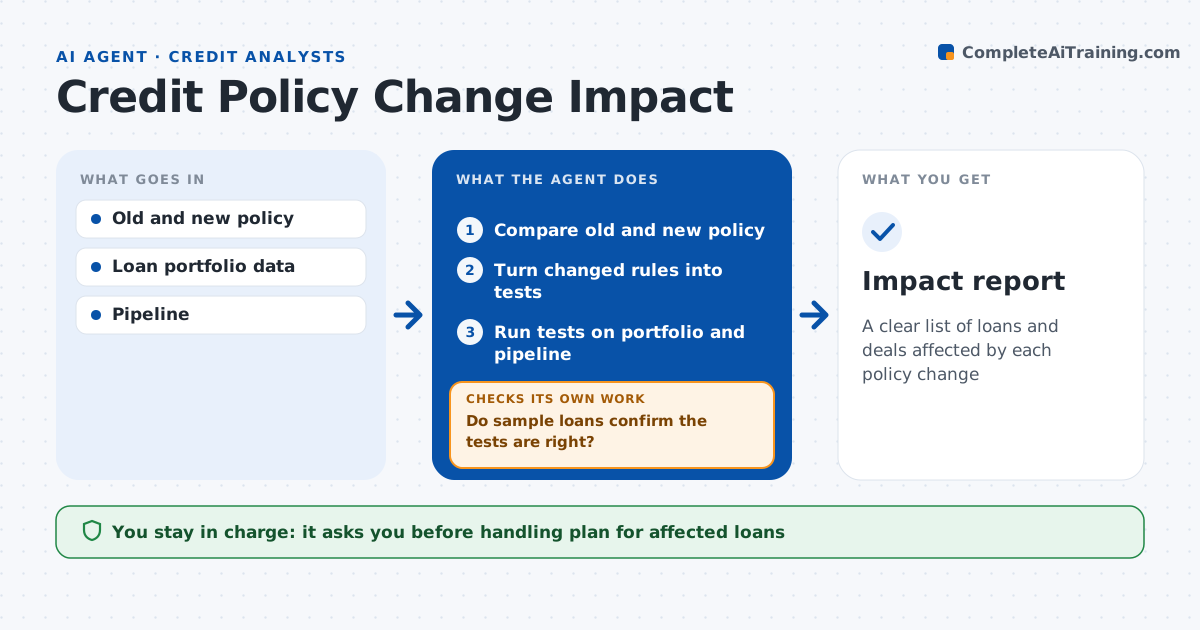
When credit policy changes, nobody knows how many existing loans and pipeline deals it touches until someone checks them one by one. This agent finds the effect. It compares the old and new policy and lists each changed rule, such as a lower maximum loan to value or a new industry limit. It turns each rule into a test and runs it over the portfolio and the pipeline. It lists loans that no longer meet a rule and pipeline deals that need changes. It checks its own tests by sampling a few loans by hand and fixes any misread rule before rerunning. The analyst and credit officer decide how to handle existing loans. Edge case: a rule applies only to new loans, so the agent keeps existing loans out of the exceptions list.
How it works
Follow the arrows from top to bottom. The orange dashed arrow is the loop: when a check fails, the agent goes back and tries again.
Read the steps as a list
- New policy published
- Compare old and new policy
- Turn changed rules into tests
- Run tests on portfolio and pipeline
- Do sample loans confirm the tests are right?If not: fix the rule test and rerun. Back to step 3.
- Credit officer decides on handlingThe agent waits here for your OK.
- Impact report
How it decides
It converts each changed rule into a data test and applies it to loans in scope.
- Rule applies to new loans only: test pipeline only
- Existing loan fails new rule: list for next review
- Pipeline deal fails: notify the loan officer
Make it yours
Every agent is a starting point. You choose these settings for your own situation.
- Portfolio segments in scope
- Sample size for checks
- Who gets pipeline notices
- Report layout
What keeps you in control
It always asks you first
- Handling plan for affected loans
- Notices to loan officers
Hard limits
- Never changes loan terms
- Never interprets policy beyond its text
It stops when
- Done: impact report delivered
- Stop: policy wording ambiguous, ask policy owner
Set it up
We guide you through the set-up, step by step
Members get the full set-up guide for this agent. No technical skills needed: you copy, paste and upload.
- One set of instructions to paste into your AI, with the clicks for ChatGPT, Claude, Microsoft 365 Copilot, Gemini and Grok
- The agent then walks you through connecting your own data, one source at a time
- A downloadable copy with the flow chart, the rules and the full guide