AI agent for account executives
CRM Pipeline Hygiene Agent
A clean, honest pipeline before every forecast call
What it does
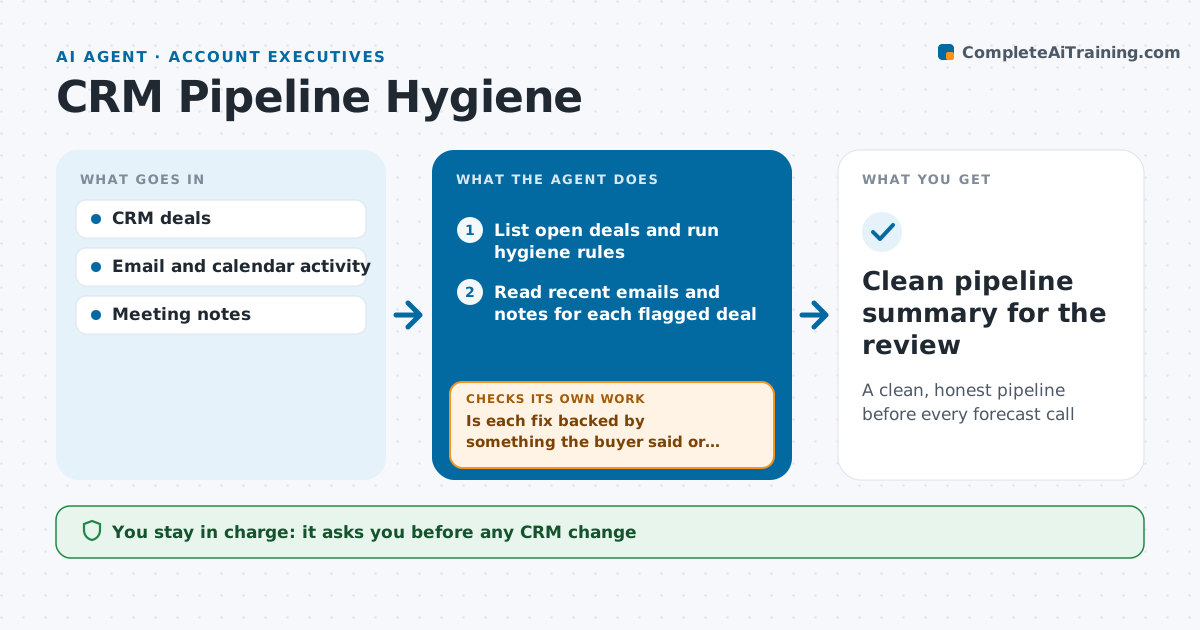
Pipeline reviews go badly when the CRM shows stale close dates and deals nobody has touched in weeks. The day before each weekly review, this agent checks every open deal the rep owns. It flags close dates in the past, no activity in 14 days, missing next steps, stages that do not match the last activity, and amounts changed without notes. For each flagged deal it reads recent emails and meeting notes and drafts a fix, such as a new close date or moving back a stage. It then checks that each fix is backed by something the buyer said or did. If the evidence does not support it, it turns the fix into a question for the rep. The rep approves every CRM change. Edge case: a deal that went quiet after a pricing email is flagged as at risk, not pushed out silently.
How it works
Follow the arrows from top to bottom. The orange dashed arrow is the loop: when a check fails, the agent goes back and tries again.
Read the steps as a list
- Day before pipeline review
- List open deals and run hygiene rules
- Read recent emails and notes for each flagged deal
- Draft fixes for dates, stages and next steps
- Is each fix backed by something the buyer said or did?If not: turn the fix into a question for the rep. Back to step 3.
- Rep approves CRM updatesThe agent waits here for your OK.
- Apply approved updates
- Clean pipeline summary for the review
How it decides
It proposes changes only when recent buyer communication supports them, otherwise it asks the rep.
- No activity in 14 days marks a deal at risk
- Past close dates must be updated or closed lost
- Stage moves need a matching activity
Make it yours
Every agent is a starting point. You choose these settings for your own situation.
- Days without activity before flagging (default 14)
- Hygiene rules used
- Run day
- Summary format
What keeps you in control
It always asks you first
- Any CRM change
- Closing a deal as lost
Hard limits
- Never emails buyers
- Never changes deal amounts without approval
It stops when
- Done: all flags fixed or answered
- Stop: CRM unavailable
Set it up
We guide you through the set-up, step by step
Members get the full set-up guide for this agent. No technical skills needed: you copy, paste and upload.
- One set of instructions to paste into your AI, with the clicks for ChatGPT, Claude, Microsoft 365 Copilot, Gemini and Grok
- The agent then walks you through connecting your own data, one source at a time
- A downloadable copy with the flow chart, the rules and the full guide