AI agent for computer science students
CS Assignment Study Coach Agent
The student finishes the assignment with understanding, writing the code themselves
What it does
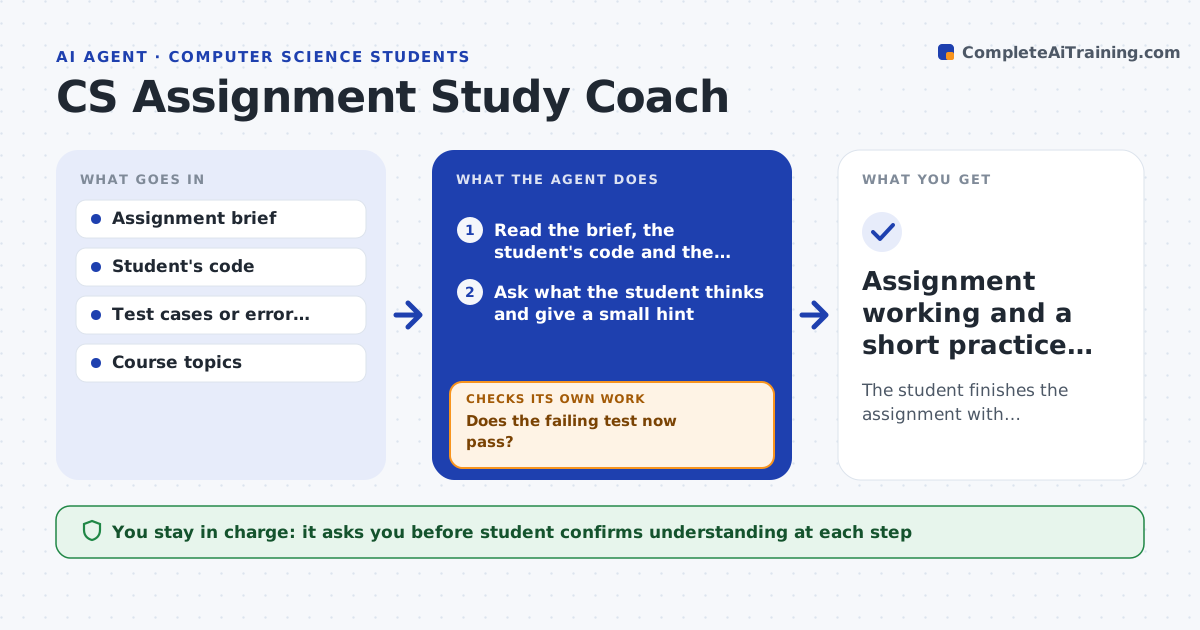
When a student is stuck on a programming assignment, copying a solution teaches nothing and the deadline still looms. This agent reads the assignment and the student's current code and works as a tutor. It asks what the student thinks is wrong, points to the failing test or error message, and gives the smallest hint that unblocks the next step, never the answer. After the student tries, it runs the tests to check whether they now pass. If not, it gives a more specific hint and loops. It keeps a list of the concepts that tripped the student and suggests practice on them. The student writes all the code. Edge case: if the student asks for the whole solution, the agent declines and offers a step-by-step plan instead.
How it works
Follow the arrows from top to bottom. The orange dashed arrow is the loop: when a check fails, the agent goes back and tries again.
Read the steps as a list
- Student opens an assignment or gets stuck
- Read the brief, the student's code and the errors
- Ask what the student thinks and give a small hint
- Run the student's updated code against the tests
- Does the failing test now pass?If not: give a more specific hint tied to the exact failure. Back to step 3.
- Note the concept that caused trouble and suggest practice
- Student confirms they understand before moving onThe agent waits here for your OK.
- Assignment working and a short practice list
How it decides
It gives the least revealing hint that moves the student forward, and escalates detail only after a genuine attempt.
- Give hints, never the full solution
- Increase hint detail only after an attempt
- Decline requests to write the whole answer
Make it yours
Every agent is a starting point. You choose these settings for your own situation.
- Hint style and how fast to escalate
- Language and course level
- Topics to track
- Whether to include extra practice
What keeps you in control
It always asks you first
- Student confirms understanding at each step
Hard limits
- Never writes the full solution
- Does not help defeat plagiarism checks
It stops when
- Done: tests pass and the student can explain the fix
- Stop: the student asks only for a copy-paste answer
Set it up
We guide you through the set-up, step by step
Members get the full set-up guide for this agent. No technical skills needed: you copy, paste and upload.
- One set of instructions to paste into your AI, with the clicks for ChatGPT, Claude, Microsoft 365 Copilot, Gemini and Grok
- The agent then walks you through connecting your own data, one source at a time
- A downloadable copy with the flow chart, the rules and the full guide