AI agent for private equity associates
Customer Cohort Diligence Agent
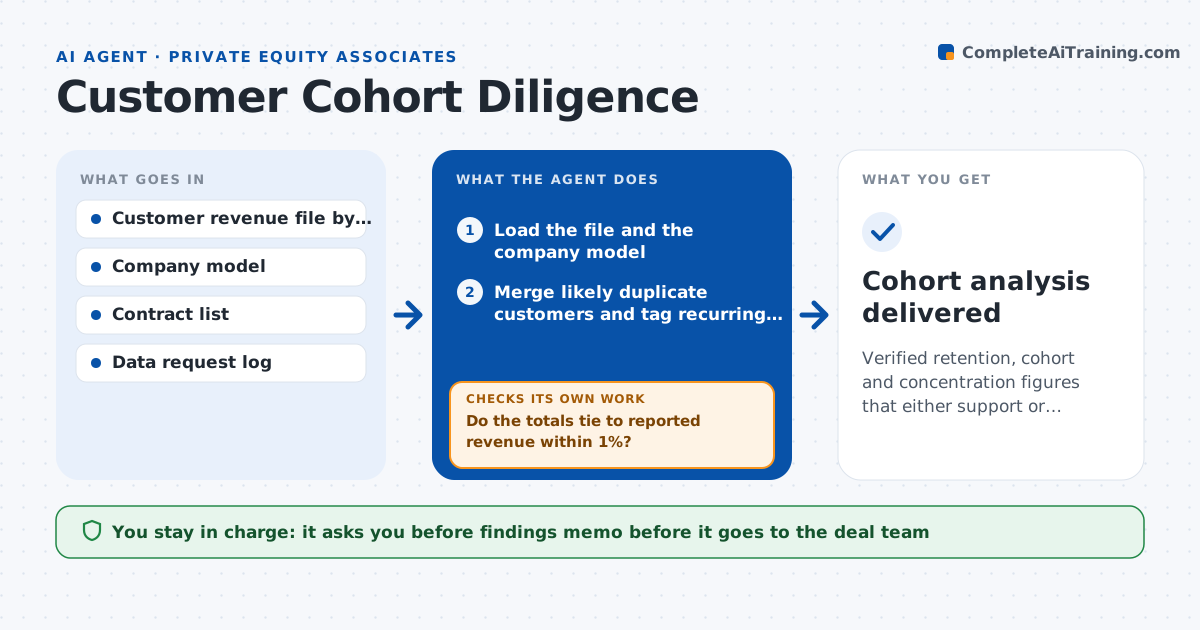
Verified retention, cohort and concentration figures that either support or contradict the company's model
What it does
A company claims 95% retention, but customer data is messy: duplicate accounts, merged customers, renamed entities and one-off projects mixed with subscriptions. Averages hide real churn. This agent reads the customer and revenue file and cleans it, merging likely duplicates and tagging revenue types. It builds cohorts by start period and tracks how much revenue each cohort keeps over time, then measures retention, expansion and concentration in the top customers. It compares the results with the retention shown in the company's model. When something does not agree, it lists the inconsistent rows and asks the company for corrected data, then recomputes with the new file. The associate approves what goes into the findings memo. Edge case: a customer that split into three accounts looks like two churns and one new logo, and the agent merges them.
How it works
Follow the arrows from top to bottom. The orange dashed arrow is the loop: when a check fails, the agent goes back and tries again.
Read the steps as a list
- Customer revenue file is received
- Load the file and the company model
- Merge likely duplicate customers and tag recurring versus one-off revenue
- Do the totals tie to reported revenue within 1%?If not: find the rows that do not tie and request corrected data. Back to step 2.
- Build cohorts by start period
- Compute gross and net retention and concentration of the top 10 customers
- Compare with the retention in the company's model
- Is the difference under 3 points?If not: list inconsistent rows, request data fixes and recompute. Back to step 2.
- Write findings with charts and open data requests
- Associate approves the findings memoThe agent waits here for your OK.
- Cohort analysis delivered
How it decides
It trusts cohort results only after duplicates are merged and revenue types are tagged, and it flags any gap with the company's reported retention above a set size.
- Merge accounts with matching tax ids or addresses
- Treat projects and one-off fees as non-recurring
- Flag any customer above 10% of revenue
- Flag retention differences over 3 points
Make it yours
Every agent is a starting point. You choose these settings for your own situation.
- Merge rules for duplicates
- Concentration threshold (default 10%)
- Retention gap tolerance (default 3 points)
- Cohort period (default quarterly)
What keeps you in control
It always asks you first
- Findings memo before it goes to the deal team
Hard limits
- Never changes the company's file
- Keeps customer names inside the deal team
- States all merge rules used
It stops when
- Done: cohort results are reconciled and approved
- Stop: the company cannot provide a usable file
Set it up
We guide you through the set-up, step by step
Members get the full set-up guide for this agent. No technical skills needed: you copy, paste and upload.
- One set of instructions to paste into your AI, with the clicks for ChatGPT, Claude, Microsoft 365 Copilot, Gemini and Grok
- The agent then walks you through connecting your own data, one source at a time
- A downloadable copy with the flow chart, the rules and the full guide