AI agent for user support specialists
Customer Complaint Pattern Escalation Agent
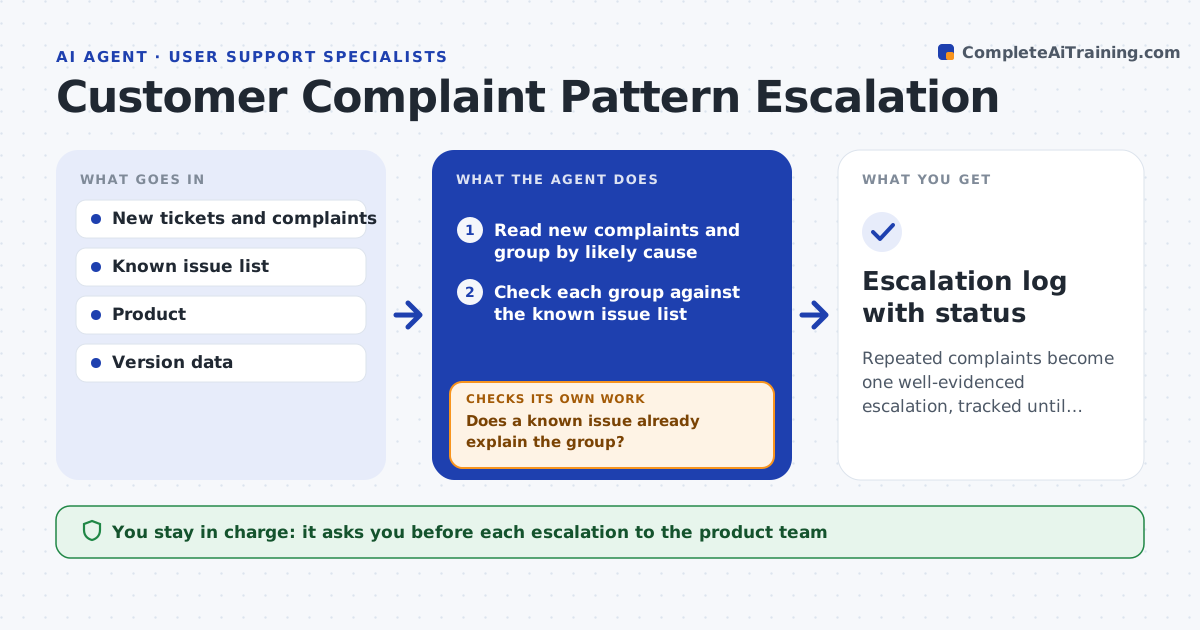
Repeated complaints become one well-evidenced escalation, tracked until the product team responds
What it does
Ten agents each solve one complaint, and no one sees that they share a cause. This agent reads new complaints each day and groups them by likely cause, using the words used, product area, version and timing. It counts affected users and checks whether the group matches a known issue. If it does not, it gathers examples, tests whether they can be reproduced from the details, and drafts an escalation for the product team with the count, trend, steps to reproduce and sample tickets. After the specialist approves it, the agent tracks the product team's response and updates the affected customers' tickets with status. If there is no response in the set time, it raises a reminder. Edge case: two groups look separate but share one failing payment step.
How it works
Follow the arrows from top to bottom. The orange dashed arrow is the loop: when a check fails, the agent goes back and tries again.
Read the steps as a list
- Daily ticket run starts
- Read new complaints and group by likely cause
- Check each group against the known issue list
- Does a known issue already explain the group?If not: link the tickets to that issue and note the status. Back to step 3.
- Gather examples and test reproduction from ticket details
- Count affected users and trend
- Does the group meet the size or growth threshold with a reproducible example?If not: keep watching the group and add new tickets to it. Back to step 2.
- Draft the escalation with examples and steps
- Specialist approves the escalationThe agent waits here for your OK.
- Track the product team's response and update tickets
- Escalation log with status
How it decides
Escalate a group when it has 10 or more tickets in a week or is growing by 50 percent, and no known issue explains it.
- Escalate at 10 or more tickets in a week
- Escalate when a group grows 50 percent week on week
- Link to a known issue before escalating
- Merge groups that share a failing step
Make it yours
Every agent is a starting point. You choose these settings for your own situation.
- Group size threshold (default 10)
- Growth threshold (default 50 percent)
- Response reminder time
- Ticket fields used
What keeps you in control
It always asks you first
- Each escalation to the product team
Hard limits
- Never promises a fix date
- Never shares customer details outside the ticket system
It stops when
- Done: the product team has responded and tickets are updated
- Stop: tickets lack details to group
Set it up
We guide you through the set-up, step by step
Members get the full set-up guide for this agent. No technical skills needed: you copy, paste and upload.
- One set of instructions to paste into your AI, with the clicks for ChatGPT, Claude, Microsoft 365 Copilot, Gemini and Grok
- The agent then walks you through connecting your own data, one source at a time
- A downloadable copy with the flow chart, the rules and the full guide