AI agent for chief marketing officers
Customer Segment Migration Tracker Agent
Spot meaningful customer movement between segments early and explain it
What it does
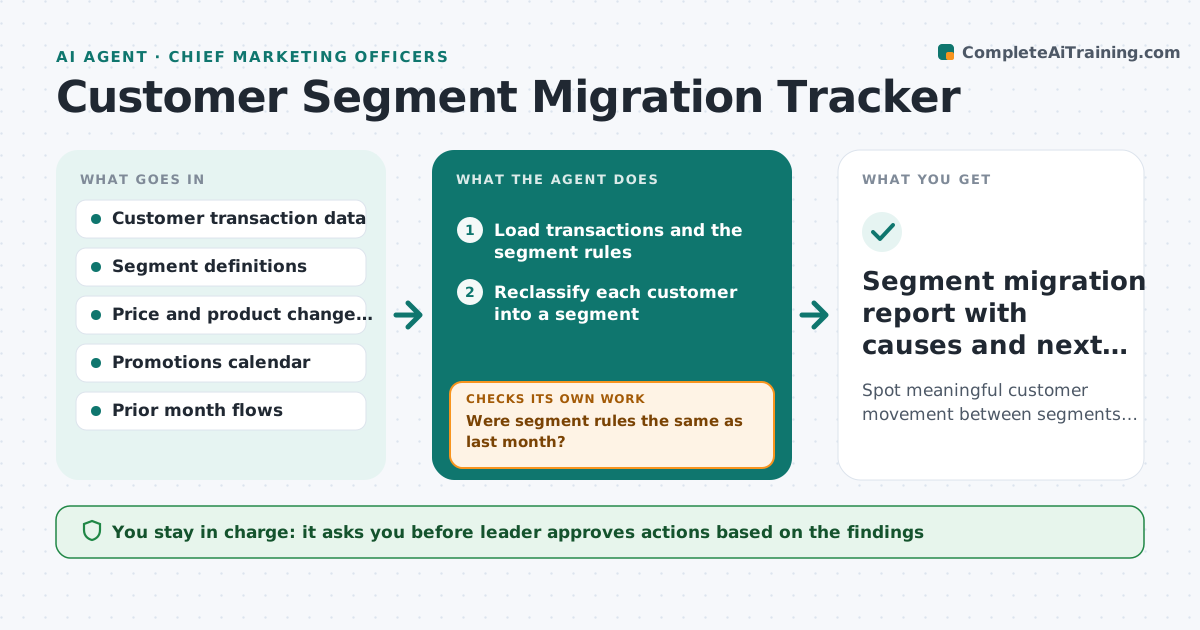
A customer base looks stable in total, but premium buyers are slipping into occasional buyers and nobody sees it until revenue drops. This agent watches the movement between segments. Each month it reclassifies every customer using the company's segment rules, builds a flow table showing who moved from which segment to which, and flags unusual shifts compared with the normal range. It checks the shifts against price changes, product launches, promotions and stock problems, and drafts hypotheses with the evidence for each. It reruns the test when new data arrives. The leader approves any action. Edge case: a segment rule changed this month. The agent restates last month under the new rule so the flows are fair.
How it works
Follow the arrows from top to bottom. The orange dashed arrow is the loop: when a check fails, the agent goes back and tries again.
Read the steps as a list
- Monthly customer data closes
- Load transactions and the segment rules
- Reclassify each customer into a segment
- Were segment rules the same as last month?If not: Restate last month under the new rules and reclassify. Back to step 2.
- Build the flow table from segment to segment
- Flag flows outside the normal range
- Check flagged flows against price, product and promotion changes
- Draft hypotheses with the supporting evidence
- Does a hypothesis match timing and size of the shift?If not: Widen the data checked, for example channel or region, and retest. Back to step 7.
- Leader approves actions to testThe agent waits here for your OK.
- Segment migration report with causes and next steps
How it decides
A shift is unusual when a flow differs by more than two standard deviations from the last 12 months. Causes are ranked by timing match and size of the affected group.
- Flows over 2 standard deviations from the 12-month range are flagged
- Segment rule changes require a restated comparison
- A cause needs a timing match within 6 weeks
- Ignore groups under 50 customers
Make it yours
Every agent is a starting point. You choose these settings for your own situation.
- Segment definitions
- Flag threshold (default 2 standard deviations)
- Minimum group size (default 50)
- Report frequency
- Change calendars to check
What keeps you in control
It always asks you first
- Leader approves actions based on the findings
Hard limits
- Reports groups, not individual customers
- Labels causes as hypotheses until tested
It stops when
- Done: report issued with ranked hypotheses
- Stop: data quality problem found, fix data before reporting
Set it up
We guide you through the set-up, step by step
Members get the full set-up guide for this agent. No technical skills needed: you copy, paste and upload.
- One set of instructions to paste into your AI, with the clicks for ChatGPT, Claude, Microsoft 365 Copilot, Gemini and Grok
- The agent then walks you through connecting your own data, one source at a time
- A downloadable copy with the flow chart, the rules and the full guide