AI agent for claims adjusters
Damage Estimate Review Agent
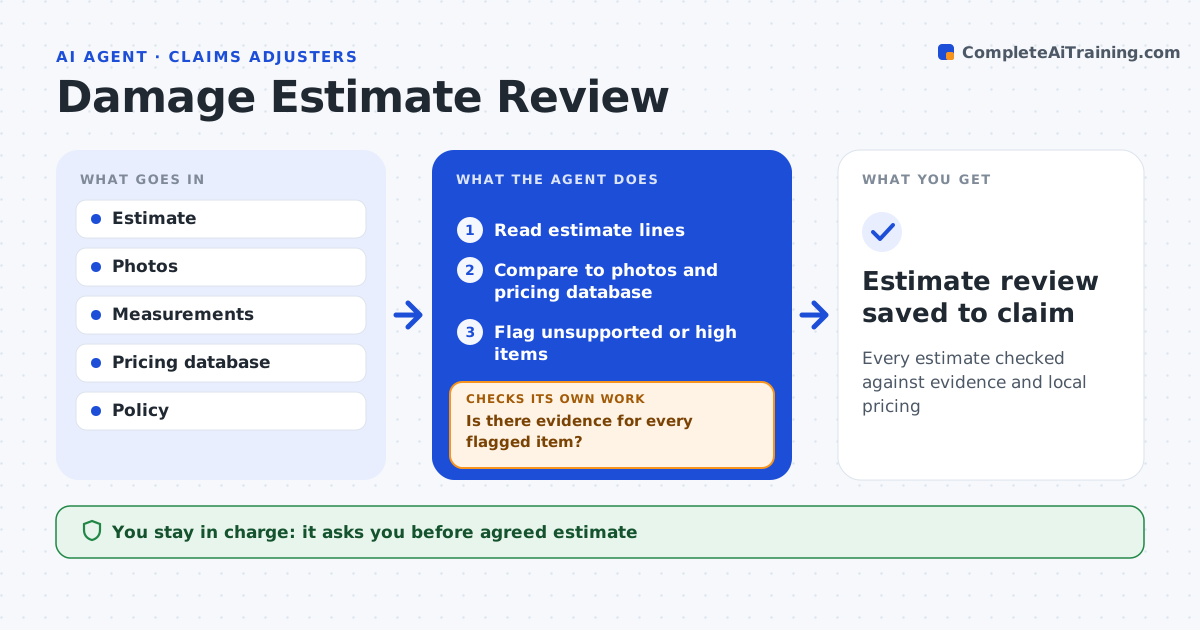
Every estimate checked against evidence and local pricing
What it does
Contractor and body shop estimates often include items unrelated to the loss, duplicate lines or prices above local rates, and adjusters have little time to check every line. When an estimate arrives, this agent reads each line, compares quantities with the photos and measurements in the file, and checks unit prices against the pricing database for the area. It flags items outside the damaged area, removes duplicate lines, and flags prices more than 15 percent above the local range. It then checks that every flagged item has evidence; if photos or measurements are missing, it drafts a request and rechecks when they arrive. It drafts a revised estimate summary with reasons. The adjuster decides, negotiates and approves all messages to contractors. Edge case: a roof estimate includes full replacement but only one slope is damaged, so the agent checks local matching rules before flagging.
How it works
Follow the arrows from top to bottom. The orange dashed arrow is the loop: when a check fails, the agent goes back and tries again.
Read the steps as a list
- Estimate uploaded
- Read estimate lines
- Compare to photos and pricing database
- Flag unsupported or high items
- Is there evidence for every flagged item?If not: request photos or measurements and recheck. Back to step 3.
- Draft revised summary
- Adjuster decides and negotiatesThe agent waits here for your OK.
- Estimate review saved to claim
How it decides
It compares lines to evidence and price ranges and flags items without support.
- Price over 15% above local range: flag
- Item not in damaged area: flag
- Duplicate line: remove
Make it yours
Every agent is a starting point. You choose these settings for your own situation.
- Price tolerance
- Pricing source
- Matching rules by state
- Summary format
What keeps you in control
It always asks you first
- Agreed estimate
- Messages to contractors
Hard limits
- Never pays claims
- Never contacts contractors directly
It stops when
- Done: review saved
- Stop: estimate unreadable
Set it up
We guide you through the set-up, step by step
Members get the full set-up guide for this agent. No technical skills needed: you copy, paste and upload.
- One set of instructions to paste into your AI, with the clicks for ChatGPT, Claude, Microsoft 365 Copilot, Gemini and Grok
- The agent then walks you through connecting your own data, one source at a time
- A downloadable copy with the flow chart, the rules and the full guide