AI agent for data engineers
Data Pipeline Schema Adaptation Agent
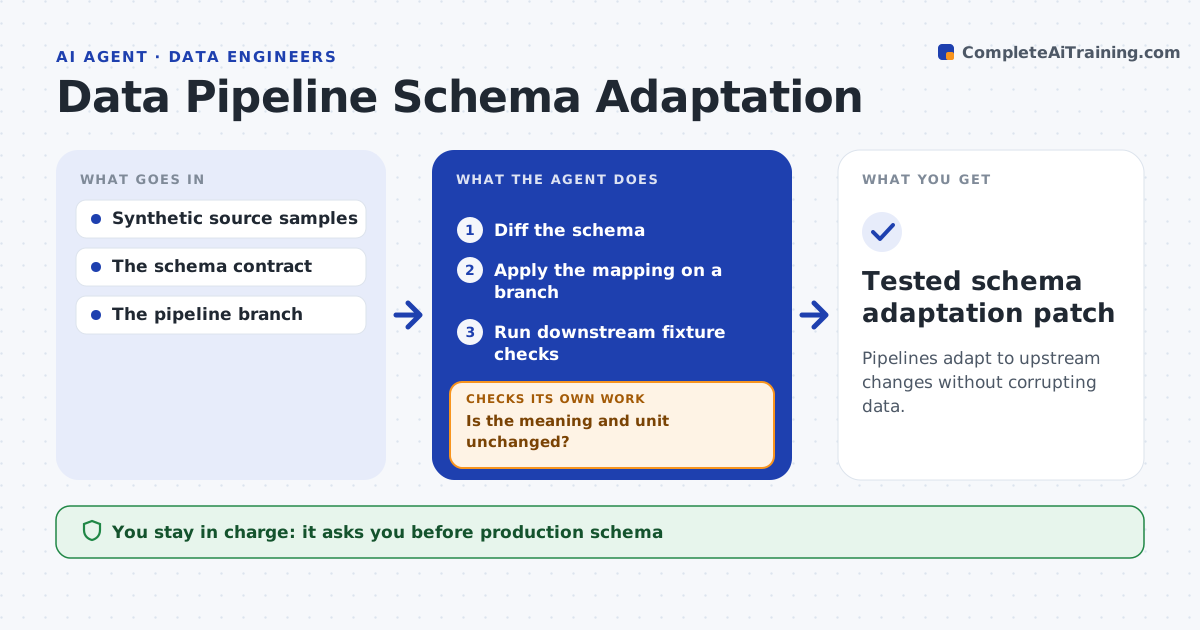
Pipelines adapt to upstream changes without corrupting data.
What it does
Upstream data changes, such as a renamed field or a switch in units, can break downstream jobs or quietly corrupt reports. When a schema change is detected upstream, this agent diffs the old and new schema and identifies what changed. It checks whether each changed field keeps the same meaning and unit, using the documented field definitions. If it does, it applies a mapping on a branch and runs downstream fixture checks. If outputs differ from expectations, it revises the mapping. If a renamed field also changed units, it stops the simple rename and requires a supported conversion. A data engineer approves. Edge case: 'weight_lb' becomes 'weight' in kilograms, so a rename alone would corrupt every report.
How it works
Follow the arrows from top to bottom. The orange dashed arrow is the loop: when a check fails, the agent goes back and tries again.
Read the steps as a list
- Upstream schema change
- Diff the schema
- Is the meaning and unit unchanged?If not: require a supported conversion. Back to step 2.
- Apply the mapping on a branch
- Run downstream fixture checks
- Do downstream outputs match expectations?If not: revise the mapping. Back to step 4.
- Data engineer approvesThe agent waits here for your OK.
- Tested schema adaptation patch
How it decides
It maps by semantics, not just names, and checks units.
- Check meaning and units before any mapping.
- A unit change requires a supported conversion, never a rename.
- Outputs must match expectations within tolerance.
Make it yours
Every agent is a starting point. You choose these settings for your own situation.
- Field definitions source
- Downstream fixtures and expected outputs
- Tolerance for output differences (default 0.1%)
- Who approves the patch
What keeps you in control
It always asks you first
- Production schema
- Data publication
Hard limits
- Branch only.
It stops when
- Done: checks pass.
Set it up
We guide you through the set-up, step by step
Members get the full set-up guide for this agent. No technical skills needed: you copy, paste and upload.
- One set of instructions to paste into your AI, with the clicks for ChatGPT, Claude, Microsoft 365 Copilot, Gemini and Grok
- The agent then walks you through connecting your own data, one source at a time
- A downloadable copy with the flow chart, the rules and the full guide