AI agent for economists
Data Revision Tracking Agent
Past analyses kept current with revised data
What it does
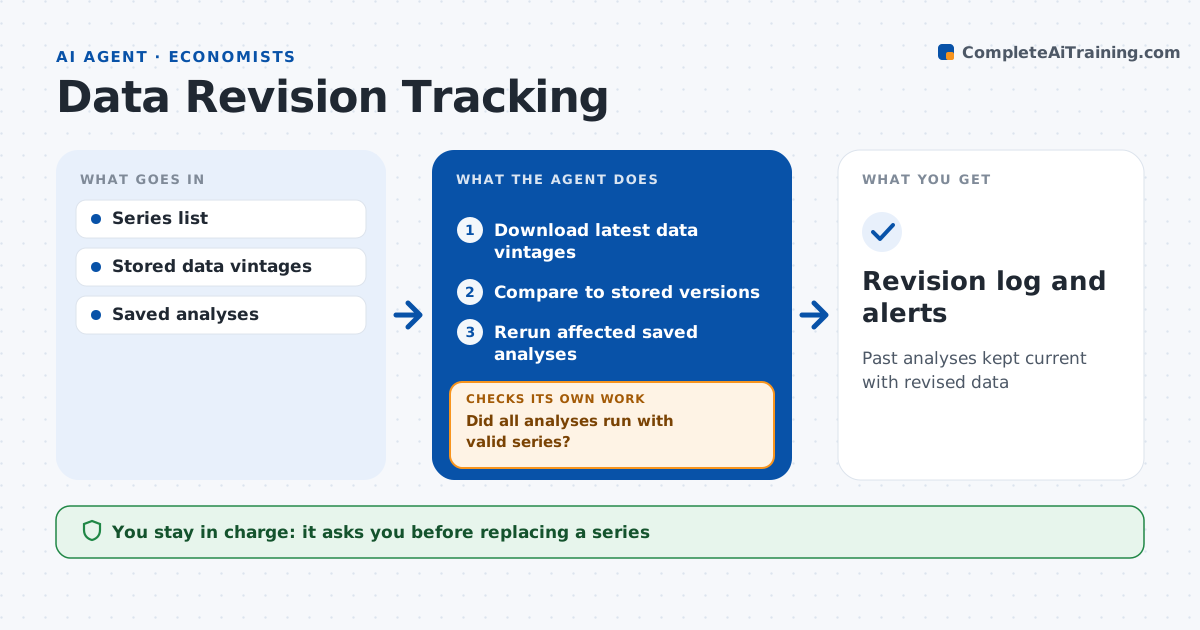
Official data gets revised all the time, and an analysis built on old figures can quietly become wrong. Each week this agent checks the series an economist relies on. It downloads the latest vintage, compares it to the stored version, and lists changed values with size and date. It reruns the saved analyses that use the changed series and checks whether conclusions move. If an analysis breaks because a series was renamed or discontinued, it finds a likely replacement and asks the economist to confirm before rerunning. It writes a revision log and alerts on material changes, such as growth revisions over 0.1 points. Edge case: a seasonal adjustment update changes five years of history, so the agent groups it as one revision event instead of many alerts.
How it works
Follow the arrows from top to bottom. The orange dashed arrow is the loop: when a check fails, the agent goes back and tries again.
Read the steps as a list
- Weekly revision check
- Download latest data vintages
- Compare to stored versions
- Rerun affected saved analyses
- Did all analyses run with valid series?If not: find replacement series and ask the economist to confirm. Back to step 3.
- Economist confirms material changesThe agent waits here for your OK.
- Revision log and alerts
How it decides
It flags revisions above a set size and reruns analyses that use those series.
- Revision over 0.1 points on growth rates: material
- Series discontinued: propose replacement
- Conclusion changes after rerun: alert
Make it yours
Every agent is a starting point. You choose these settings for your own situation.
- Series to watch
- Materiality thresholds
- Analyses to rerun
- Alert method
What keeps you in control
It always asks you first
- Replacing a series
- Updating published numbers
Hard limits
- Never overwrites stored vintages
- Never changes published work
It stops when
- Done: log updated
- Stop: source unavailable
Set it up
We guide you through the set-up, step by step
Members get the full set-up guide for this agent. No technical skills needed: you copy, paste and upload.
- One set of instructions to paste into your AI, with the clicks for ChatGPT, Claude, Microsoft 365 Copilot, Gemini and Grok
- The agent then walks you through connecting your own data, one source at a time
- A downloadable copy with the flow chart, the rules and the full guide