AI agent for policy makers
Budget Scenario Optimization Agent
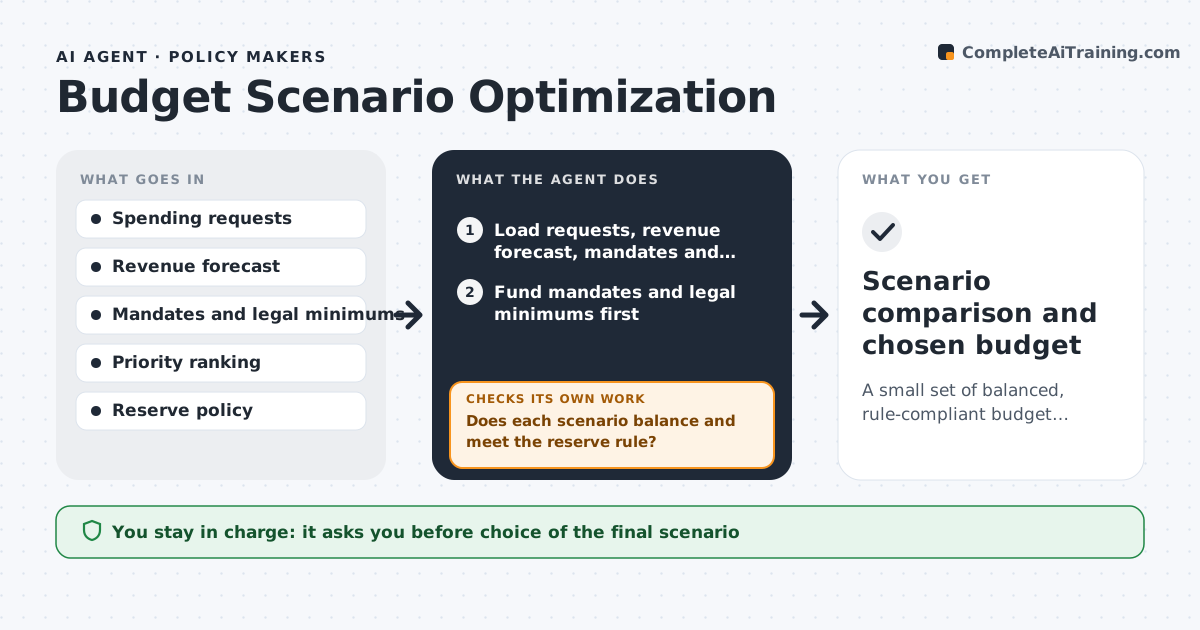
A small set of balanced, rule-compliant budget scenarios ranked by how well they meet priorities
What it does
A budget request lists many wants, while revenue, mandates and legal limits cap what can be done. This agent builds budget scenarios from the stated priorities and the legal minimums, such as required reserves and mandated services. It tests each scenario against projected revenue, mandates and rules, then ranks them by how much of the priority list they fund. If a scenario fails a test, for example it breaks the reserve rule or spends more than revenue, it adjusts the lowest priority items and reruns. It checks that the final scenarios balance and that every mandate is fully funded. It reports what each scenario funds, cuts and risks. The official chooses. Edge case: a grant that requires a local match is funded only when the match is in the same scenario.
How it works
Follow the arrows from top to bottom. The orange dashed arrow is the loop: when a check fails, the agent goes back and tries again.
Read the steps as a list
- Budget cycle opens or revenue estimate changes
- Load requests, revenue forecast, mandates and reserve rules
- Fund mandates and legal minimums first
- Build scenarios by funding priorities in rank order
- Does each scenario balance and meet the reserve rule?If not: reduce the lowest-priority items in that scenario and rerun. Back to step 4.
- Are matching grants funded together with their match?If not: fund the match or remove the grant from the scenario. Back to step 4.
- Test each scenario against a lower revenue case
- Rank scenarios by share of priorities funded
- Official chooses a scenario or asks for changesThe agent waits here for your OK.
- Scenario comparison and chosen budget
How it decides
Mandates and legal minimums are funded first. Remaining money goes to priorities in rank order, subject to match requirements and the reserve rule.
- Fund mandates and legal minimums before any priority
- Reject a scenario that leaves reserves below the policy level
- Test with revenue 3% below forecast
- Fund a grant only with its required match
Make it yours
Every agent is a starting point. You choose these settings for your own situation.
- Priority ranking
- Reserve requirement (default 8%)
- Downside revenue case (default minus 3%)
- Number of scenarios to build
What keeps you in control
It always asks you first
- Choice of the final scenario
Hard limits
- Never changes the official budget system
- Does not set priorities itself
It stops when
- Done: the official selects a scenario
- Stop: revenue forecast is missing
Set it up
We guide you through the set-up, step by step
Members get the full set-up guide for this agent. No technical skills needed: you copy, paste and upload.
- One set of instructions to paste into your AI, with the clicks for ChatGPT, Claude, Microsoft 365 Copilot, Gemini and Grok
- The agent then walks you through connecting your own data, one source at a time
- A downloadable copy with the flow chart, the rules and the full guide