AI agent for database administrators
Database Backup and Integrity Agent
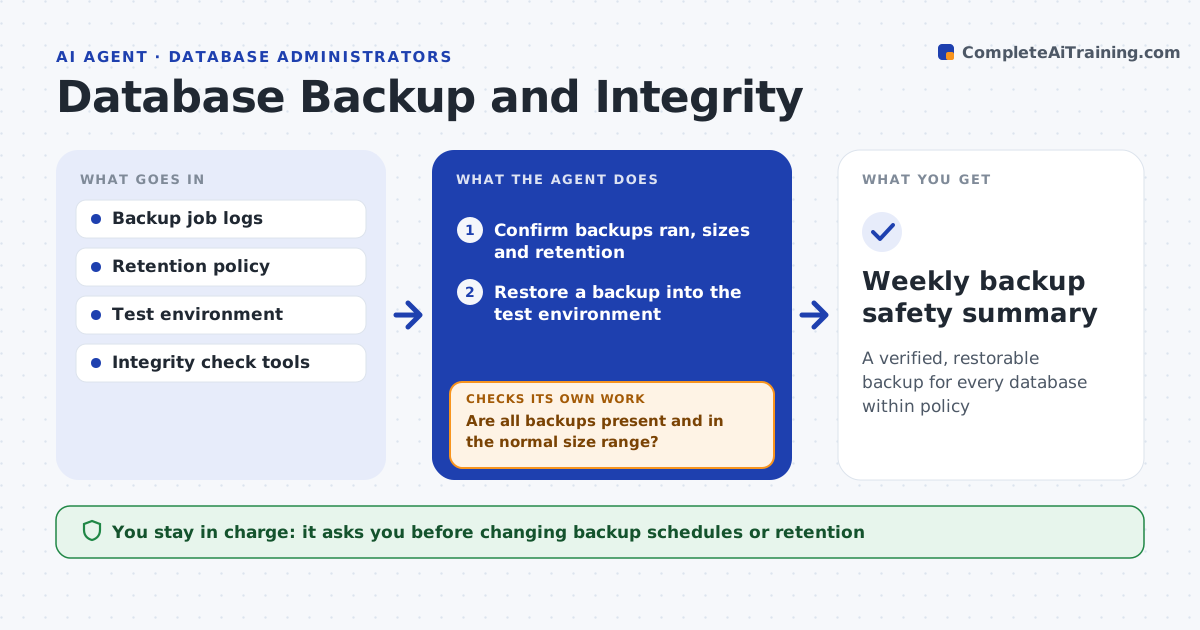
A verified, restorable backup for every database within policy
What it does
A database is only as safe as its last good, restorable backup, yet backups are often assumed to work until a restore is needed. Each day this agent confirms that scheduled backups ran, are the expected size and are kept per policy. On a schedule it restores a backup into a test environment and runs integrity checks to confirm the data is consistent and complete. If a backup is missing, too small or fails to restore, it retries per the runbook. If it still fails, it raises a high-priority ticket that states how long it has been since the last good backup. It drafts a weekly safety summary. You approve changes to backup schedules or storage. Edge case: a backup that completes but fails an integrity check counts as a failed backup.
How it works
Follow the arrows from top to bottom. The orange dashed arrow is the loop: when a check fails, the agent goes back and tries again.
Read the steps as a list
- Daily backup check
- Confirm backups ran, sizes and retention
- Are all backups present and in the normal size range?If not: retry per the runbook, then ticket if still failing. Back to step 2.
- Restore a backup into the test environment
- Run integrity and completeness checks
- Did the restore pass integrity checks?If not: raise a high-priority ticket with time since last good backup. Back to step 5.
- DBA approves schedule or storage changesThe agent waits here for your OK.
- Weekly backup safety summary
How it decides
A backup counts as good only when it exists, is in the normal size range, restores cleanly and passes integrity checks.
- Treat a failed integrity check as a failed backup
- Escalate critical databases after one missed good backup
- Keep retention exactly to policy
Make it yours
Every agent is a starting point. You choose these settings for your own situation.
- Size ranges per database
- Test restore frequency
- Critical databases list
- Summary recipients
What keeps you in control
It always asks you first
- Changing backup schedules or retention
- Adding storage
Hard limits
- Never deletes backups outside policy
- Restores only to the test environment
It stops when
- Done: every database has a verified backup
- Stop: backup console unreachable
Set it up
We guide you through the set-up, step by step
Members get the full set-up guide for this agent. No technical skills needed: you copy, paste and upload.
- One set of instructions to paste into your AI, with the clicks for ChatGPT, Claude, Microsoft 365 Copilot, Gemini and Grok
- The agent then walks you through connecting your own data, one source at a time
- A downloadable copy with the flow chart, the rules and the full guide