AI agent for database administrators
Patch and Upgrade Rehearsal Agent
A patch that is proven on a realistic copy, with known issues and timings before production
What it does
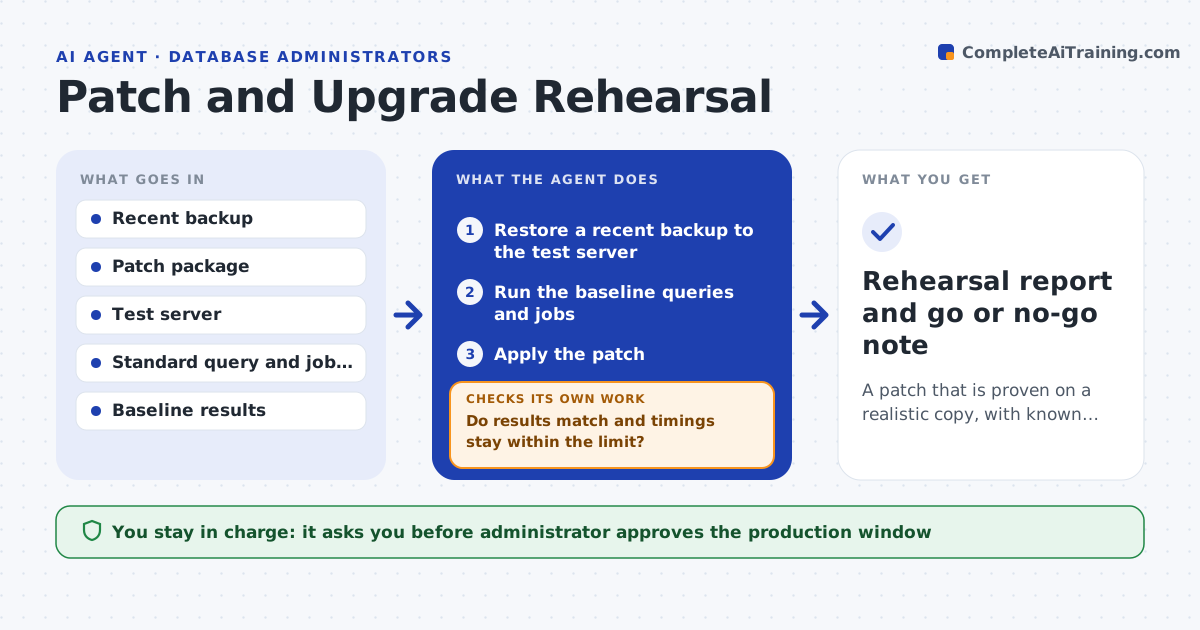
Upgrades fail in production because they were never tested on realistic copies. This agent restores a recent backup to a test server, applies the patch and runs your standard queries and jobs. It compares results and timings with a baseline run from before the patch. If a check fails, it records the error and tries the documented fix. If that does not work, it reports the failure with the evidence. The administrator approves the production window. Edge case: a stored procedure behaves differently after the patch, so the agent shows the two outputs side by side.
How it works
Follow the arrows from top to bottom. The orange dashed arrow is the loop: when a check fails, the agent goes back and tries again.
Read the steps as a list
- Patch is planned
- Restore a recent backup to the test server
- Run the baseline queries and jobs
- Apply the patch
- Run the same queries and jobs again
- Do results match and timings stay within the limit?If not: record the error, try the documented fix and rerun. Back to step 5.
- Write the rehearsal report with timings and issues
- Did the restore and patch finish within the planned window?If not: adjust the steps and run again. Back to step 2.
- Administrator approves the production windowThe agent waits here for your OK.
- Rehearsal report and go or no-go note
How it decides
A rehearsal passes when the restore works, results match the baseline and timings stay within the limit.
- Pass only if results match the baseline
- Allow a timing slowdown up to the limit
- Run each documented fix once
- Report any issue without a fix
Make it yours
Every agent is a starting point. You choose these settings for your own situation.
- Slowdown limit (default: 10%)
- Query and job suite
- Test server size
- Backup to use
What keeps you in control
It always asks you first
- Administrator approves the production window
Hard limits
- Never runs in production
- Never uses a backup with live personal data without masking where required
It stops when
- Done: the rehearsal passes and the window is approved
- Stop: the fix fails, so the patch is held
Set it up
We guide you through the set-up, step by step
Members get the full set-up guide for this agent. No technical skills needed: you copy, paste and upload.
- One set of instructions to paste into your AI, with the clicks for ChatGPT, Claude, Microsoft 365 Copilot, Gemini and Grok
- The agent then walks you through connecting your own data, one source at a time
- A downloadable copy with the flow chart, the rules and the full guide