AI agent for database administrators
Replication Lag Investigation Agent
A confirmed cause of replica lag and a tested fix, with the evidence recorded
What it does
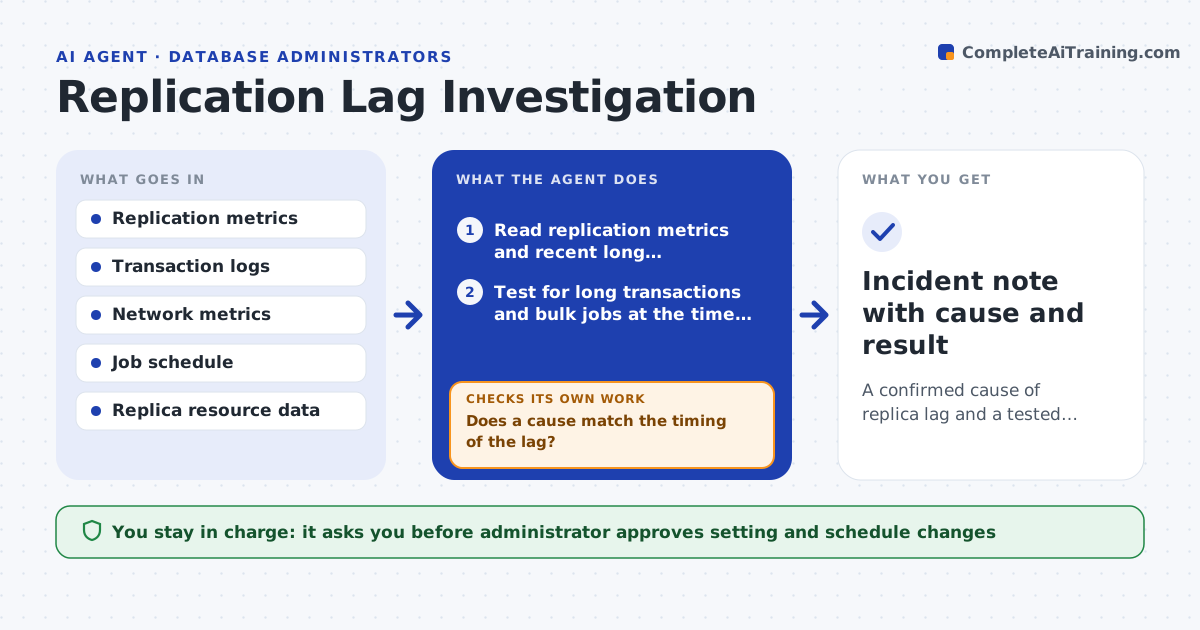
Replica lag appears and clears with no known cause. When lag passes your threshold, this agent reads long-running transactions, network metrics and replica load, then tests possible causes in a fixed order. It records the likely one with the evidence, for example a bulk update on the primary or a slow disk on the replica. It suggests changes to settings or schedules and rechecks lag after they are applied. The administrator approves any setting change. Edge case: lag spikes every night at 1 am, so the agent compares the time with the scheduled jobs before blaming the network.
How it works
Follow the arrows from top to bottom. The orange dashed arrow is the loop: when a check fails, the agent goes back and tries again.
Read the steps as a list
- Lag passes the threshold
- Read replication metrics and recent long transactions
- Test for long transactions and bulk jobs at the time of the lag
- Test network delay and replica resources
- Does a cause match the timing of the lag?If not: widen the time window and test the next cause. Back to step 3.
- Record the likely cause and suggest a change
- Administrator approves any setting or schedule changeThe agent waits here for your OK.
- Apply the change
- Did lag fall below the threshold afterward?If not: revert the change and test the next cause. Back to step 3.
- Incident note with cause and result
How it decides
Causes are tested in order: long transactions, bulk jobs, network, replica resources. The first one that matches the timing is likely.
- Test causes in a fixed order
- Compare lag time with scheduled jobs first
- Match a cause only on timing and metrics
- Revert a change that does not help
Make it yours
Every agent is a starting point. You choose these settings for your own situation.
- Lag threshold (default: 60 seconds)
- Persistence time
- Cause test order
- Job schedule source
What keeps you in control
It always asks you first
- Administrator approves setting and schedule changes
Hard limits
- Never changes settings without approval
- Never restarts replication
It stops when
- Done: lag stays below the threshold after the fix
- Stop: replication metrics are missing
Set it up
We guide you through the set-up, step by step
Members get the full set-up guide for this agent. No technical skills needed: you copy, paste and upload.
- One set of instructions to paste into your AI, with the clicks for ChatGPT, Claude, Microsoft 365 Copilot, Gemini and Grok
- The agent then walks you through connecting your own data, one source at a time
- A downloadable copy with the flow chart, the rules and the full guide