AI agent for clinical data managers
Database Lock Readiness Agent
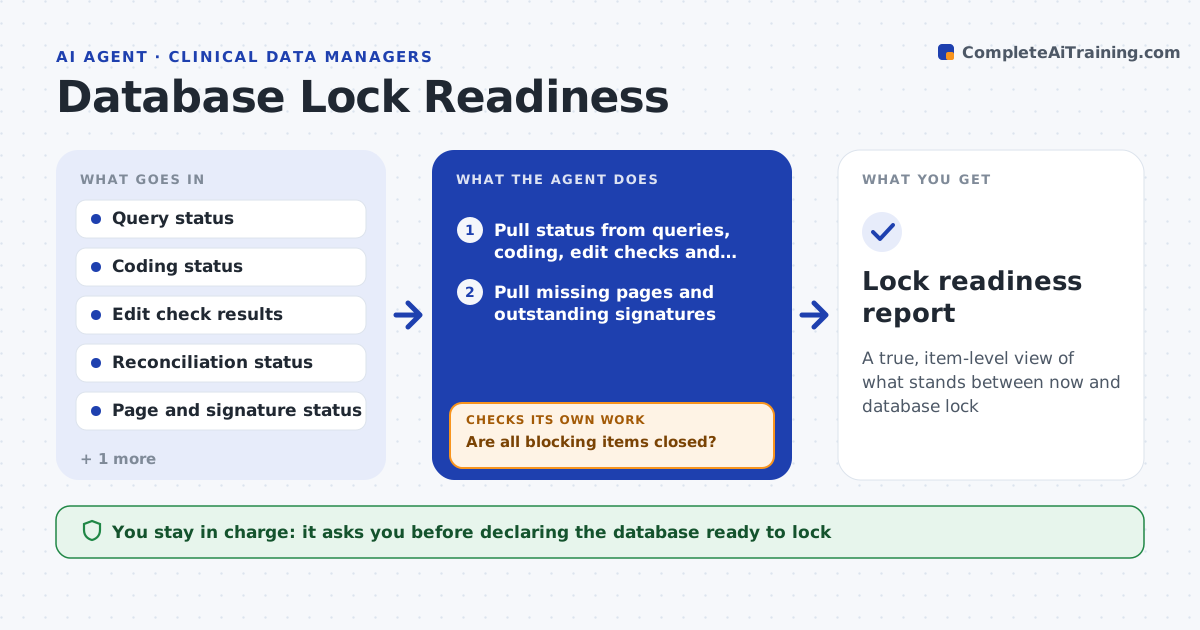
A true, item-level view of what stands between now and database lock
What it does
Locking a clinical database means every item is clean, coded, reconciled and signed, and open items found at the last minute make lock slip. This agent runs the lock readiness checklist: open queries, uncoded terms, failed edit checks, unreconciled external data, missing pages and outstanding signatures. It pulls the real status from each system instead of trusting a manual tracker. For each open category it lists the specific items and their owners. It then estimates whether lock is achievable by the target date given recent closure rates. Where an item blocks lock, it flags it with the action needed and rechecks on the next run. It reports more often as the date nears. You approve declaring the database ready to lock. Edge case: a page marked complete with a pending query counts as open.
How it works
Follow the arrows from top to bottom. The orange dashed arrow is the loop: when a check fails, the agent goes back and tries again.
Read the steps as a list
- Lock readiness review
- Pull status from queries, coding, edit checks and reconciliation
- Pull missing pages and outstanding signatures
- List open items by category with owners
- Are all blocking items closed?If not: flag each open item with the action and owner, and recheck on the next run. Back to step 2.
- Estimate readiness against the target date from closure rates
- Draft the readiness report
- Data manager approves declaring ready to lockThe agent waits here for your OK.
- Lock readiness report
How it decides
It counts an item ready only when every linked check is closed, and declares lock readiness only when no blocking item remains.
- Count an item open if any linked check is open
- Declare ready only with no blocking items
- Estimate feasibility against the lock date
Make it yours
Every agent is a starting point. You choose these settings for your own situation.
- Checklist categories
- What counts as blocking
- Report frequency
- Lock date and owners
What keeps you in control
It always asks you first
- Declaring the database ready to lock
Hard limits
- Does not lock the database itself
- Uses live system status, not manual trackers alone
It stops when
- Done: database confirmed ready or blockers listed
- Stop: a status source is unavailable
Set it up
We guide you through the set-up, step by step
Members get the full set-up guide for this agent. No technical skills needed: you copy, paste and upload.
- One set of instructions to paste into your AI, with the clicks for ChatGPT, Claude, Microsoft 365 Copilot, Gemini and Grok
- The agent then walks you through connecting your own data, one source at a time
- A downloadable copy with the flow chart, the rules and the full guide