AI agent for demand planners
Demand History Cleansing Agent
Clean demand history that improves forecast accuracy
What it does
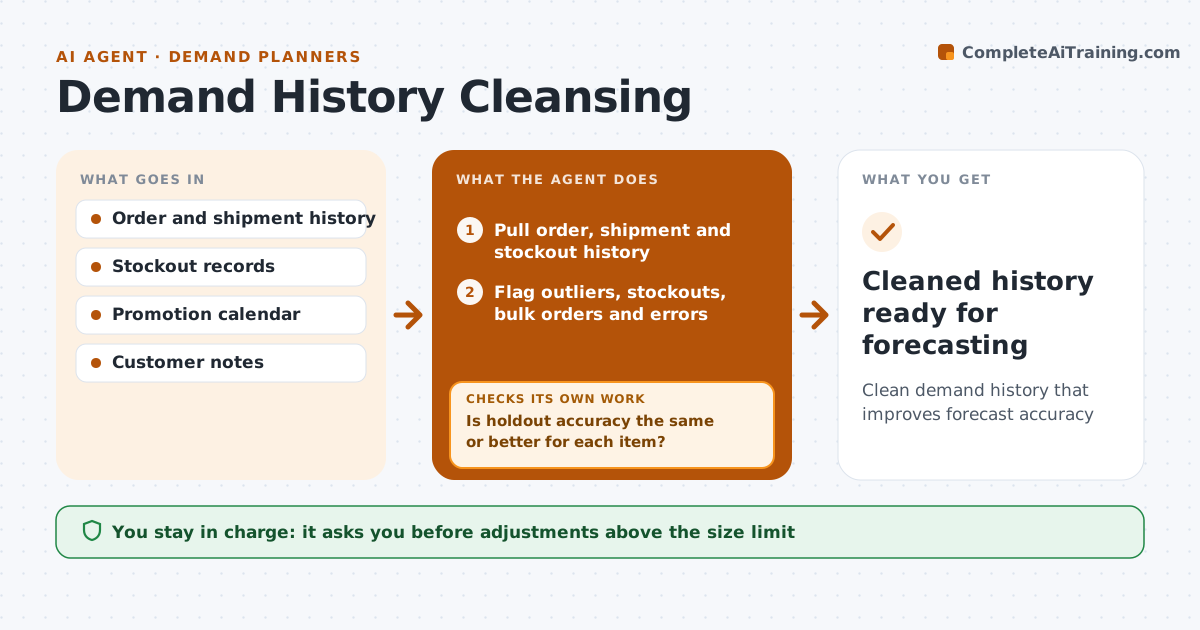
A forecast is only as good as the history behind it, and raw sales history is full of stockouts, one-off bulk orders and data errors. At the start of each forecast cycle, this agent pulls order, shipment and stockout history and flags points more than three standard deviations from each item's pattern, plus stockout periods, bulk orders, promotions and returns. It proposes adjustments, such as replacing a stockout week with expected demand. It then reruns the baseline forecast on both cleaned and raw history and compares accuracy on a holdout period. An adjustment is kept only if accuracy stays the same or improves. If it gets worse, the agent reverses that adjustment and retests. Adjustments over 20 percent of an item's volume need the planner's approval. Edge case: a permanent customer loss is treated as a level change, not an outlier.
How it works
Follow the arrows from top to bottom. The orange dashed arrow is the loop: when a check fails, the agent goes back and tries again.
Read the steps as a list
- Forecast cycle begins
- Pull order, shipment and stockout history
- Flag outliers, stockouts, bulk orders and errors
- Propose adjustments per item
- Rerun baseline forecast on cleaned and raw history
- Is holdout accuracy the same or better for each item?If not: reverse the adjustment for that item and retest. Back to step 4.
- Planner approves large adjustmentsThe agent waits here for your OK.
- Cleaned history ready for forecasting
How it decides
It flags points more than three standard deviations from the item's pattern or during known stockouts, and keeps an adjustment only if holdout accuracy does not get worse.
- Stockout weeks use demand, not capped sales
- Customer losses are level changes
- Adjustments over 20 percent of volume need approval
Make it yours
Every agent is a starting point. You choose these settings for your own situation.
- Outlier sensitivity (default 3 standard deviations)
- Approval size limit (default 20 percent)
- Holdout period length
- Items in scope
What keeps you in control
It always asks you first
- Adjustments above the size limit
Hard limits
- Never overwrites source sales data
- Keeps a log of every adjustment
It stops when
- Done: cleaned history approved
- Stop: history shorter than 12 months, forecast with care and note it
Set it up
We guide you through the set-up, step by step
Members get the full set-up guide for this agent. No technical skills needed: you copy, paste and upload.
- One set of instructions to paste into your AI, with the clicks for ChatGPT, Claude, Microsoft 365 Copilot, Gemini and Grok
- The agent then walks you through connecting your own data, one source at a time
- A downloadable copy with the flow chart, the rules and the full guide