AI agent for sales managers
Inventory-Linked Promotion Planner Agent
A promotion plan limited to items that have stock and keep margin
What it does
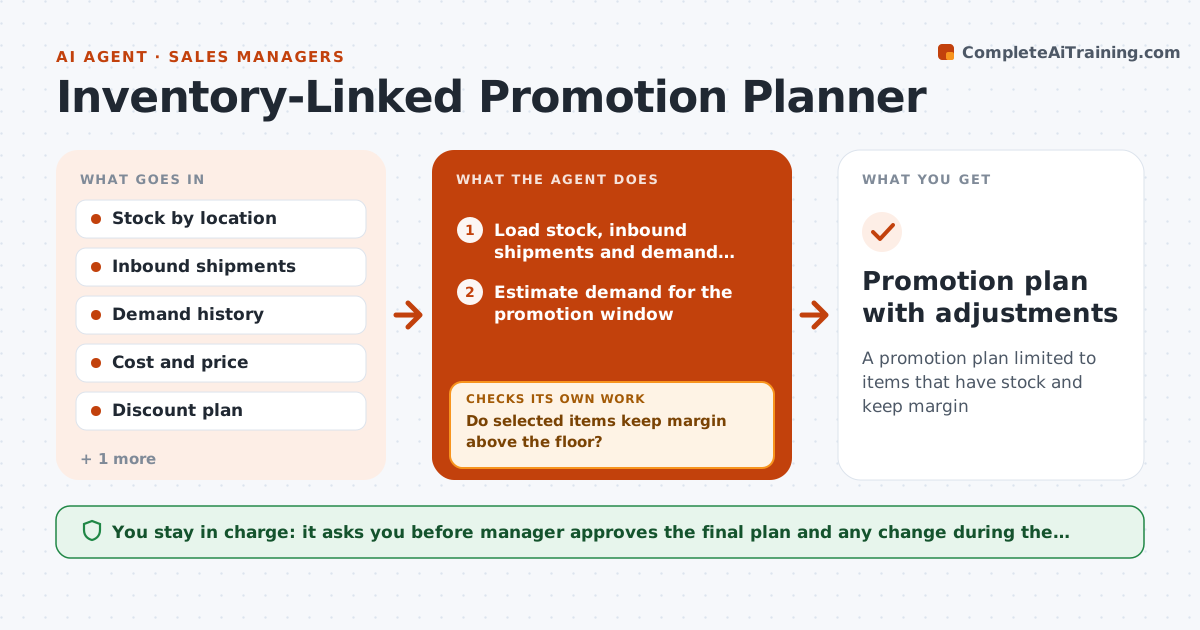
A promotion on an item that sells out in two days wastes the advertising and frustrates customers. This agent reads stock levels, inbound shipments and demand history, then finds items that can carry a promotion without running out. It checks the expected margin at the planned discount, and removes items where the margin is too low. When stock changes, such as a late shipment or a sellout, it reruns the list and adjusts the plan. It then checks that the final promotion list matches stock and margin rules. The manager approves the plan. Edge case: a popular item has stock but a delayed shipment, so the agent shortens the promotion window.
How it works
Follow the arrows from top to bottom. The orange dashed arrow is the loop: when a check fails, the agent goes back and tries again.
Read the steps as a list
- Promotion planning begins
- Load stock, inbound shipments and demand history
- Estimate demand for the promotion window
- Select items where stock covers demand
- Calculate margin at the planned discount
- Do selected items keep margin above the floor?If not: reduce the discount or remove the item. Back to step 3.
- Build the promotion list with dates
- Manager approves the promotion planThe agent waits here for your OK.
- Monitor stock daily during the promotion
- Does stock still cover demand?If not: shorten the promotion on that item or replace it. Back to step 3.
- Promotion plan with adjustments
How it decides
An item qualifies if stock covers expected demand for the whole promotion and margin stays above the floor. The list is rechecked when stock changes.
- Require stock of at least 120 percent of expected demand
- Remove items below the margin floor
- Shorten a promotion when shipments are late
- Rerun the list when stock changes by 20 percent
Make it yours
Every agent is a starting point. You choose these settings for your own situation.
- Stock cover (default 120%)
- Margin floor
- Review frequency
- Discount range
What keeps you in control
It always asks you first
- Manager approves the final plan and any change during the promotion
Hard limits
- Never publish promotions
- Do not change prices
- Use current stock data only
It stops when
- Done: promotion ends and results are logged
- Stop: manager cancels the promotion
Set it up
We guide you through the set-up, step by step
Members get the full set-up guide for this agent. No technical skills needed: you copy, paste and upload.
- One set of instructions to paste into your AI, with the clicks for ChatGPT, Claude, Microsoft 365 Copilot, Gemini and Grok
- The agent then walks you through connecting your own data, one source at a time
- A downloadable copy with the flow chart, the rules and the full guide