AI agent for demand planners
Demand Scenario Planning Agent
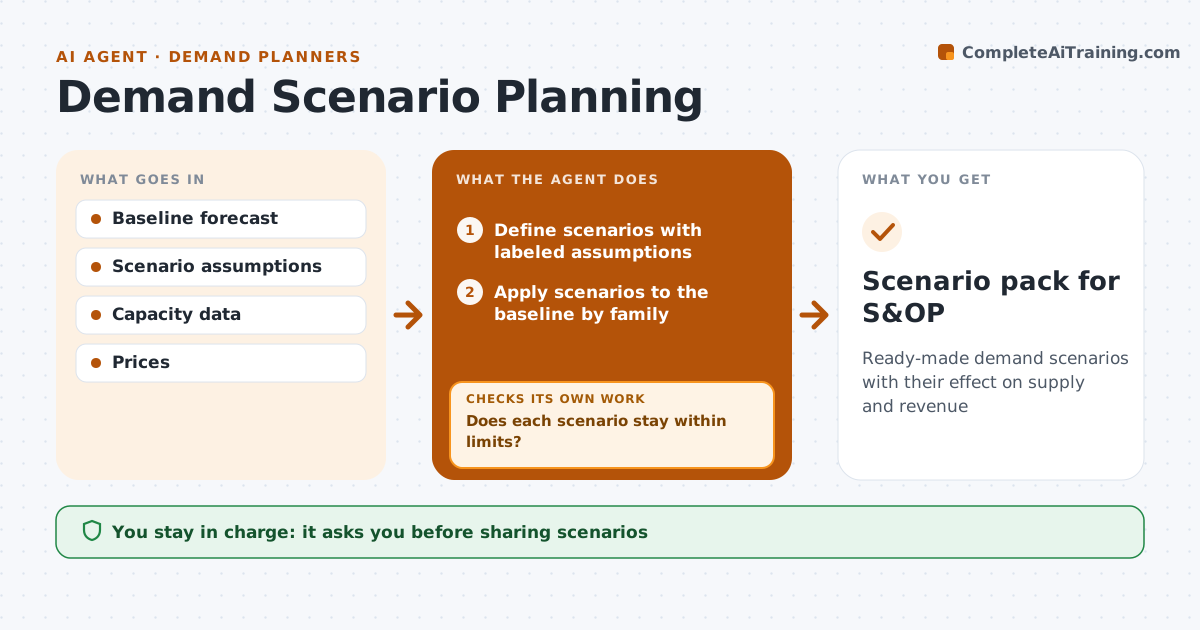
Ready-made demand scenarios with their effect on supply and revenue
What it does
Leaders want to know what happens if demand rises or falls, but building scenarios by hand rarely shows where supply would break. Each quarter, or after a major event, this agent defines scenarios with the planner, such as a big customer win, a recession dip or a competitor exit, with every assumption labeled. It applies each scenario to the baseline forecast by family and shows the effect on inventory, capacity and revenue. Scenarios with overlapping effects are not added together. It then checks each scenario against capacity and supplier limits month by month. If a scenario breaks a limit, it shows the first month and the size of the gap and drafts options. A second check confirms the scenario totals reconcile with the baseline. The planner approves scenarios before they go to the S&OP meeting. Edge case: a scenario that relies on an unconfirmed contract is marked as speculative.
How it works
Follow the arrows from top to bottom. The orange dashed arrow is the loop: when a check fails, the agent goes back and tries again.
Read the steps as a list
- Quarterly review or major event
- Define scenarios with labeled assumptions
- Apply scenarios to the baseline by family
- Calculate inventory, capacity and revenue effects
- Check capacity and supplier limits by month
- Does each scenario stay within limits?If not: show the first month the limit breaks and draft options. Back to step 4.
- Do scenario totals reconcile with the baseline without double counting?If not: remove overlapping effects and reapply. Back to step 3.
- Planner approves scenariosThe agent waits here for your OK.
- Scenario pack for S&OP
How it decides
It applies changes by family and flags the first month a capacity or supplier limit is broken.
- Overlapping effects are not added
- Limits shown by month
- Assumptions labeled
Make it yours
Every agent is a starting point. You choose these settings for your own situation.
- Scenario list and size of each swing
- Planning horizon (default 12 months)
- Limits checked
- Pack format
What keeps you in control
It always asks you first
- Sharing scenarios
Hard limits
- Never commits supply or capacity
- Always labels assumptions
It stops when
- Done: approved scenarios ready for S&OP
- Stop: capacity data missing, run demand and revenue only and say so
Set it up
We guide you through the set-up, step by step
Members get the full set-up guide for this agent. No technical skills needed: you copy, paste and upload.
- One set of instructions to paste into your AI, with the clicks for ChatGPT, Claude, Microsoft 365 Copilot, Gemini and Grok
- The agent then walks you through connecting your own data, one source at a time
- A downloadable copy with the flow chart, the rules and the full guide