AI agent for real estate developers
Development Site Feasibility Screening Agent
A quick, sourced feasibility screen for each site
What it does
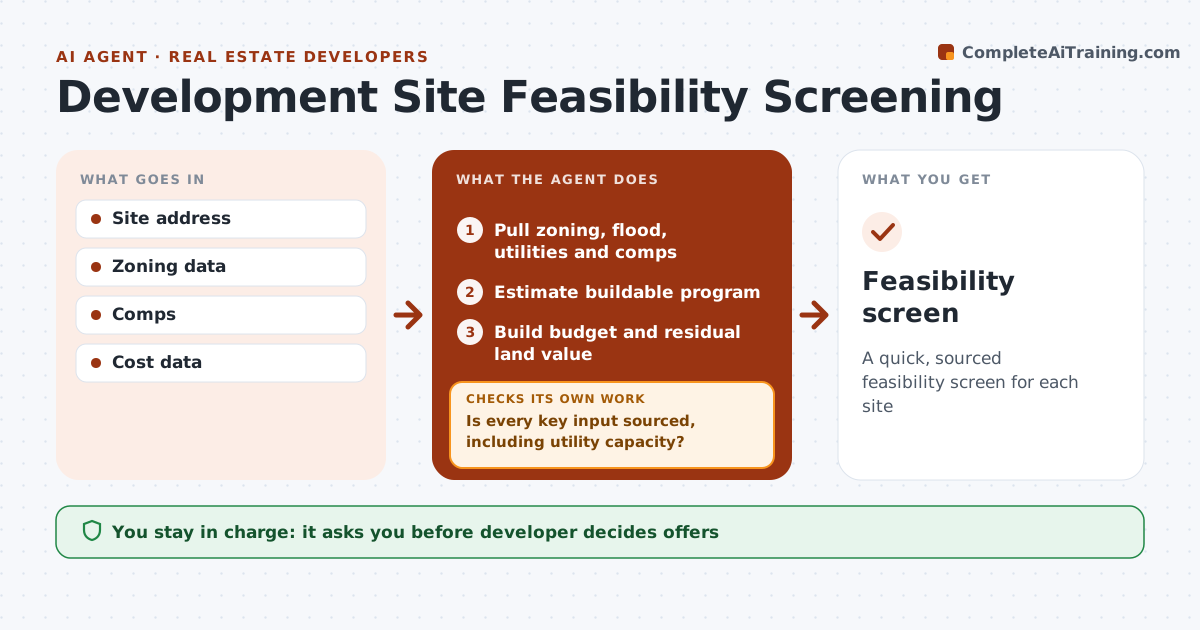
Before making an offer, developers need a quick view of what can be built and whether it pays. This agent pulls zoning, overlays, flood zone, utilities and comps for the site, estimates the buildable units or square footage, and builds a rough budget and residual land value. It checks each assumption against its source and flags missing data like utility capacity. If the residual land value falls below the asking price, it tests alternative programs, such as a different unit mix. Sites needing rezoning are shown with time and risk. The developer decides whether to pursue. Edge case: a program that only works with a rezoning is never shown as the base case.
How it works
Follow the arrows from top to bottom. The orange dashed arrow is the loop: when a check fails, the agent goes back and tries again.
Read the steps as a list
- Site proposed
- Pull zoning, flood, utilities and comps
- Is every key input sourced, including utility capacity?If not: flag the missing data and request it from the utility or city. Back to step 2.
- Estimate buildable program
- Build budget and residual land value
- Is residual value above the asking price?If not: test alternative programs. Back to step 4.
- Note rezoning time and risk for any alternative that needs it
- Developer decidesThe agent waits here for your OK.
- Feasibility screen
How it decides
Residual land value is compared with price. Missing data is flagged.
- Residual land value vs price
- Rezoning risk shown
- Missing data flagged
Make it yours
Every agent is a starting point. You choose these settings for your own situation.
- Return targets
- Cost sources
- Program options
- Report format
What keeps you in control
It always asks you first
- Developer decides offers
Hard limits
- Not legal or investment advice
- Never contacts sellers
It stops when
- Done: screen ready
- Stop: site off market
Set it up
We guide you through the set-up, step by step
Members get the full set-up guide for this agent. No technical skills needed: you copy, paste and upload.
- One set of instructions to paste into your AI, with the clicks for ChatGPT, Claude, Microsoft 365 Copilot, Gemini and Grok
- The agent then walks you through connecting your own data, one source at a time
- A downloadable copy with the flow chart, the rules and the full guide