AI agent for historians
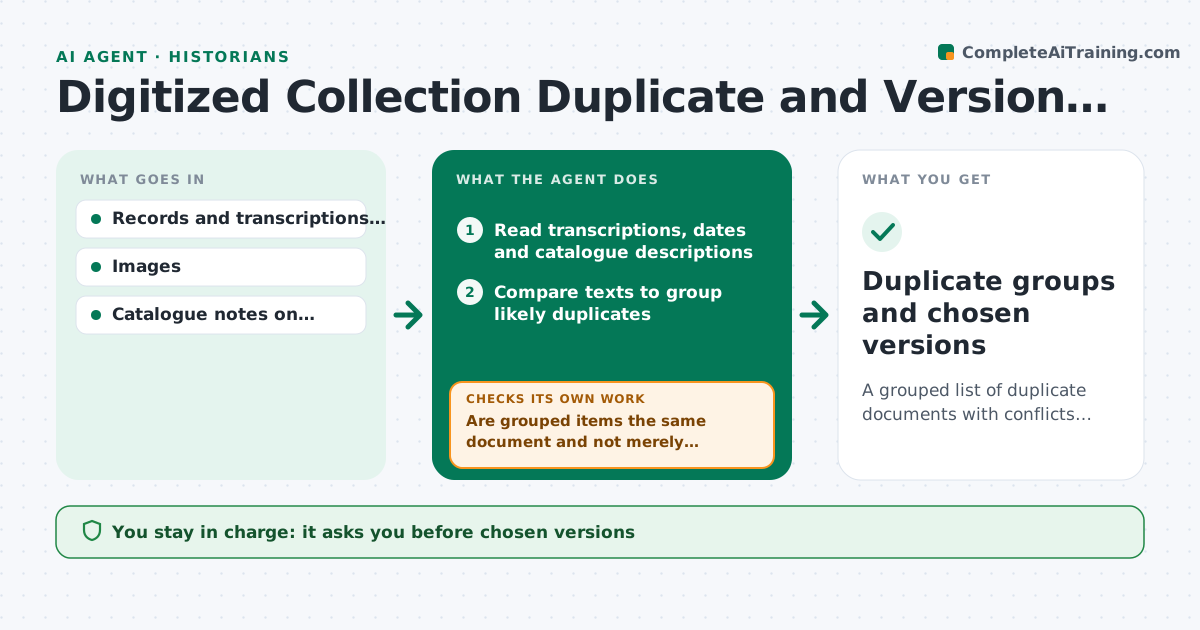
Digitized Collection Duplicate and Version Check Agent
A grouped list of duplicate documents with conflicts flagged and a chosen best copy for each, approved by the historian
What it does
The same document often appears in several online collections, with different dates, transcriptions and descriptions, and a historian can cite the weaker copy without knowing. This agent compares the transcriptions, dates and descriptions of each candidate across the archives. It groups duplicates, flags conflicts, such as a letter dated 1847 in one collection and 1849 in another, and picks the best copy by provenance, completeness and image quality. It lists what it could not decide. After the historian reviews a group, it rechecks related items. The historian approves the chosen versions. Edge case: two transcriptions differ in one name, so the agent keeps both readings with the image link rather than choosing.
How it works
Follow the arrows from top to bottom. The orange dashed arrow is the loop: when a check fails, the agent goes back and tries again.
Read the steps as a list
- New batch of records added
- Read transcriptions, dates and catalogue descriptions
- Compare texts to group likely duplicates
- Are grouped items the same document and not merely similar?If not: split the group and mark uncertain pairs. Back to step 3.
- List conflicts in dates, names and transcriptions
- Rate each copy on provenance, completeness and image quality
- Propose the best copy for each group
- Historian reviews and approves the chosen versionsThe agent waits here for your OK.
- Reread related items after the review
- Do the approved choices hold for related documents?If not: reopen the related groups and recompare. Back to step 4.
- Duplicate groups and chosen versions
How it decides
Copies are grouped when text and metadata overlap strongly. The preferred copy has clear provenance, the fullest text and the best image.
- Group only when most of the text matches
- Keep both readings when transcriptions differ on names or numbers
- Prefer the copy with documented provenance
- Never merge records with different archive identifiers without a note
Make it yours
Every agent is a starting point. You choose these settings for your own situation.
- Match strictness
- Archives included
- Quality criteria weights
- Output format for notes
What keeps you in control
It always asks you first
- Chosen versions
- Any correction cited in the research notes
Hard limits
- Never edits the archive records
- Never decides a date without evidence
It stops when
- Done: all groups reviewed and versions chosen
- Stop: records lack enough text to compare
Set it up
We guide you through the set-up, step by step
Members get the full set-up guide for this agent. No technical skills needed: you copy, paste and upload.
- One set of instructions to paste into your AI, with the clicks for ChatGPT, Claude, Microsoft 365 Copilot, Gemini and Grok
- The agent then walks you through connecting your own data, one source at a time
- A downloadable copy with the flow chart, the rules and the full guide