AI agent for employee relations specialists
Disciplinary Process Timeline Agent
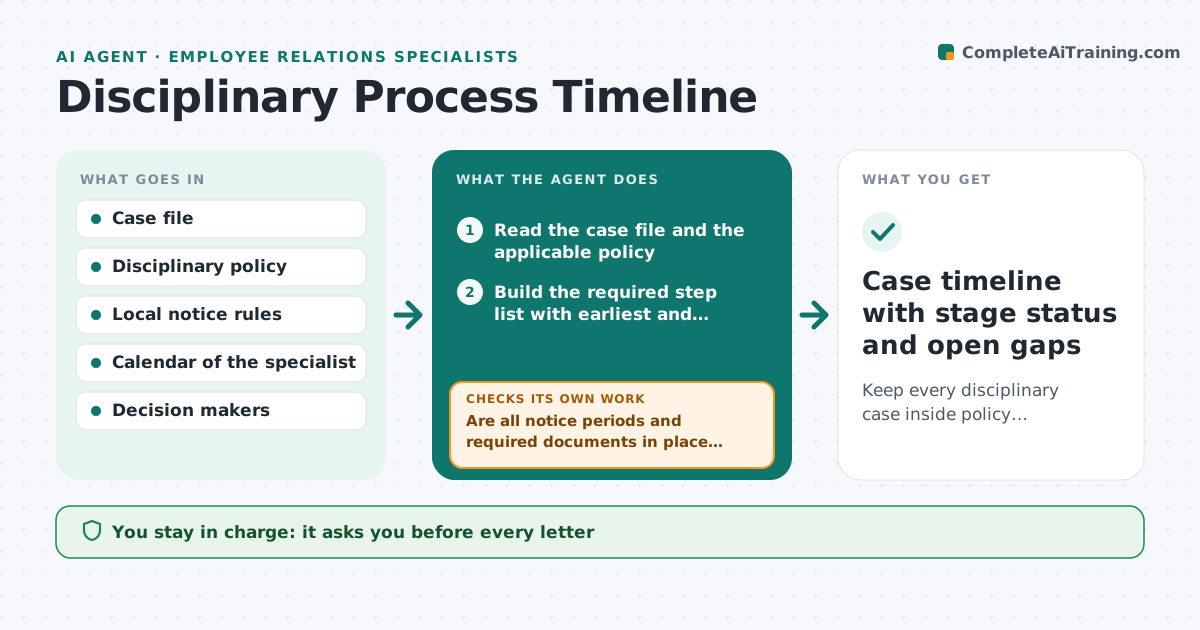
Keep every disciplinary case inside policy timelines with complete documents.
What it does
A disciplinary case has many small requirements: written notice, a minimum number of days before the hearing, the right to bring a companion, evidence shared in advance, and a written outcome. Miss one and the whole process can be challenged. This agent reads the case file and the company policy, then builds the list of steps the case needs, with the earliest and latest date for each. At every stage it checks that the date rules are met and that the documents on file are the ones the policy requires. It flags gaps in plain words, such as a hearing letter sent only three days before a five-day rule. When the specialist updates the file, it checks again. It does not decide anything about the employee. Edge case: if the employee requests a postponement, it rebuilds all following dates.
How it works
Follow the arrows from top to bottom. The orange dashed arrow is the loop: when a check fails, the agent goes back and tries again.
Read the steps as a list
- Case opened in the case file
- Read the case file and the applicable policy
- Build the required step list with earliest and latest dates
- Check each date and document against the list
- Are all notice periods and required documents in place for this stage?If not: List each gap with the rule it breaks and ask the specialist to fix it. Back to step 4.
- Draft the next letter from the policy template for review
- Specialist approves any letter before it goes outThe agent waits here for your OK.
- Record the update and recalculate later dates
- Do the new dates still meet every rule after the change?If not: Move the affected steps and warn about any that now break a deadline. Back to step 4.
- Case timeline with stage status and open gaps
How it decides
Applies the policy's step list and day counts to the dates in the file, marks each step complete, due or at risk, and re-evaluates every time a document or date changes.
- Hearing notice below the policy minimum (default 5 working days) is flagged as a breach risk
- Missing evidence copy to the employee blocks the hearing step
- Postponement requests rebuild all later dates
- Any letter that names a sanction stays in draft until approved
Make it yours
Every agent is a starting point. You choose these settings for your own situation.
- Minimum notice days per stage (default 5 working days)
- Which policy applies per employee group
- Reminder lead time before each deadline (default 2 days)
- Letter templates to use
- Who is copied on flags
What keeps you in control
It always asks you first
- Every letter
- Any decision or sanction
- Any change to the policy interpretation
Hard limits
- Never state or imply guilt
- Never send a letter or schedule a hearing without approval
It stops when
- Done: outcome letter issued and filed, no gaps open
- Stop: case withdrawn or settled
- Stop: a legal question needs counsel
Set it up
We guide you through the set-up, step by step
Members get the full set-up guide for this agent. No technical skills needed: you copy, paste and upload.
- One set of instructions to paste into your AI, with the clicks for ChatGPT, Claude, Microsoft 365 Copilot, Gemini and Grok
- The agent then walks you through connecting your own data, one source at a time
- A downloadable copy with the flow chart, the rules and the full guide