AI agent for chemical engineers
Distillation and Separation Performance Agent
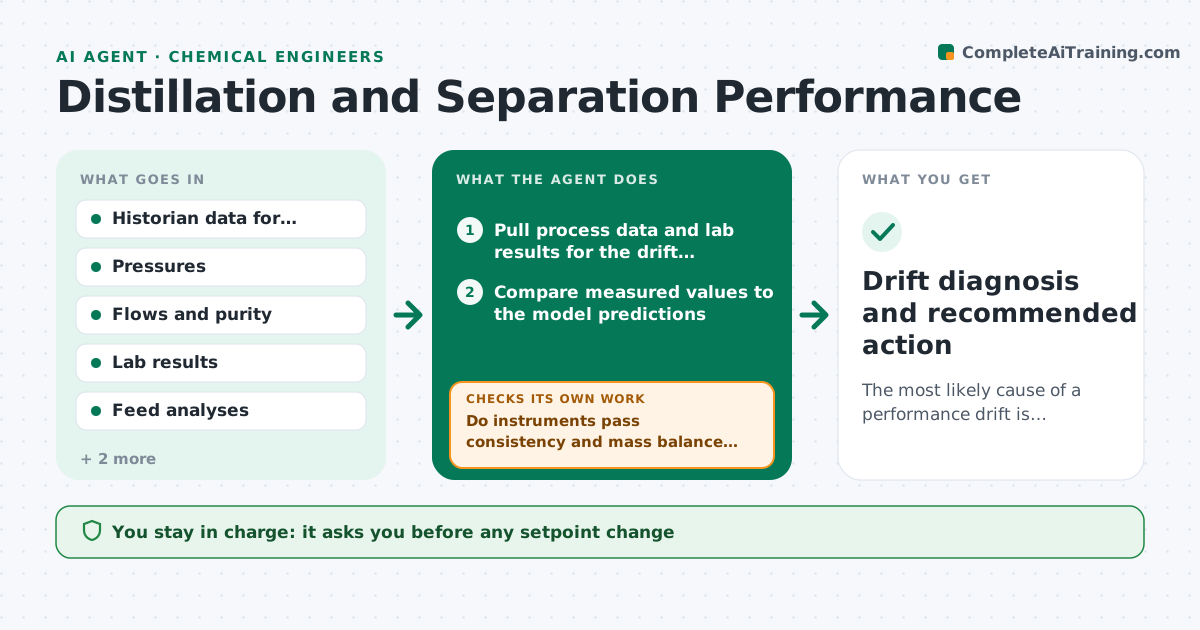
The most likely cause of a performance drift is identified with evidence and a next action is agreed
What it does
When a column drifts, the first questions are always the same: is it fouling, a feed change or a bad instrument? This agent compares measured tray temperatures, pressure drop, flows and product purity to the model. It checks instruments first by looking for sensors that disagree with each other or with mass balance. Then it tests causes in order, such as feed composition, flooding and fouling signs, and recalculates tray or overall efficiency after each test. It proposes the next test or a small adjustment. When new data arrives it reruns the comparison. The engineer approves any setpoint change. Edge case: a temperature probe reads 8 degrees low and made efficiency look poor, so the agent clears the fouling theory and asks for a calibration check.
How it works
Follow the arrows from top to bottom. The orange dashed arrow is the loop: when a check fails, the agent goes back and tries again.
Read the steps as a list
- Performance drift flagged
- Pull process data and lab results for the drift period
- Compare measured values to the model predictions
- Do instruments pass consistency and mass balance checks?If not: mark the suspect sensor and request calibration before testing process causes. Back to step 3.
- Test feed change, then flooding, then fouling in order
- Recalculate efficiency with each tested cause
- Does one cause explain the drift within the model tolerance?If not: move to the next cause and widen the data window. Back to step 4.
- Propose the next test or adjustment with expected effect
- Engineer approves any setpoint changeThe agent waits here for your OK.
- Drift diagnosis and recommended action
How it decides
Instruments are cleared before process causes. A cause is accepted only when recalculated efficiency moves in the expected direction.
- Clear instruments before process causes
- Treat a pressure drop rise above 15% of baseline as a fouling or flooding signal
- Accept a cause only when recalculated efficiency matches within 3%
- Propose reversible adjustments before invasive ones
Make it yours
Every agent is a starting point. You choose these settings for your own situation.
- Pressure drop alert level (default 15% over baseline)
- Tag list for the column
- Efficiency tolerance (default 3%)
- Check frequency
What keeps you in control
It always asks you first
- Any setpoint change
- Any request to take the column offline
Hard limits
- Never changes setpoints itself
- Never recommends bypassing a safety instrument
It stops when
- Done: cause identified and action approved
- Stop: data is insufficient to separate causes
Set it up
We guide you through the set-up, step by step
Members get the full set-up guide for this agent. No technical skills needed: you copy, paste and upload.
- One set of instructions to paste into your AI, with the clicks for ChatGPT, Claude, Microsoft 365 Copilot, Gemini and Grok
- The agent then walks you through connecting your own data, one source at a time
- A downloadable copy with the flow chart, the rules and the full guide