AI agent for logistics consultants
Distribution Network Scenario Agent
Tested network options with cost and service trade-offs
What it does
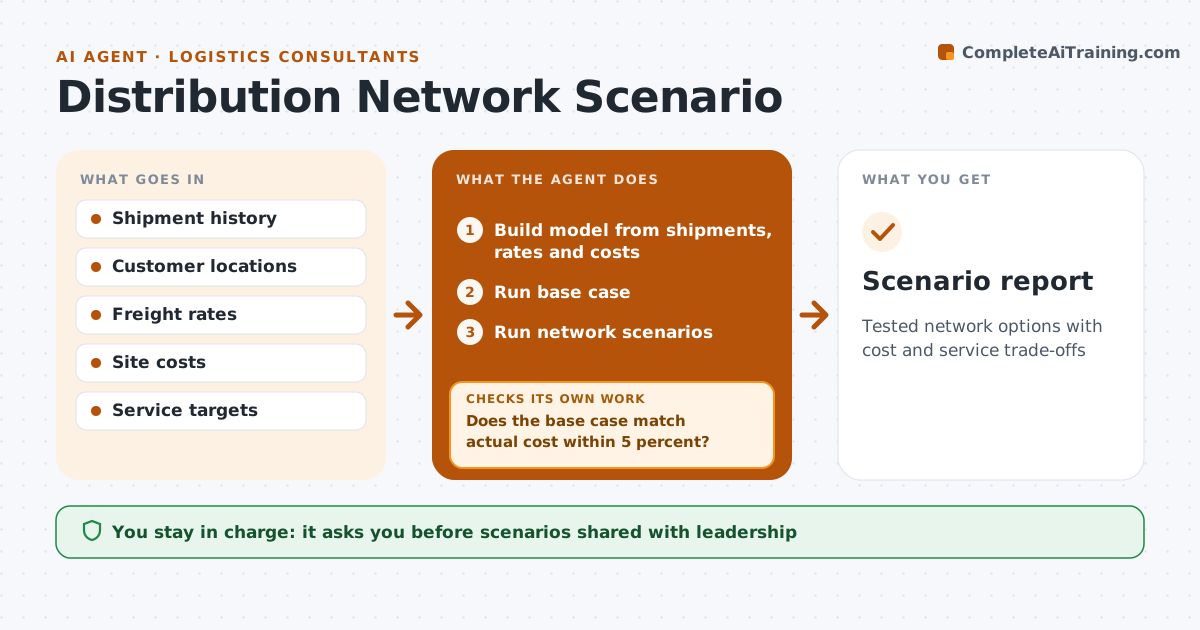
Should a company open a new depot, close one, or move stock closer to customers? These decisions are expensive, and a model with wrong inputs gives confident wrong answers. When a network review starts, this agent builds a model from shipment history, customer locations, freight rates, warehouse costs and service targets. It first runs a base case and checks that it reproduces last year's actual cost within 5 percent. If not, it fixes rates, volumes or site costs and reruns. Only then does it run scenarios, such as adding a site, closing one or changing which site serves which area. Service targets are hard limits. It compares cost and delivery times, showing one-off and running costs. The engineer or consultant approves the scenarios presented to leadership. Edge case: a customer needing same-day delivery limits how far its serving site can be.
How it works
Follow the arrows from top to bottom. The orange dashed arrow is the loop: when a check fails, the agent goes back and tries again.
Read the steps as a list
- Network review starts
- Build model from shipments, rates and costs
- Run base case
- Does the base case match actual cost within 5 percent?If not: fix rates, volumes or site costs and rerun. Back to step 2.
- Run network scenarios
- Compare cost and service by scenario
- Engineer or consultant approves scenarios for leadershipThe agent waits here for your OK.
- Scenario report
How it decides
It only trusts scenarios after the base case reproduces last year's cost within 5 percent.
- Base case must match actuals
- Service targets are hard limits
- Scenarios show one-off and running costs
Make it yours
Every agent is a starting point. You choose these settings for your own situation.
- Scenario list
- Service targets
- Cost inputs
- Base case tolerance (default 5 percent)
What keeps you in control
It always asks you first
- Scenarios shared with leadership
Hard limits
- Never commits to sites or leases
- Labels all assumptions
It stops when
- Done: approved scenarios
- Stop: cost data missing for a site
Set it up
We guide you through the set-up, step by step
Members get the full set-up guide for this agent. No technical skills needed: you copy, paste and upload.
- One set of instructions to paste into your AI, with the clicks for ChatGPT, Claude, Microsoft 365 Copilot, Gemini and Grok
- The agent then walks you through connecting your own data, one source at a time
- A downloadable copy with the flow chart, the rules and the full guide