AI agent for online sellers
Returns Disposition Preparation Agent
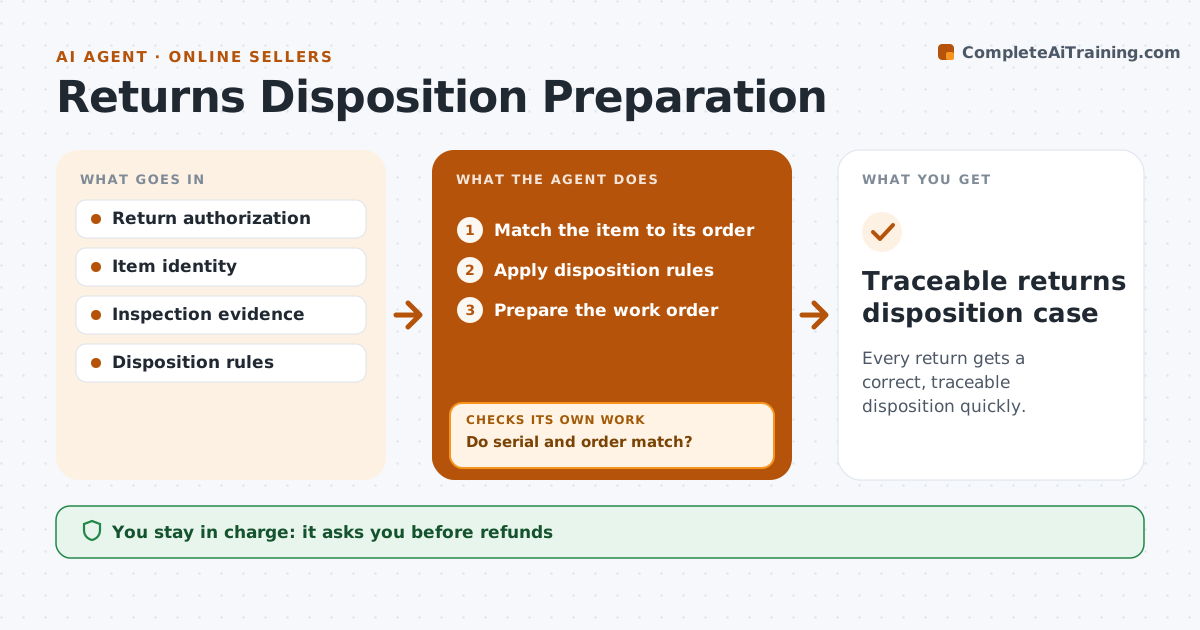
Every return gets a correct, traceable disposition quickly.
What it does
Returned items sit on warehouse shelves while inspection notes, order records and return reasons are scattered across systems. When a return arrives, this agent first matches the item to its original order by serial number and order number. If they do not match, the item is quarantined and flagged, and nothing else happens until a person looks at it. For matched items, it reads the inspection notes and applies the written disposition rules: restock, refurbish or dispose. It prepares the work order and a refund recommendation with the evidence attached. The returns coordinator approves refunds, resale condition and any disposal or shipment. Edge case: a returned camera's serial number does not match the original order, so it is quarantined.
How it works
Follow the arrows from top to bottom. The orange dashed arrow is the loop: when a check fails, the agent goes back and tries again.
Read the steps as a list
- Return arrives
- Match the item to its order
- Do serial and order match?If not: quarantine and flag. Back to step 2.
- Apply disposition rules
- Prepare the work order
- Coordinator approves refund and dispositionThe agent waits here for your OK.
- Traceable returns disposition case
How it decides
It checks identity first, then applies rules to inspection evidence.
- Confirm item identity before any disposition.
- Apply disposition rules only to recorded inspection evidence.
- Mismatched items stay quarantined until a person reviews them.
Make it yours
Every agent is a starting point. You choose these settings for your own situation.
- Disposition rules per product category
- Identity fields to match (default serial and order number)
- Where quarantined items are routed
- Refund approval limit (default all refunds need approval)
What keeps you in control
It always asks you first
- Refunds
- Resale condition claims
- Disposal or shipment
Hard limits
- No refunds.
It stops when
- Done: disposition prepared.
Set it up
We guide you through the set-up, step by step
Members get the full set-up guide for this agent. No technical skills needed: you copy, paste and upload.
- One set of instructions to paste into your AI, with the clicks for ChatGPT, Claude, Microsoft 365 Copilot, Gemini and Grok
- The agent then walks you through connecting your own data, one source at a time
- A downloadable copy with the flow chart, the rules and the full guide