AI agent for geologists
Drillhole Data Validation Agent
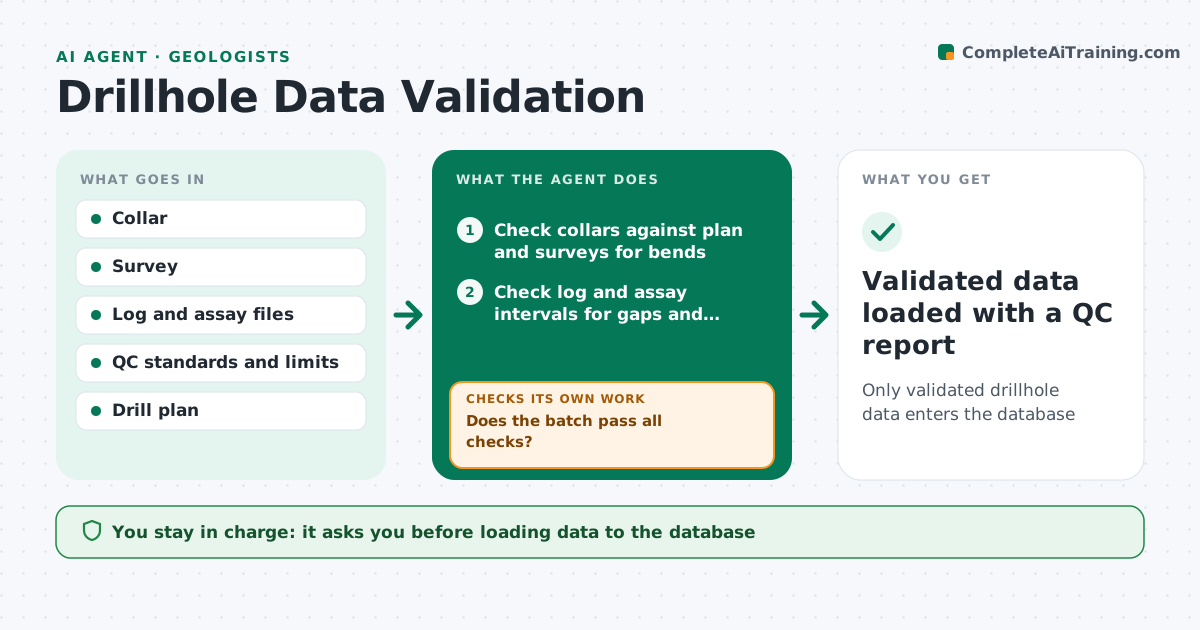
Only validated drillhole data enters the database
What it does
Drilling programs produce collar locations, downhole surveys, geological logs and assay results from different people and labs, and one bad interval can distort a resource model. This agent checks each new batch before it enters the database. It compares collars with planned positions and looks for surveys with impossible bends. It checks log and assay intervals for gaps, overlaps, depths beyond the hole and assays without matching samples. It evaluates lab quality control: standards, blanks and duplicates. Problems go to the logging geologist or lab with specific questions or re-assay requests, and it rechecks the fixed batch. Before loading, it checks the batch against holes already in the database for duplicate IDs. The geologist approves loading. Edge case: a standard that fails by a small margin triggers re-assay of nearby samples rather than the whole batch.
How it works
Follow the arrows from top to bottom. The orange dashed arrow is the loop: when a check fails, the agent goes back and tries again.
Read the steps as a list
- New data batch arrives
- Check collars against plan and surveys for bends
- Check log and assay intervals for gaps and overlaps
- Evaluate standards, blanks and duplicates
- Does the batch pass all checks?If not: send questions or re-assay requests and recheck the fixed batch. Back to step 2.
- Compare hole IDs with the existing database
- Is the batch free of duplicate holes and IDs?If not: merge or rename with the geologist's input. Back to step 6.
- Geologist approves loading to the databaseThe agent waits here for your OK.
- Validated data loaded with a QC report
How it decides
It rejects intervals that overlap or exceed hole depth, surveys with bends above the limit, and assay batches where QC fails the set limits.
- Reject overlapping or too-deep intervals
- Request re-assay around failed standards
- Flag collars beyond the set distance from plan
Make it yours
Every agent is a starting point. You choose these settings for your own situation.
- QC limits for standards (default 3 standard deviations)
- Maximum survey bend
- Collar tolerance
- Report format
What keeps you in control
It always asks you first
- Loading data to the database
- Requesting re-assays at cost
Hard limits
- Never edits the master database directly
- Never deletes original files
It stops when
- Done: batch loaded
- Stop: lab does not provide QC data; hold the batch
Set it up
We guide you through the set-up, step by step
Members get the full set-up guide for this agent. No technical skills needed: you copy, paste and upload.
- One set of instructions to paste into your AI, with the clicks for ChatGPT, Claude, Microsoft 365 Copilot, Gemini and Grok
- The agent then walks you through connecting your own data, one source at a time
- A downloadable copy with the flow chart, the rules and the full guide